
Snurl.com (SnipUrl) API ColdFusion Component Wrapper
I was thinking of integrating my Snurl.com account (one of the many url shortening services) into KinkyTwits, my ColdFusion and jQuery powered Twitter client. Before I could do that, though, I had to create a ColdFusion component that would wrap around the SnipURL API provided by Snurl.com. The API itself has Create, Update, and Read style methods, but I only included the Create and Read wrappers as I don't see a real need to update short URLs.
Although I did run into some oddities with the UrlDecode() method this morning, the SnipURL.cfc ColdFusion component is rather simple:
<cfcomponent
	output="false"
	hint="I provide SnipURL API functionality.">


	<cffunction
		name="Init"
		access="public"
		returntype="any"
		output="false"
		hint="I return an initialized component.">

		<!--- Define arguments. --->
		<cfargument
			name="Username"
			type="string"
			required="true"
			hint="I am the username for the SnipURL account."
			/>

		<cfargument
			name="APIKey"
			type="string"
			required="true"
			hint="I am the API key gotten from the SnipURL account settings."
			/>

		<!--- Set up instance variables and store arguments. --->
		<cfset VARIABLES.Instance = {
			Username = ARGUMENTS.Username,
			APIKey = ARGUMENTS.APIKey
			} />

		<!--- Return This reference. --->
		<cfreturn THIS />
	</cffunction>


	<cffunction
		name="CreateSnip"
		access="public"
		returntype="struct"
		output="false"
		hint="I create a snip with the given data.">

		<!--- Define arguments. --->
		<cfargument
			name="URL"
			type="string"
			required="true"
			hint="I am the URL that is being shortened."
			/>

		<cfargument
			name="NickName"
			type="string"
			required="false"
			default=""
			hint="I am the nickname that is associated with the short URL (will attempt to be used in the short URL)."
			/>

		<cfargument
			name="Title"
			type="string"
			required="false"
			default=""
			hint="I am the title of the snip used in the snip details."
			/>

		<cfargument
			name="PrivateKey"
			type="string"
			required="false"
			default=""
			hint="I am the private key."
			/>

		<cfargument
			name="Owner"
			type="string"
			required="false"
			default=""
			hint="I am the optional owner (if not by the given account)."
			/>

		<!--- Define the local scope. --->
		<cfset var LOCAL = {} />

		<!---
			Create the parameters collection and set required
			values for API call.
		--->
		<cfset LOCAL.Parameters = {
			SnipUser = VARIABLES.Instance.Username,
			SnipAPI = VARIABLES.Instance.APIKey,
			SnipLink = ARGUMENTS.URL
			} />

		<!--- Check for optional parametesr. --->
		<cfif Len( ARGUMENTS.NickName )>

			<cfset LOCAL.Parameters.SnipNick = ARGUMENTS.NickName />

		</cfif>

		<cfif Len( ARGUMENTS.Title )>

			<cfset LOCAL.Parameters.SnipTitle = ARGUMENTS.Title />

		</cfif>

		<cfif Len( ARGUMENTS.PrivateKey )>

			<cfset LOCAL.Parameters.SnipPK = ARGUMENTS.PrivateKey />

		</cfif>

		<cfif Len( ARGUMENTS.Owner )>

			<cfset LOCAL.Parameters.SnipOwner = ARGUMENTS.Owner />

		</cfif>


		<!--- Submit the raw API request. --->
		<cfset LOCAL.ResponseXML = THIS.SubmitRawSnipRequest(
			"http://snipr.com/site/getsnip",
			LOCAL.Parameters
			) />


		<!--- Create the response structure. --->
		<cfset LOCAL.Response = {
			ID = LOCAL.ResponseXML.XmlRoot.ID.XmlText,
			Title = LOCAL.ResponseXML.XmlRoot.Title.XmlText,
			URL = UrlDecode(
				LOCAL.ResponseXML.XmlRoot.URL.XmlText,
				"utf-8"
				),
			Created = ParseDateTime( LOCAL.ResponseXML.XmlRoot.Created.XmlText )
			} />

		<!--- Return API response. --->
		<cfreturn LOCAL.Response />
	</cffunction>


	<cffunction
		name="GetSnipDetails"
		access="public"
		returntype="struct"
		output="false"
		hint="I get details for the snip at the given ID.">

		<!--- Define arguments. --->
		<cfargument
			name="ID"
			type="string"
			required="true"
			hint="I am the ID of the snip (URL will be stripped automatically if need-be)."
			/>

		<!--- Define the local scope. --->
		<cfset var LOCAL = {} />

		<!--- Strip out any leading URL information to get the ID. --->
		<cfset ARGUMENTS.ID = REReplaceNoCase(
			ARGUMENTS.ID,
			"^http://[^/]+/",
			"",
			"one"
			) />

		<!---
			Create the parameters collection and set required
			values for API call.
		--->
		<cfset LOCAL.Parameters = {
			SnipUser = VARIABLES.Instance.Username,
			SnipAPI = VARIABLES.Instance.APIKey,
			SnipID = ARGUMENTS.ID
			} />

		<!--- Submit the raw API request. --->
		<cfset LOCAL.ResponseXML = THIS.SubmitRawSnipRequest(
			"http://snipr.com/site/getsnipdetails",
			LOCAL.Parameters
			) />


		<!--- Create the response structure. --->
		<cfset LOCAL.Response = {
			ID = LOCAL.ResponseXML.XmlRoot.ID.XmlText,
			Title = LOCAL.ResponseXML.XmlRoot.Title.XmlText,
			URL = UrlDecode( LOCAL.ResponseXML.XmlRoot.URL.XmlText ),
			Clicks = Val( LOCAL.ResponseXML.XmlRoot.Clicks.XmlText ),
			Unique = Val( LOCAL.ResponseXML.XmlRoot.Unique.XmlText ),
			Created = ParseDateTime( LOCAL.ResponseXML.XmlRoot.Created.XmlText ),
			Modified = ParseDateTime( LOCAL.ResponseXML.XmlRoot.Modified.XmlText )
			} />

		<!--- Return API response. --->
		<cfreturn LOCAL.Response />
	</cffunction>


	<cffunction
		name="SubmitRawSnipRequest"
		access="public"
		returntype="xml"
		output="false"
		hint="I submit the raw HTTP POST and return the XML document.">

		<!--- Define arguments. --->
		<cfargument
			name="URL"
			type="string"
			required="true"
			hint="I am the API action URL."
			/>

		<cfargument
			name="Parameters"
			type="struct"
			required="true"
			hint="I am the set of parameters to pass to API."
			/>

		<!--- Define the local scope. --->
		<cfset var LOCAL = {} />

		<!--- Make CFHTTP POST request. --->
		<cfhttp
			method="post"
			url="#ARGUMENTS.URL#"
			useragent="SnipURLAPIBot"
			result="LOCAL.APIResponse">

			<!--- Loop over paramters to post. --->
			<cfloop
				item="LOCAL.Parameter"
				collection="#ARGUMENTS.Parameters#">

				<!--- Send through as form field. --->
				<cfhttpparam
					type="formfield"
					name="#LCase( LOCAL.Parameter )#"
					value="#ARGUMENTS.Parameters[ LOCAL.Parameter ]#"
					encoded="false"
					/>

			</cfloop>

		</cfhttp>


		<!--- Check the response for a successful connection. --->
		<cfif NOT FindNoCase( "200", LOCAL.APIResponse.StatusCode )>

			<!--- Throw error. --->
			<cfthrow
				type="SnipURL.SubmitRawSnipRequest.HTTPFailure"
				message="The API request failed - #LOCAL.APIResponse.StatusCode#"
				detail="The API request failed: #LOCAL.APIResponse.FileContent#"
				/>

		</cfif>


		<!--- Parse the resposne into XML. --->
		<cfset LOCAL.ResponseXML = XmlParse(
			Trim( LOCAL.APIResponse.FileContent )
			) />

		<!--- Return XML document. --->
		<cfreturn LOCAL.ResponseXML />
	</cffunction>

</cfcomponent>
When you call the SnipURL.cfc methods, it submits the POST request and parses the XML response into easy-to-use ColdFusion structures. Here's a small demo that creates a shortened URL and then retrieves the URL details:
<!--- Create the SnipURL API component. --->
<cfset objAPI = CreateObject( "component", "SnipURL" ).Init(
	Username = "XXXXXX",
	APIKey = "XXXXXXXX"
	) />

<!--- Create a snip. --->
<cfset objResponse = objAPI.CreateSnip(
	URL = "http://flickr.com/photos/31062833@N07/3255353692/",
	NickName = "dangy"
	) />

<!--- Output the response. --->
<cfdump
	var="#objResponse#"
	label="CreateSnip() Response"
	/>


<!--- Get the snip details. --->
<cfset objResponse = objAPI.GetSnipDetails(
	ID = "dangy"
	) />

<!--- Output the response. --->
<cfdump
	var="#objResponse#"
	label="GetSnipDetails() Response"
	/>
When we run the above code, we get the following CFDump output:
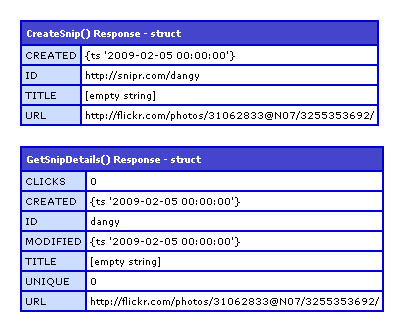
Nothing too complicated here, but maybe this will be useful to someone.
Want to use code from this post? Check out the license.

Reader Comments
Don't forget to look over shrinkURL in case you ever want to access other services: http://snurl.com/anom6
@Andy,
That is badass. I see it even covers Snurl! Perhaps I will just skip my integration and move to yours directly.
Snurl is the service that I personally use. It's quick, been around for a while, and offers built in tracking for URLs. Those are the three main requirements for me personally.
I hope you like it Ben...it was something I came up with so that I could integrate into the blog software that I'm writing. My original goal was to write a blog post then, when published, the software would create a short URL from a selected service, then submit a tweet about it using the Twitter API.
Adam Tuttle over at Fusiongrokker.com has submitted several changes and additions so it's been seen by more than just my eyes. Please let me know if you've got any suggestions. I'm hoping to let this get some good exposure and your software would definitely help it do that.
Indeed, it's pretty well tested at this point. And I've submitted some changes to make it compatible with CF 6, and 7, as well as Railo. :)
I'll be taking Adam's Railo compatibility changes, adding some additional services like URLZen and Zi.ma, and releasing shrinkURL 0.4 this weekend.
@Andy,
I haven't looked at the actual code yet - are you building all the services into one CFC? Or is there like an abstract CFC that the different services extends (like Snul.cfc extends ShrinkUrl.cfc)?
All services in one CFC.
Currently there's a controller method "shrink" which calls a single method for each service, each of which in turn reference a master "callAPI" method.
There's a structure in the CFC's variables scope containing meta data about each of the services. This metadata can be exposed by calling the listServices method.
I've got plans to remove the unique methods for each service, essentially building a method at runtime based on the metadata for that service.
Andy, I'm not sure if I'm misunderstanding your intentions, but wouldn't it be easier just to write a function that uses the configuration from the services structure to compose the API call as needed? You may need to add a configuration point or two (ReturnsXML = true/false, comes to mind), but it doesn't sound too difficult. :)
That's pretty much exactly what I'm talking about. One method which uses the metadata from the services structure to make the call.