
Embedding ZIP Files Inside JPG Files Using ColdFusion
A while back, I saw a interesting trick where someone used the MS DOS command, "copy," to hide MP3 files inside of images that they were uploading to Flickr. I thought that idea might be something fun to play around with in ColdFusion. After reading the documentation for the MS DOS copy command, it turns out that the trick they were using was simply appending one binary data to another. In ColdFusion and Java, that's pretty easy to do... but, could that possibly be all that it takes?
To test this from end to end, I am gonna do the following:
- ZIP several files together.
- Embed that ZIP file inside of a JPG image file.
- Read image file.
- Output image file to screen with new format.
- Read ZIP entries out of image and output query.
- Extract one of the ZIP entries and output.
I figure this way, we can see if the ZIP file can, in fact, be embedded in an image. And, if so, can we still use the image file successfully as both an image and a ZIP archive.
Here's the test:
<!---
	Store the name of the image file into which we want
	to embed the zipped data.
--->
<cfset strImageFile = "girl.jpg" />

<!---
	This is the name of our new graphic with the embedded
	zip file.
--->
<cfset strNewImageFile = "special_girl.jpg" />


<!---
	Create the array of files we want to zip up and embed
	with in the image file.
--->
<cfset arrFileNames = [
	"DataFile_1.txt",
	"DataFile_2.txt",
	"DataFile_3.txt",
	"Song.mp3"
	] />


<!---
	Create our ZIP file based using all of the files above.
	This is the zip file that will be embedded in the image.
--->
<cfzip
	action="zip"
	file="#ExpandPath( './data.zip' )#"
	overwrite="true">

	<!--- Loop over files to add zip entries. --->
	<cfloop
		index="strFileName"
		array="#arrFileNames#">

		<cfzipparam
			source="#ExpandPath( './#strFileName#' )#"
			/>

	</cfloop>

</cfzip>


<!---
	Create a binary output stream. This will be used to
	copy the zip file to the image file.
--->
<cfset objOutputStream = CreateObject(
	"java",
	"java.io.ByteArrayOutputStream"
	).Init()
	/>


<!---
	Loop over files that we want to join. The first is the
	image and the second is our zip data file.
--->
<cfloop
	index="strFileName"
	list="#strImageFile#|data.zip"
	delimiters="|">

	<!--- Read in the file binary data (byte array). --->
	<cffile
		action="readbinary"
		file="#ExpandPath( './#strFileName#' )#"
		variable="binFileData"
		/>

	<!--- Append the file to the binary output buffer. --->
	<cfset objOutputStream.Write(
		binFileData,
		JavaCast( "int", 0 ),
		JavaCast( "int", ArrayLen( binFileData ) )
		) />

</cfloop>


<!--- Write the byte array stream to disk. --->
<cffile
	action="write"
	file="#ExpandPath( strNewImageFile )#"
	output="#objOutputStream.ToByteArray()#"
	/>


<!---
	Now, read the image file into ColdFusion and write it
	to the browser. This will test to see if it can be read
	and manipulated properly as an image.
--->
<p>
	<cfimage
		action="writetobrowser"
		source="#strNewImageFile#"
		format="png"
		/>
</p>


<!---
	Now, read the contents of the "zip" data out of the new
	image file. This will test to see if the image file can
	be read and properly manipulated as a ZIP file.
--->
<cfzip
	action="list"
	file="#ExpandPath( strNewImageFile )#"
	name="qEntry"
	/>

<!--- Trim the query for output. --->
<cfquery name="qEntry" dbtype="query">
	SELECT
		name,
		size,
		type
	FROM
		qEntry
</cfquery>

<!--- Output the ColdFusion query. --->
<cfdump
	var="#qEntry#"
	label="#strNewImageFile# w/ Data Zip"
	/>


<!--- Read the text data for a given entry. --->
<cfzip
	action="unzip"
	file="#ExpandPath( strNewImageFile )#"
	destination="#ExpandPath( './output' )#"
	entrypath="DataFile_1.txt"
	/>

<!--- Include the text file. --->
<p>
	<cfinclude template="./output/DataFile_1.txt" />
</p>
As you can see, I am following the exact outline as above. And, when we run the above code, we get the following screen output:
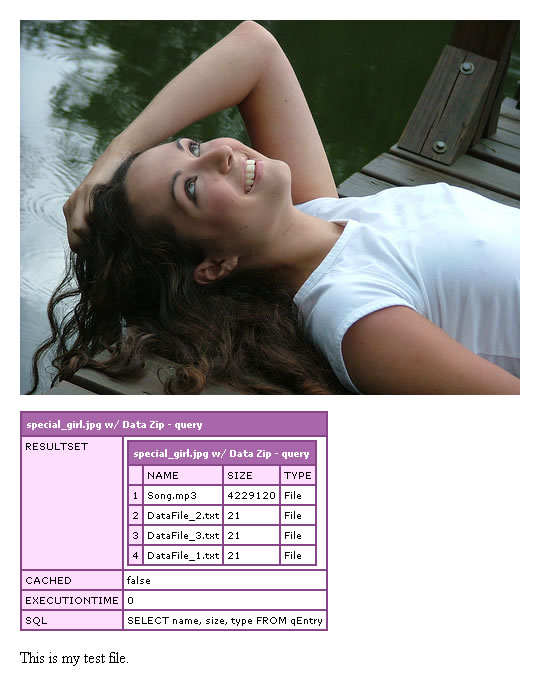
Holy cow! I can't believe that actually works - and, that it is done so easily. ColdFusion successfully uses the new merged file as a JPG (converting it to a PNG for output) using CFImage; and, ColdFusion's CFZIP tag is able to read all the data entries and extract a given one to disk.
Want to use code from this post? Check out the license.

Reader Comments
It's either really cold or...
... or this ColdFusion post is just really really exciting :)
Very clever. :-) Can this be put to a real world use? For example, when I try to email zip files or other non-Office files to certain organisations/clients it's rejected by their filewall, so sending an innocent looking file could be slipped through. (Wouldn't that be like a tojan, something scanners are supposed to detect?)
Even if it got through how would the person at the other end unmerge the files from the email attachment keeping in mind that even if an "unmerge" web app was available on the Internet the resulting downloads would be blocked too. Hmm. AIR can't run CFML on a desktop yet can it?
Well, I guess if the local computer was running CF, then it could call localhost, but it can't run a self-contained instance of CF.
@Gary,
You can actually just rename the file and it works. So, if you saved the special_girl.jpg and renamed it to be "special_girl.zip" and double-clicked it - it would open up as a ZIP file. No need to do anything programmatically.
"The compressed folder is invalid or corrupt". :-( WinRar doesn't like it either.
@Gary,
Did you rename it as .ZIP or a .RAR file? I'll put together a demo video tomorrow, just to demonstrate it, to make sure we're all on the same page.
Renamed to .zip. A demo video? Cool, I like them. :-)