
When I first started using the MySQL database engine, I would get this error from time to time after doing data transfer:
MySQL Cannot Convert Value '0000-00-00 00:00:00' From Column XX To TIMESTAMP
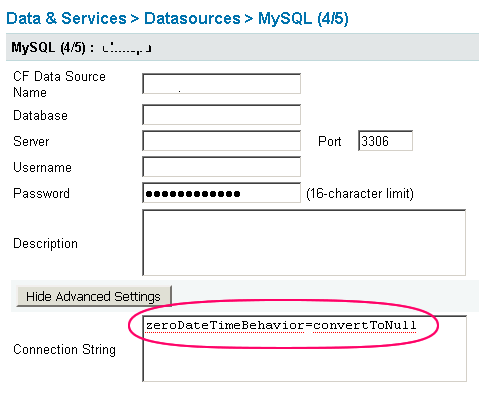
For a long time, I just assumed that I was messing something up in the data transfer (which I may very well have been doing). But then, I got it again last week on an existing database with a new ColdFusion datasource, so I figured I'd Google what was going on. Luckily, Andy Jarrett had the answer on hand; I needed to modify the connection string of the ColdFusion MySQL datasource to include:
zeroDateTimeBehavior=convertToNull
Here is a screen shot of this activity:
|
|
|
|
|
|
|
|
 |
|
||
|
|
|
|
I don't know how the zero dates get into the database in the first place (why NULL dates were not stored), but at least I know how to deal with this corrupt data.

Reader Comments
That is a handy bit. We used to frequently get this when I started here 3.5 years ago and coding/db standards were a bit lax. I was used to MSSQL where zero and partial dates are not allowed along with strict coding standards.
MySQL has the *feature* of storing partial/zero dates, which may seem like a good idea, sometimes, so you don't have to store off separate data parts when you only know partial dates (like mm/dd for a birthday, but you don't know the year). The idea of storing invalid dates still seems a bit odd to me. It seems like it might be handy for patterns as well (how often to run a process)...
However, java dates, and thus ColdFusion, throw on invalid dates. So can't use'em. Eventually we weeded out the frequency of this issue with implementing stronger coding and database standards. Now the only time this occurs, we know it is a data corruption issue. I am therefore half inclined to NOT update our db connection to this behaviour because it would mask data corruption... hum.....
I also would guess with the latest versions of mySQL there is a switch to make it behave like traditional databases if you have access to the db server.
K, I just checked on that. Version 5.0.18 and previous (at least) no longer allow partial dates... er...sort of, it looks like bug reports went back and forth and it seems they may have reverted after some debate -- not documented very well on this point. As of 5.0.41 at least (and it appears they reverted if you download older versions anew) you can again use partials. Zero dates are still and always have been allowed and are, by MySQL folk, considered a valid value as the Gregorian Calendar is 0 -> 9999 years.... so, although 0000-00-00 00:00:00 is the beginning of time, so to speak, java date will spit it out (along with partial dates). It does not appear there is currently a switch to not allow zero date in MySql.
MySQL in "traditional" mode does not allow zero dates.
If you do not want to run MySQL in full "traditional" mode (there are some not-always-desired implications for multi-row updates with tat mode), you can just enable NO_ZERO_DATE mode.
http://dev.mysql.com/doc/refman/5.0/en/server-sql-mode.html
and while you are there changing MySQL mode, you may as well enable NO_BACKSLASH_ESCAPES mode to further protect yourself from SQL injection attacks...
@Williambq,
Thanks for the insight. I can understand the requirement to store a zero date from time to time, but for the most part, I don't even know how it gets into the database! I haven't looked at the code that was causing it yet, but I can only assume that NULL should be inserted rather than what is currently there.
@Azadi,
Thanks for the link to the modes page; that will be quite useful.
@Azadi : Thanks! The two commands relevant
NO_ZERO_DATE
NO_ZERO_IN_DATE since 5.02
Plus needs to be in strict mode. Gonna go change that right now.
@Ben : We find this 'corruption' is most likely to occur during database transfers/updates/restores that fail partially. Occasionally, a particular table just gets corrupted. Datetime fields that get added when default = null is forgotten to be set will default to zero dates as well. I have never seen it be ColdFusion that causes this as long as the default is already set to null on a datetime/timestamp field.
I was making sure our settings were on for dates getting errors. I finally noticed at the bottom of that mode page I see that setting the db to 'Traditional', which we have been doing here in the ini/cfn (live is on ubunto, dev/units are windows) files since 5.0x-ish automatically sets the other values:
TRADITIONAL-
Equivalent to STRICT_TRANS_TABLES, STRICT_ALL_TABLES, NO_ZERO_IN_DATE, NO_ZERO_DATE, ERROR_FOR_DIVISION_BY_ZERO, NO_AUTO_CREATE_USER.
@Williambq,
That makes sense; I think the last time I got the error was when I pulled a database down from production to a local copy. It didn't throw any errors during the transfer, but that's when the dates started showing up (as far as I know - it was the first time it ran locally).
Interesting I ran into something similar for midnight times and the default driver for mysql in CF 8. I intended to update the driver, but have totally forgotten since then. http://www.usefulconcept.com/index.cfm/2008/3/21/MySQL-JDBC-505-bug-with-TIME-column-and-midnight
Thanks Joshua - that's exactly the information I was looking for.
Just been tearing my hair out on this one after updating from mysql 3 driver to 4/5. I don't have access to the administrator so had to go through the tables with incorrect dates (ouch). Thanks!
@Matt,
No problem my man. Sorry your dates got messed up; I've been there and it is annoying!
Thanks again Ben! One question/thought that I'm probably not looking at quite right. I am updating an app that uses your POI Utility to import XL files and they want to add in a time from XL for the import. It seems POI converts a time from XL into an int 0-1. But it uses 0 for midnight (12:00:00 AM), and it seems that MySQL would store 00:00:00 for midnight but then it obviously cannot get it w/o an error and differentiate that from a true NULL. Does that make any rambling sense?
Woohoo Ben saves the day again. No need for MySQL documentation with you around
This is awesome, thanks for this. It was starting to piss me off a little!
Thanks for this post! Helped me kill a bug I caused in the expansion of some tables and adding of "fill data". I suppose to can not have a date that goes back to the beginning of A.C.!
Thank you so much!!! It Worked.
This connection string works up to CF10. When you try to create a DSN with this in your connection string in CF10, you will encounter an error:
It has been reported as a bug: https://bugbase.adobe.com/index.cfm?event=bug&id=3197321
Thank you for blogging this topic, Ben. Thanks for posting the bug report page, Brian. "screennameunavai" posted a work-around which is to add & at the end of the string so it looks like "zeroDateTimeBehavior=convertToNull&". It worked.
@Ben,
good
@Anita,
good
@Joel,
good