
Getting Header Values From A ColdFusion Request
Last week, Ray Camden commented on my post about sending multiple data parts in a CFHttp post. In his comment, he demonstrated how he posted custom header data to a Google API. While it was clear that I misunderstood the original question, seeing Ray's comment got me thinking; in ColdFusion I have only ever set Header values for a response or a CFHttp post - I have never gotten them from the current ColdFusion request.
The hard thing about testing this is that I sort of need two different pages - one that sets custom Header values and then one that reads them. I suppose I could have just used one page and read the Header values that came from the browser; but, I wanted to be able to see custom values that I set (which is more satisfying). First, I created a page that posted a CFHttp FORM and then CFDump'd out the response:
<!--- Build the calling URL. --->
<cfset strURL = (
	"http://" &
	CGI.serer_name &
	GetDirectoryFromPath( CGI.script_name ) &
	"response.cfm"
	) />


<!--- Make a post. --->
<cfhttp
	method="post"
	url="#strURL#"
	username="epicenter"
	password="epicenter"
	result="objPost">

	<!--- Send header value. --->
	<cfhttpparam
		type="header"
		name="Sarah"
		value="Stubby"
		/>

	<!--- Send form data. --->

	<cfhttpparam
		type="formfield"
		name="test"
		value="value"
		/>

	<cfhttpparam
		type="file"
		name="data_file"
		file="#ExpandPath( './data.txt' )#"
		/>

</cfhttp>


<!--- Output response content. --->
<cfoutput>
	#objPost.FileContent#
</cfoutput>
As you can see, we are simply posting some form data and a custom Header value: "Sarah=Stubby".
Once I had this page in place, I started to experiment with response.cfm to see how I could access the Header data. As it turns out, my first test was the only one I needed:
<!--- Dump out the request data. --->
<cfdump
	var="#GetHttpRequestData()#"
	label="GetHttpResponseData() Values"
	/>
When we run the above code, we get the following output:
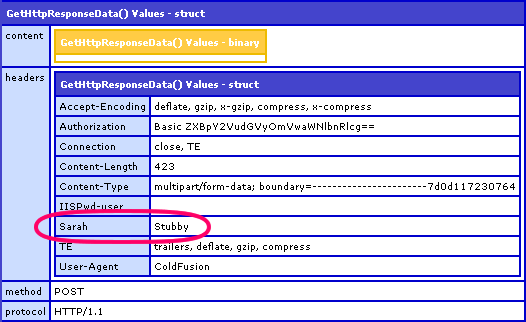
As you can see from the above CFDump, the posted Header values are readily available in the ColdFusion struct:
GetHttpRequestData().Headers
Wow, that was easy!
Want to use code from this post? Check out the license.

Reader Comments
Nice
Now, show us how to use the binary content to upload a file without having to use cffile=upload? :)
@Don,
I love CFFile - trying to upload without it would be cruel and unusual (like it is in ASP). The "content" is not just the file. The binary data should contain the file and the form field that we are submitting. However, as you can see form the CFDump, the binary data is empty. To be honest, I am not sure where the binary data goes. I don't know if this is part of ColdFusion 8's new file handling or if the form post data is stored elsewhere. I will look into this.
Hi Ben-
How can I get the Accept-Language HTTP Request item so that I can assign to a variable?
Thanks
Cesar
@Cesar,
Grab it out of the headers:
getHttpRequestData().headers[ "Accept-Language" ]
Hi Ben,
there's a typo in the third line of your example code (cgi.serer_name - should be server I assume).
On a different note, how can I per request set a HTTP-header for U-AX-Compatability (IE8 weirdness)? Instead of this <meta http-equiv="X-UA-Compatible" content="IE=EmulateIE7" /> I want to do this
<?php header('X-UA-Compatible: IE=EmulateIE7'); ?>.
Can I just do this: <cfheader charset="UTF-8" name="X-UA-Compatible" value="IE=EmulateIE7"> and place this in my Application.cfm/cfc?
@Sebastiaan,
Huh, good catch on the typo. I have no idea how that demo would have run (I pretty much copy/paste my actual code). I must have accidentally deleted the character. You are right - should be "server".
As far as the IE compatibility, I am not sure that that is something you can try to override with the site headers. Maybe it is - I know extremely little about it (I haven't even downloaded IE8 yet.. shame shame).
I'll have to do some research before I can answer that.
Hi Ben,
I've done the research for you ;-) C here: http://onlinebase.nl/blog/index.cfm?fuseAction=dspEntry&entry=127&category=9
My question actually boils down to the cfheader issue!
Thanx up front.
@Don,
The binary content of the file is easy without using CFFile action="upload", check the value of the form field you used for the upload. It'll contain the path to where CF has stored the upload until you're ready to use it.
And if you're after the original filename that it was uploaded with. Well that's hidden away in the form scope...
http://misterdai.wordpress.com/2010/06/23/form-scope-hidden-upload-details/
Shouldn't it be
not
?
Great post, once again, Ben. I was doing some CORS work and Google led me to this post to dig up the right combo for figuring out the referring origin, ie. GetHttpRequestData().Headers.origin. I then check that against an approved list of origins, and if it matches, return that back so the other site can post to the form. Seems to work nicely, and keeps security tighter than just going with the *.
Ack! Here's another side effect of this. Some of these variables are available as non-scoped variables (or at least I could not find them in any of the scopes named in the CF documentation).
In one script, we have (now "had"!) code that uses "origin" as an unscoped variable. It was defined in FORM scope (cfinput type="hidden" name="origin") in the submitting page. When the code referenced #origin#, instead of the form value it was getting "http://--domain--". This *ONLY* happened in Chrome, so was quite confusing / aggravating.
I found that by dumping out all of the values in getHttpRequestData().headers and replacing "-" with "_" in the name, I could see all of the header values. So, #origin#, #Content_Type#, #Content_Length# (notice the underscores), etc., are all defined -- I just don't know what scope they are in.
Unfortunately, whatever scope these are in takes precedence over the FORM scope, so our code was seeing "http://..." as the value for #origin# instead of the FORM.origin value. By replacing the unscoped code with scoped references, it is all working again in Chrome.