
Interesting Behavior When Swapping Live Nodes In A ColdFusion XML Document
Last week, I posted a few times about ordering nodes in an XML document using XSLT and ColdFusion. Then, over Thanksgiving, Simon Free suggested that I try swapping the XML nodes directly in the "live" XML document object. Messing with an actual XML document in ColdFusion can be a bit tricky because XML nodes have document owners, which means you can't just go around, willy-nilly, creating XML nodes and putting them places. However, if you have two existing nodes in the same ColdFusion XML document, then things might get a little more interesting.
To test this out, I set up a simple demo that would swap two sibling nodes:
<!--- Create a ColdFusion XML document. --->
<cfxml variable="xmlData">

	<toes>
		<toe id="1" isticklish="yes" />
		<toe id="2" isticklish="yes" />
		<toe id="3" isticklish="no" />
		<toe id="4" isticklish="no" />
		<toe id="5" isticklish="yes" />
	</toes>

</cfxml>


<!--- Store the 3rd node in a temp variable. --->
<cfset xmlTemp = xmlData.toes.toe[ 3 ] />

<!--- Set the 3rd node to point to the 2nd node. --->
<cfset xmlData.toes.toe[ 3 ] = xmlData.toes.toe[ 2 ] />

<!---
	Now, store the old 3rd node pointer back into the
	2nd node. This should effectively swap nodes 2 and 3.
--->
<cfset xmlData.toes.toe[ 2 ] = xmlTemp />

<!--- Dump out new ColdFusion XML structure. --->
<cfdump
	var="#xmlData#"
	label="xmlData After Swap."
	/>
Here, you can see we are using one of the first swaps you ever learn in computer science - swapping two items using a temporary intermediary variable. When I run the above code, I get the following output:
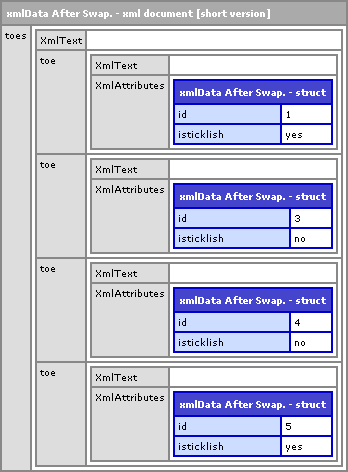
As you can see, there is no more node "2". There are now only 4 toe child nodes. Very odd. And, what's even odder is that there was no error thrown or anything. Although, when I did try to use ColdFusion's ArraySwap(), it did error saying that I could not use the method on a node list. This feels like a situation that should have thrown an error.
I wasn't sure which part of the code was actually doing the dirty work here, so I tried to separate out the code that would remove the node. My hunch was that it was setting nodes 3 to 2. So, I broke that out:
<!--- Create a ColdFusion XML document. --->
<cfxml variable="xmlData">

	<toes>
		<toe id="1" isticklish="yes" />
		<toe id="2" isticklish="yes" />
		<toe id="3" isticklish="no" />
		<toe id="4" isticklish="no" />
		<toe id="5" isticklish="yes" />
	</toes>

</cfxml>


<!--- Set the 3rd node to point to the 2nd node. --->
<cfset xmlData.toes.toe[ 3 ] = xmlData.toes.toe[ 2 ] />

<!--- Dump out new ColdFusion XML structure. --->
<cfdump
	var="#xmlData#"
	label="xmlData After Overwrite."
	/>
As you can see, setting one node equal to a sibling node is what removed one of the nodes form the XML document:
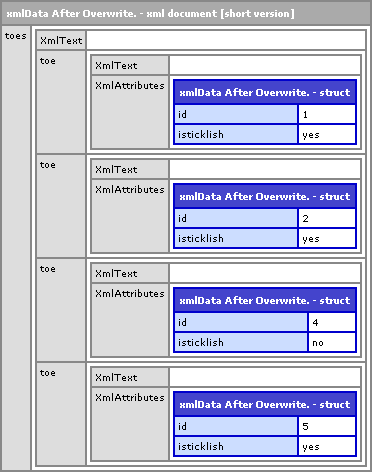
The node that is missing still exists but is no longer part of the document. In a further test, I ran an XmlSearch() call on the missing node to get it's parent:
XmlSearch( xmlMissingNode, ".." )
This returns an empty array. The missing node has no parent; it was truly removed from the document.
I guess the moral of this story is that while ColdFusion XML documents do allow for some array and struct access, they simply cannot be treated like true arrays and structs all the time. It looks like XSLT is the only way to go about sorting XML nodes.
Want to use code from this post? Check out the license.

Reader Comments
You just need to watch your pointers, Ben.
Modify your node assignment line thus:
{code}
<cfset xmlData.toes.toe[3] = duplicate(xmlData.toes.toe[2])>
{code}
--
Adam
Yep Duplicate() will fix the direct assignment within the XML document :)
@Adam, Justin,
Ahhh, thanks. Yes, that does seem to fix the problem. Granted, it does discard a node in the XML document, but as long as no one has an existing reference to it, there shouldn't be a problem.
I wonder if this will help me with my sorting issue. I've got some ideas.
@Adam, Justin,
Thanks guys! Your tip enabled me to solve my XML sub-tree sorting problem. In fact, I was able to solve this way more satisfactorily than I could with XSLT:
www.bennadel.com/index.cfm?dax=blog:1416.view
Rock on!
Hi All,
Recently I had to do something similar to swap nodes and came accross this post.
I've implemented something to do a node swap using arrayswap().
Here's the code and hope it helps.
<cfset variables.oldPos = 2>
<cfset variables.newPos = 4>
<cfset variables.xml = '<Items>
<item id="1">Text 1</item>
<item id="2">Text 2</item>
<item id="3">Text 3</item>
<item id="4">Text 4</item>
<item id="5">Text 5</item>
</Items>'>
<cfset variables.xml = xmlParse(variables.xml)>
<cfdump var="#variables.xml#">
<cfset ArraySwap(variables.xml.xmlRoot.xmlChildren,oldPos,newPos)>
<cfdump var="#variables.xml#">
@Gun,
Interesting. I'll have to try that out. I don't think I tried ArraySwap() on the actual childNodes before.