
The other day, I was working on an in-line-editing style datagrid and in order to minimize the datagrid's AJAX calls (required for saving), I wanted to only save records that have been altered in some way. At first, I started down the path of storing original values with the intent to compare them to input values on "blur" or on "focus" as needed. This got really complicated really fast.
Then, it dawned on me - text inputs, like select boxes, have an onChange method that fires when the text value of a given input changes. I think that I've completely forgotten about this method. In fact, I'm not sure if I've even ever used this method before in an application (outside of the select box).
Anyway, I was so excited at how easy this made flagging rows as dirty in my datagrid, I wanted to share it in case others had completely forgotten that it existed.
<!DOCTYPE html PUBLIC "-//W3C//DTD XHTML 1.0 Transitional//EN" "http://www.w3.org/TR/xhtml1/DTD/xhtml1-transitional.dtd">
<html>
<head>
	<title>jQuery Leveraged OnChange Method</title>

	<style type="text/css">

		input.dirty {
			background-color: #660000 ;
			color: #FFFFFF ;
			}

	</style>

	<script type="text/javascript" src="jquery-1.2.6.min.js"></script>
	<script type="text/javascript">

		// When DOM loads, init the page.
		$( InitPage );

		// Init the page.
		function InitPage(){
			var jInput = $( ":input" );

			// Bind the onchange event of the inputs to flag
			// the inputs as being "dirty".
			jInput.change(
				function( objEvent ){
					// Add dirtry flag to the input in
					// question (whose value has changed).
					$( this ).addClass( "dirty" );
				}
				);
		}

	</script>
</head>
<body>

	<h1>
		jQuery Leverages OnChange Method
	</h1>

	<form>

		<p>
			Data Item 1:
			<input type="text" id="d1" value="" />
		</p>

		<p>
			Data Item 2:
			<input type="text" id="d2" value="" />
		</p>

		<p>
			Data Item 3:
			<input type="text" id="d3" value="" />
		</p>

	</form>

</body>
</html>
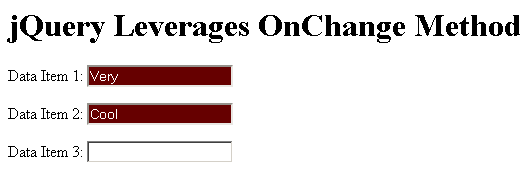
In this example, we are adding a "dirty" class to any input that get's changed. This class doesn't, in and of itself, do anything; but, it's not too difficult to imagine leveraging this dirty class (or other hidden flags) to alter the behavior of a page.
When I add some text to the inputs in the above example, my page looks like this:

Reader Comments
Thank you for a really nice post!
Your idea sounds great, but I wonder how do you intend to treat the case when data was changed and then changed back to it's original value (without submission).
It will stay "dirty" in this case...
@Vvvlad,
It's interesting, I actually thought of that use case. But then, I realized that that is an artificial concern. When we look at a text field and change the value, it becomes dirty - period. If someone then goes back and changes it again, pre-save, back to the original value, I think that it is a false construct that we should now consider that field to be no longer dirty. I know that might sound odd, but it's just something I feel.
Thanks for the post, its a simple example but can be adapted to other more complex items. Much appreciated.
Hi Ben,
Thanks for the input dirty, How can i expand the same to textarea.
@Ravi,
This should work just the same for textareas as it does for inputs.
Great script, but does it work with select and checkboxes?
Nice Script! very useful, thank you.
Thnx. FYI spelling error in your comment "// Add dirtry flag to the input in"
@Kirk,
Thanks for the catch. I blame spelling on genetics ;)
Hiya Ben,
thanks again, I say again, cos this is like the 4th or 5th time google has pointed me to one of your blogs when searching for a solution to my problem and each time your solution did the trick. So thanks for that, I think I should rather bookmark your page and skip google in future and come directly here myself. LOL..
Keep on doing what your doing, we appreciate it.
Hi ben,
I trying to redirect onchange to change() trigger, but I don't find information about that.
just imagine :
i have a <select id="myselect" onChange="a script" > ...</select>
I just use Jquery to replace this select by my own select (with div input img, etc...) and then delete the original html select.
but How to "copy" the OnChange select script to my own "select".
I'm trying this but it don't run (error message from jquery) :
$("#mynewselect").change($("#myselect").change())
have you an Idea of how to do that.
thanks in advance
@Derrick,
Thanks a lot - it means a lot to me to hear that!
@Mesobius,
I am not sure I understand; are you using a jQuery plugin to replace the core Select box with some sort of "high design" custom select box? If that is the case, you'll have to look at the plugin documentation to see how they (if they even to) implement the change event.
Hi Ben
it's not a plugin, It's my own code to replace the core select.
I customize my design, in my html page:
first : i place a standard select with an onchange event
then, I call my javascript code to replace this core select by my own drawing select.
but I want to re-use the onchange script that i place on the onchange event of my core select in my html page for my own select.
I know how to call an change event with a new code (with event : function () {...} etc...
but how to call the pre-defined onchange of the code select in my own code...
sorry if I don't explain correctly, I not speaking english very well (I french ;-) )
example :
imagine in your code below (your tuto)
just replace your <input> like that :
# <input type="text" id="d1" value="" onchange='$(this).css("color","#FF00FF") '/>
then in your initpage function :
# function InitPage(){
# var jInput = $( ":input" );
#
# // Bind the onchange event of the inputs to flag
# // the inputs as being "dirty".
# jInput.change(
# function( objEvent ){
#
# how to call the defined input onchange event ???
# }
# );
# }
probably it's more clear with this example !
@Meobius,
I see what you're saying. That's an interesting question. I have never tried that before, but you could probably get the reference to the original onChange function and then use the call/apply methods to execute it in the context of your new, custom select box.
<select id="foo" onchange="alert( 'bar' );">
</select>
<script type="text/javascript">
var foo = document.getElementById( "foo" );
foo.onchange.apply( customSelect );
</script>
I just tested this in IE, but I am not sure how consistently the "onchange" function can be referenced in that way.
@Ben Nadel,
thanks for your reply,
I'll go on holidays (15 days) with no PC :-(
I'll give you feedback when I'll come back.
thanks for all Ben !
@Mesobius,
No problem my man - have fun; touch base when you get back.
@ben,
Hi, I'm back after my holidays.
about my problem, it seem's to be more complexe.
first, it's because my standard select is deleted after the creation of my custom select, so, the onchange event does not exist yet.
second, if I want to affect the onchange event handler with my original onchange event, nothing is done, but there no error.
so due to the deadline off my project, I find another solution.
in my standard select, i include a new attribute call "autoupdate" in which I put string of element to update with the onchange. When event occurs, I take this string and I use it as selector parameter $(mystring)
then I can affect now all element on onchange
I hear you saying, ARG !! so dirty !!
I'm agree with you, but I'm now to short from the deadline to spend time to fine more beautifull solution.
the other way consist of creating special function that do the onchange script and use it, I think with existing function your solution will work. but when we write :
<select onchange="$("#foo").val("hello")"
this is an abstract function, probably not functionnal for what I want to do.
but When I'll have more time, I will try to find good solution, because I don't want doing dirty code "for project life".
I'll be back as soon as possible with solution, I hope.
just a last thing : I have post some message on differents forums or blogs to have solution (and in the jquery official forum too) and you are the only one that give me solution or way to investigate.
Thanks a lot GUY !! You are very coooooollllll !!
Good job
@Mesobius,
I hope your holiday was good. And sometimes, you just need to get it down - dirty or not :) That's the problem with deadlines. Glad that I could provide you with some ideas, even if it wasn't necessary any answers.
Hi Ben!
Nice blog, lot's of good content.
I have a question regarding the .change() event.
I have a shopping cart, which automatically adds some <input> fields, with dynamic values (it extracts values from a cookie, and assigns the different values to the input fields).
Now, here's the problem. When someone types in a new amount of a specific item, e.g. changes the amount of iPods he wants to buy from 1 to 4, I need my jQuery to perform an ajax request, whenever this field is changed.
Here's the code, and I have been trying for 12+ hours now, to get it right!
$(InitPage);
function initPage() {
var jInput = $(":input");
jInput.change(
function( objEvent ) {
var itemAmount = $(this).val();
var itemID = $(this).siblings("input#vareID").val();
});
$.ajax({
type: 'POST',
url: 'checkout.aspx',
data: { 'ID': itemID , 'Amount': itemAmount}
});
});
The codebehind stuff then requests the two datatypes, ID and Amount, but they keep returning zero.
The purpose of this, is updating the client cookie on the fly, with the new item amount.
Woops, the 7th line of the code is of course as follows:
var itemID = $(this).siblings("input#itemID ").val();
@Madsmads,
It looks like your AJAX request is not actually inside of the change() event handler?
@Ben,
Yeah, I realised that as well, so the code now looks like this:
$(InitPage);
function initPage() {
var jInput = $(":input");
jInput.change(function( objEvent ) {
var itemAmount = $(this).val();
var itemID = $(this).siblings("input#itemID").val();
$.ajax({
type: 'GET',
url: 'checkout.aspx',
data: { 'ID': itemID, 'Amount': itemAmount }
});
});
});
But it still wont work :(
Can you think of something I might have done wrong, or a workaround for this problem?
@Madsmads,
Hmm, nothing looks wrong to me. If they keep returning Zero, then at least they are referencing Input fields. Can you use Firebug or something to look at your markup and make sure the inputs actually have the right value? The zero isn't just coming from no-where - it's coming from an input.
Hi again!
It works now. Now I just need to figure out how to refresh the page asynchronously when the changes are made to the cookie.
The code that worked for me looks like this:
$(document).ready(function() {
var jInput = $(":input");
jInput.change(function() {
var itemAmount = $(this).val();
var itemID= $(this).siblings("input#itemID").val();
$.ajax({
type: 'POST',
url: 'checkout.aspx',
data: { 'ID': itemID, 'Amount': itemAmount }
});
});
});
Thanks for the quick response :)
@Madsmads,
Glad you got it working. Good luck with the next step (which sounds like it has something to do with cookies). On that note, a recent blog post I had talked about cookies and their interaction with AJAX requests:
www.bennadel.com/blog/1995-AJAX-Requests-Get-And-Set-Cookies-Like-Any-Other-HTTP-Request.htm
Not sure if that would be helpful to you.
Hi ben,
I have a general question about DOM properties, javascript and html tag, but I'm not sure that i'm in the good blog post.
if you remember my problem (my "customize" select), I had create a new property of the "standard select", an "autoupdate" property.
<select ... autoupdate="#foo, #bar" >
So my question :
it is allowed to create all the properties we want on all the tag we want ?
is there's some DOM limitations to this creation, and it is compatible with all the actual browser ?
because if it's ok, we can do all what we want, but I think that it's probably not compatible with all browser.
I want your opinion on this point, probably some other developpers may want a response.
@Mesobius,
That's a very good question. I think that it might work across all browsers. If it's valid? That's another question. I know part of the HTML5 specification is the ability to create custom tag attributes that start with "data-" as in (data-autoupdate="true"). That's for clarity and name-collision prevention (I assume). But, I think before that, it's still doable as you have done.
In the non-tag world - meaning, in the DOM and other Javascript objects, I am pretty sure that you can mutate those objects in any way like (assuming you don't mess with read-only attributes).
In the end, just be sure to cross-browser test.
Hi Ben,
I ran into a similar problem. But in my case, the text fields were readonly.
A javascript calender control was setting the date in the textbox
Apparently, the change event is a replica of the blur event. It only fires if the textbox is enabled and someone types in it.
If its set through javascript, the onChange event doesn't fire.
Any suggestions?