Java Hashtable - An Object-Based-Lookup "Struct" (Thanks Nathan Mische)
A little while ago Nathan Mische solved a problem that some people were getting with my POI Utility project in which cell styles were "bleeding" into other cells. The problem, as he discovered, had to do with my reliance on the undocumented .hashCode() method of ColdFusion structs, which apparently was not the most reliable undocumented method on the block. To solve this problem, he used the Java Hashtable object to cache CellStyle instances. This was quite clever. I will definitely be implementing this, but before I do, I figured I better play around with the Java Hashtable a bit to see how it works.
The Java Hashtable acts much like a ColdFusion struct in that it stores and returns values based on keys. The important difference is that ColdFusion structs use string-based keys and Java Hashtables use "object" keys. This means we can use any value (that supports the .hashCode() and .equals() methods) as our value key.
Ok, so let's start out by just creating some structs to use as the key for some arrays:
<!--- Set up a key. --->
<cfset objKeyA = {
	FirstName = "Ben",
	LastName = "Nadel"
	} />

<!--- Set up a value object. --->
<cfset objValueA = [
	"Ben",
	"Nadel"
	] />


<!--- Set up a key. --->
<cfset objKeyB = {
	FirstName = "Sarah",
	LastName = "Vivenzio"
	} />

<!--- Set up a value object. --->
<cfset objValueB = [
	"Sarah",
	"Vivenzio"
	] />


<!--- Create a Java hash table with default load settings. --->
<cfset objHashTable = CreateObject(
	"java",
	"java.util.Hashtable"
	).Init()
	/>

<!---
	Put both values in the hash table based on their
	key objects.
--->
<cfset objHashTable.Put( objKeyA, objValueA ) />
<cfset objHashTable.Put( objKeyB, objValueB ) />


<!--- Dump out the first value. --->
<cfdump
	var="#objHashTable.Get( objKeyA )#"
	label="ValueA Using Original Key"
	/>


<!--- Dump out the second value. --->
<cfdump
	var="#objHashTable.Get( objKeyB )#"
	label="ValueB Using Original Key"
	/>
As you can see, we are caching the two arrays based on their relative structs. Then, we simply CFDump them out again, using the original structs as the look-up keys. Running the above code, we get the following output:
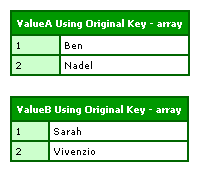
This gives us back the same values we put in.
But, what if we create a totally new "key" struct? Is it the actual instance of the struct that is important when it is used as a look-up key, or is the contents of the struct that are more important? To test this, we are going to create a totally new struct using a different creation methodology and give it the same values our one of our original structs. Then, we're going to see what that gives us:
<!---
	Now, let's create a new key that has the same values
	as the second key, but is a new object (we are going
	to use a different creation method to see if that makes
	any difference).
--->
<cfset objKeyBAlt = StructNew() />
<cfset objKeyBAlt.FirstName = "Sarah" />
<cfset objKeyBAlt.LastName = "Vivenzio" />

<!--- Dump out the second value using new key. --->
<cfdump
	var="#objHashTable.Get( objKeyBAlt )#"
	label="ValueB Using Alternate Key"
	/>
Using the alternate key, we get the following CFDump output:
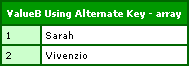
As you can see, even when we create a totally new struct, because it has the same values, it acts as the same key. It is this feature that makes this the viable POI solution that Nathan Mische came up with.
But what about case sensitivity? ColdFusion, as we all know, is not case sensitive; Ben is the same as BEN is the same as BeN. But, does this case insensitivity bubble up to the underlying Java methods for hashCode() and Equals()? To test this, we will again create a completely new struct, but rather than using the exact same keys, we will use all uppercase keys:
<!---
	Now, let's create an alternate key that is the same values
	but with different case. ColdFusion is not case sensitive,
	but let's see if that bubbles up to its hashCode() and
	equals() core methods.
--->
<cfset objKeyBAlt2 = {
	FirstName = "SARAH",
	LastName = "VIVENZIO"
	} />

<!--- Dump out the second value using new key. --->
<cfdump
	var="#objHashTable.Get( objKeyBAlt2 )#"
	label="ValueB Using Alternate Key (2)"
	/>
Running this code, we get the following output:
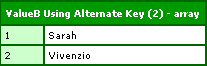
Looks like the case insensitivity of ColdFusion does successfully bubble up to its Java interface, at least in this case.
This Java Hashtable is pretty cool, and will definitely serve as a performant solution for a caching issue that I was having in my POI ColdFusion custom tags. If you try to look up a key that doesn't exist, the Java Hashtable returns a NULL. I'm not going to bother demonstrating this as Java NULL values have been demonstrated on this blog a thousand times, but, if you try to "get" a value from the Hashtable that it doesn't have indexed, it returns a NULL which destroys the ColdFusion value into which it is stored.
Anyway, thanks Nathan Mische for bringing this cool object to my attention.
Want to use code from this post? Check out the license.

Reader Comments