
Ask Ben: Create A New XML Document Based On A Child Node Of An Existing XML Document
Yesterday, someone asked me about creating new XML documents. They had an XML packet that came back from a web service call. This XML had some extra information in it that had to do with the web service call itself, not the data that was being transported. As such, they wanted to create a new XML document based on the target XML data, without the superfluous web service node data. For example, let's say that the web service returned something like this:
<envelope>
	<body>
		<actress>
			<name>Maria Bello</name>
			<birthday>April 18, 1967</birthday>
			<url>http://www.imdb.com/name/nm0004742/</url>
		</actress>
	</body>
</envelope>
Here, the Envelope and Body node tags are protocols of the web service call and have nothing to do with the actual data that is being returned. As such, he wanted to take the Actress node and convert that to its own XML document in which Actress is the root node.
You're initial instinct might tell you just to try and copy the node using something like this:
<!--- Create new XML document. --->
<cfset xmlActress = XmlNew() />

<!--- Copy XML node to new document. --->
<cfset xmlActress.XmlRoot = xmlResponse.envelope.body.actress />
While this looks good, if you have messed around with XML a bunch, you will know that this is going to throw a document ownership error:
WRONG_DOCUMENT_ERR: A node is used in a different document than the one that created it. null.
XML nodes are owned by a given document and you can't simply copy a node from one XML document to another document (even if you try to Duplicate() the node first). At least, not with basic ColdFusion functions. If, however, you dig around in the Java methods, you will find that you can import nodes from one document to another.
But, there's actually an even simpler, ColdFusion-native way to do this - create a new ColdFusion XML document out of the given node. I know that sounds like I am answering the question with the question, but when you see the following, you will see that it is quite literally true:
<!---
	We are going to assume this is some XML coming back from a
	web service. We are conveting it to an actual ColdFusion XML
	document object.
--->
<cfxml variable="xmlResponse">

	<envelope>
		<body>
			<actress>
				<name>Maria Bello</name>
				<birthday>April 18, 1967</birthday>
				<url>http://www.imdb.com/name/nm0004742/</url>
			</actress>
		</body>
	</envelope>

</cfxml>


<!---
	Convert the Actress node to a totally new XML document
	of it's own. The trick here is that XmlParse() requires a
	string, so ColdFusion will auto-convert the node into an
	XML string of it's own. Then, XmlParse() takes that and
	creates a totally new ColdFusion XML document object
	from that.
--->
<cfset xmlActress = XmlParse(
	xmlResponse.envelope.body.actress
	) />

<!--- Output new ColdFusion XML document. --->
<cfdump
	var="#xmlActress#"
	label="New Actress XML Document"
	/>
If you ignore the CFXml tag and the CFDump tag, the above is really just one line of code:
<cfset xmlActress = XmlParse(
	xmlResponse.envelope.body.actress
	) />
As you can see, this is about as straight forward as I said it would be - you are creating a new ColdFusion XML document out of the existing node. That's what it looks like, but of course, that's not exactly what's happening. XmlParse() expects a string value and ColdFusion, in its infinite wisdom, will do whatever it can to make that happen. As such, it takes the Actress XML node from the original XML document and converts it into a string. The same effect would be accomplished with this call:
ToString( xmlResponse.envelope.body.actress )
... we are just letting ColdFusion do this implicitly. This creates an XML string in which the Actress node is the root node. Then, our XmlParse() call takes that and creates a totally new XML document based on that intermediary XML string. Pretty slick. And, so you can see this work, when we run the code above, here is the CFDump we get:
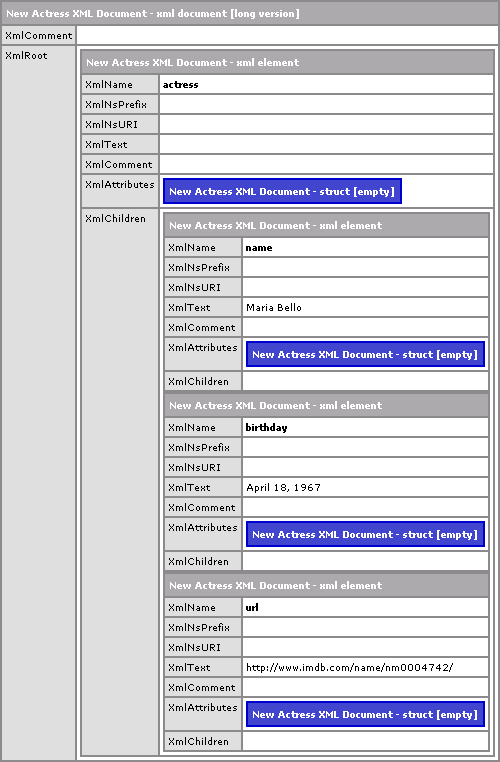
Now, because we are conerting to and from string values, this is not going to be the fastest process, but it's one line of code, and that's the trade off.
Want to use code from this post? Check out the license.

Reader Comments