
Bug With ARGUMENTS Scope And Implicit Array / Struct Creation
When I was working on my XmlDeleteNodes() user defined function, I ran into a weird issue involving the ARGUMENTS scope and implict array notation. This feels very much like a bug to me, but I am not 100% sure. With my XmlDeleteNodes() method, you could pass in either a single node or an array of nodes to be deleted. However, internally, I wanted to operate under the assumption that I always had an array of nodes. To make this work, I started off by doing this:
<!---
	Check to see if we have a node or array of nodes. If we
	only have one node passed in, let's create an array of
	it so we can assume an array going forward.
--->
<cfif NOT IsArray( ARGUMENTS.Nodes )>

	<!--- Convert single node to array. --->
	<cfset ARGUMENTS.Nodes = [ ARGUMENTS.Nodes ] />

</cfif>
Nothing crazy going on here - I am simply taking the XML Node, wrapping it in an implict array, and storing it back into the ARGUMENTS scope. I have done something like this many times before, just never before with implicit array notation - usually with an intermeidary value (pre ColdFusion 8), which is what I ended up doing for the XmlDeleteNodes() method.
When I came up against this, I didn't really take time to explore it, so I thought I would do so now. I tried this with both arrays and structs, both of which have implicit creation in ColdFusion 8. Let's start off with the ColdFusion array:
<cffunction
	name="TestArray"
	access="public"
	returntype="void"
	output="true">

	<!--- Define arguments. --->
	<cfargument
		name="Data"
		type="any"
		required="true"
		hint="I am a single data item or an array of items."
		/>

	<!--- Define the local scope. --->
	<cfset var LOCAL = {} />

	<!---
		Check to see if the given data item is an array. If
		not, then we want to convert it to an array.
	--->
	<cfif NOT IsArray( ARGUMENTS.Data )>

		<!--- Convert the argument to an array. --->
		<cfset ARGUMENTS.Data = [ ARGUMENTS.Data ] />

	</cfif>


	<!---
		Now that we know for sure that our data item is an
		array, loop over the array and dump out the element.
	--->
	<cfloop
		index="LOCAL.DataItem"
		array="#ARGUMENTS.Data#">

		<!--- Dump out item. --->
		<cfdump var="#LOCAL.DataItem#" />

	</cfloop>

	<!--- Return out. --->
</cffunction>


<!--- Call with a non-array item. --->
<cfset TestArray( "Ben" ) />
As you can see, I am passing in a String value to the method. The method then stores that string back as an implicit array into the ARGUMENTS. Because the right side of an equation is evaluated first, this should really cause no problems at all. You can think of that equation as such:
<cfset ARGUMENTS.Data = [ ARGUMENTS.Data ] />
... evaluates to:
<cfset ARGUMENTS.Data = [ string ] />
... evaluates to:
<cfset ARGUMENTS.Data = array />
Nothing crazy going on at all, and yet, when we CFDump out the array item, we get this:
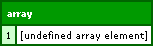
This must be a bug. It's like ColdFusion doesn't fully evaluate the right side of the equals sign before assigning the value when it comes to implict array creation.
I then tried the same thing with implicit struct creation. Same idea:
<cffunction
	name="TestStruct"
	access="public"
	returntype="void"
	output="true">

	<!--- Define arguments. --->
	<cfargument
		name="Data"
		type="any"
		required="true"
		hint="I am a single data item or a struct of items."
		/>

	<!--- Define the local scope. --->
	<cfset var LOCAL = {} />

	<!---
		Check to see if the given data item is a struct. If
		not, then we want to convert it to a struct.
	--->
	<cfif NOT IsStruct( ARGUMENTS.Data )>

		<!--- Convert the argument to a struct. --->
		<cfset ARGUMENTS.Data = { Data = ARGUMENTS.Data } />

	</cfif>


	<!---
		Now that we know for sure that our data item is a
		struct, loop over the struct and dump out the element.
	--->
	<cfloop
		item="LOCAL.Key"
		collection="#ARGUMENTS.Data#">

		<!--- Dump out item. --->
		<cfdump var="#ARGUMENTS.Data[ LOCAL.Key ]#" />

	</cfloop>

	<!--- Return out. --->
</cffunction>


<!--- Test with a non-struct item. --->
<cfset TestStruct( "Ben" ) />
This time, we get something very weird, although I suspect that this is caused by the same exact bug:
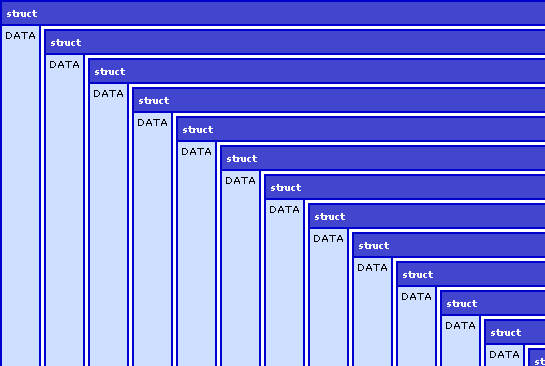
Definitely a bug, right?
Want to use code from this post? Check out the license.

Reader Comments
As far as I can tell, it doesn't like you using a structure for the loop index.
No, I'm wrong as I was able to make a regular loop and use a structure and the index. You're right, you stumbled onto something weird.
<cfset variables.stuff = "stuff">
<cfset stuff = [variables.stuff]>
<cfdump var="#variables.stuff#">
Shouldn't this:
<cfif NOT IsStruct( ARGUMENTS.Data )>
<cfset ARGUMENTS.Data = { Data = ARGUMENTS.Data } />
</cfif>
Be:
<cfif NOT IsStruct( ARGUMENTS.Data )>
<cfset ARGUMENTS = { Data = ARGUMENTS.Data } />
</cfif>
Otherwise, you're putting the structure of data into arguments.data which is Arguments.data.data? Regardless, it's still bombing out.
@Todd,
Think about in terms of left / right side equation evaluation. When we pass in a string,
<cfset ARGUMENTS.Data = { Data = ARGUMENTS.Data } />
.... evaluates to:
<cfset ARGUMENTS.Data = { key = string } />
... evaluates to:
<cfset ARGUMENTS.Data = struct />
This should work fine.
When I use my above fix, you get an actual error now:
Element DATA is undefined in ARGUMENTS.
The error occurred in C:\Dev\Apache2.2.6\htdocs\stuff.cfm: line 7
5 : <cfif NOT IsStruct( ARGUMENTS.Data )>
6 :
7 : <cfset ARGUMENTS = { Data = ARGUMENTS.Data } />
8 : </cfif>
9 : <cfloop item="LOCAL.Key" collection="#ARGUMENTS.Data#">
What's happening is that the {} is initializing arguments.data and wiping everything out, thus, it's undefined now. You can test this by doing:
<cfif NOT IsStruct( ARGUMENTS.Data )>
<cfdump var="#arguments.data#"><cfabort>
<cfset ARGUMENTS = { Data = ARGUMENTS.Data } />
</cfif>
It returns "Ben" and if you take out the dump/abort and run it, it returns error and undefined. Which is correct (to me). So, that's not a bug.
Ben, that's not how it works (for structure creation). Consider the following:
<cfset stuff = {blah=1}>
<cfdump var="#stuff#">
You're putting a key of "blah" which has a value of 1 inside variables.stuff. If I attempt to write it the way you have it written, it would be:
<cfset stuff.blah = {blah=1}>
<cfdump var="#stuff#">
Look at the results.
@Todd,
Sorry, we have some miscommunication because of my variable naming choices. I chose to name the KEY of the new struct Data since it needed a key. However, since these are the same keys, it is a bit confusing in my intent. Rethink of it like this:
<cfif NOT IsStruct( ARGUMENTS.Data )>
. . . . <!--- Convert the argument to a struct. --->
. . . . <cfset ARGUMENTS.Data = { Value = ARGUMENTS.Data } />
</cfif>
My intent was not to erase ARGUMENTS.Data or anything like that; my intent was to take the non-struct value and turn it into a struct (AND store it back into ARGUMENTS.Data.
The struct example is not a good one since structs need a KEY which is not inherently obvious. The Array example is a much more obvious use-case since arrays have an inherent order to them. I was really only trying structs to see if this error happens with all implicit creation.
<cfset LOCAL = {
Data = EVALUATE( "ARGUMENTS.Data" )
} />
Throws: "Invalid collection Ben. Must be a valid structure or COM object."
vs
<cfset ARGUMENTS = {
Data = EVALUATE( "ARGUMENTS.Data" )
} />
Throws: "Variable ARGUMENTS.Data is undefined"
The strange part is if it's not in a cffunction, then this bit of code works..
<cfset VARIABLES.Data = "hallo" />
<cfif NOT IsStruct( VARIABLES.Data )>
<cfset VARIABLES = {
Data = EVALUATE( "VARIABLES.Data" )
} />
</cfif>
I would send the following to Adobe:
<cfset stuff = "blah">
<cfset stuff = {blah=stuff}>
<cfdump var="#stuff#">
Ask them what is going on. :) And, yes, your weird naming through me for an infinite loop. And, yes, your weird naming through me for an infinite loop. And, yes, your weird naming through me for an infinite loop. And, yes, your weird naming through me for an infinite loop. And, yes, your weird naming through me for an infinite loop. And, yes, your weird naming through me for an infinite loop.
<cfbreak>
Sigh.
Ha ha ha :) Sorry about that.
Definitely a bug. I wonder what code it's generating for these implicit data structures...
Another nasty bug I ran into is that Query of Queries that join two queries sorts the queries by the join key!
<cfset query1 = ...>
<cfset query2 = ...>
<cfquery name="result" dbtype="query">
select *
from
query1, query2
where
query1.col = query2.col
</cfquery>
Now, query1 and query2 are both sorted in descending order by the column "col"!
So annoying. Had to sprinkle duplicate() calls into our code to make sure data doesn't get sorted oddly due to query joins. :/
I really hope Adobe fixes this stuff soon.
@Elliott: You're aware that you can do an 'order by' in your query of queries?
@Todd
I think you misunderstood. The bug is that the QoQ sorts the two source queries (the ones being used like "tables") by the join column. This isn't related to the result ordering at all.
So if the queries were:
<cfquery name="query1" datasource="db">
select topicName, speakerId
from topics
order by topicName
</cfquery>
<cfquery name="query2" datasource="db">
select speakerName, speakerId
from speakers
order by speakerName
</cfquery>
<!--- At this point query1 is ordered by topicName; query2 is ordered by speakerName --->
<cfquery name="result" dbtype="query">
select * from query1, query2
where query1.speakerId = query2.speakerId
</cfquery>
<!--- Now, because of the bug query1 and query2 are ordered by speakerId --->
A QoQ shouldn't modify the source queries that you're selecting from.
@Elliott,
That's an odd bug!
@Elliott,
But is that actually a bug? In order for for CF to join the QoQ's, there has to be some sort of data manipulation going on CF-side. I understand that the 2 queries were originally sorted by different values, but how would CF "know" how to sort the resulting query...would it be by topicName (Q1) or speakerName (Q2), or by a column it knows is already there, speakerId (Q3), as no order was specified.
@Gareth
' but how would CF "know" how to sort the resulting query.'
Again, this has nothing to do with the ordering of the resulting query. Adding an "order by" in there doesn't change what this bug does.
And of course it's a bug. If CF is sorting the data first so it can perform a join faster (which it should be) it should be doing that on a duplicate, not on the queries you passed in.
Your database certainly doesn't reorder the your tables permanently when you join two tables with some sql! And listFindNoCase() doesn't sort your list when you search for something!
As for your question of how should we order it:
Algorithmically we can join two record sets in O(n^2) time preserving the order in the second set as it was joined to the first fairly easily. This essentially works out to be a stable sort of the second set where the "sorted order" is defined by the order of the first set.
However O(n^2) kind of sucks, so if we first sort both record sets, then do a merge operation on them it works out something like 2nlogn+n which is O(nlogn) and is much better. The issue with this though is that we lose the original ordering and end up with a sorted result query. We could devise some kind of complicated bucket sort based on the input queries, but I'm not sure that's really worth it. Better to just put in the docs that you should add an "order by" clause to make sure the result of joins is what you want in terms of order.
The math behind why this bug happens is fairly obvious. The issue is that QoQ seems to be calling sort() on the original queries instead of duplicate copies like it should be. A select in a QoQ should be non-destructive.... obviously, it's a Select! :P
@Elliott,
Sorry, I misread your post. I thought it was reordering Q3, not Q1 and Q2.
Not to resurrect an old post, but the workaround for this issue is to assign the arguments to another variable before attempting to overwrite it. Which fits what Todd said
"What's happening is that the {} is initializing arguments.data and wiping everything out, thus, it's undefined now."
<cfif NOT isArray(ARGUMENTS.options)>
<cfset LOCAL.opt = ARGUMENTS.options>
<cfset ARGUMENTS.options = [ LOCAL.opt ] >
</cfif>
@Steve,
In ColdFusion 9, the implicit arrays are getting better, but there's still some buggy behavior along these lines.
@Ben
It's simply a matter of the left side evaluating before the right side.
"ARGUMENTS.options" gets wiped out as soon as you implicitly create it as if you set it with ArrayNew()/StructNew(). You'll see the same issue appear javascript and other languages from time to time. Thats where the 'workaround' comes in. Store the value first so it doesn't get wiped then make use of it later.
btw - The example was for CF8 just didn't include the
<cfset var LOCAL = {} > ;)
Steve
@Ben
Have you tested in 9.0.1? They fixed tons of these bugs. I have a fairly complicated test suite for implicit structs and arrays that all passed in CF9.0.1
Sigh, I spoke too soon.
http://cfbugs.adobe.com/cfbugreport/flexbugui/cfbugtracker/main.html#bugId=83671
Implicit structs and arrays are still broken in all kinds of fun ways.
I really wish I knew why Adobe couldn't get this right.
Please vote. :/
@Steve,
Yes, that is what is happening; but this is most definitely a bug. Expressions should be evaluated on the right side first, then left.
@Elliott,
I haven't tested this specific bug (I am not sure I understand the verbiage in the CF Bug tracker) in CF 9.0.1. In fact, I have yet to install it. Hopefully after CFUNITED, I'll get on top of that (fingers crossed that it doesn't mess up my multi-instance JRUN).
Ben, this is definitely a bug introduced with 9.0.1.
I ran into it after updating, as well.
The argument scope seems to be unavailable.
In my case, it was occurring when nesting a struct inside of a function call.
myFunction( arg1 = 1, arg2 = {'structkey1'= arguments.myVar}
I had to create the struct before the function call then pass it in.
var preFabStruct = {'structkey1'= arguments.myVar}
myFunction( arg1 = 1, arg2 = myPreFabStruct}
I didn't see a bug for this on the CF tracker, has it been created?
@Tom
I submitted a bug because they broke implicit structs and arrays in named arguments in 9.0.1, specifically with accessing local variables (of which the arguments scope is one). I got a confirmation that they fixed it but it also vanished from the bug tracker. Hopefully we'll get a hotfix soon.
@Tom, @Elliott,
I haven't upgraded to ColdFusion 9.0.1 just yet, but hope to do so in the near future. I'll be bowled over with happiness when they finally iron out alllll the bugs with implicit struct/array creation.
How do you get involved with your services?