
For anyone who has built a web page that has uploaded and sent files (such as sending resumes to the Human Resources department of a law firm), you probably know that one of the most frustrating things about sending mail from ColdFusion is that the mail doesn't get sent out immediately; it gets spooled. This means that your mail file sits in a directory until the mail service finds it and sends it out. Since sending mail is very much a "set it and forget it" function, the point of friction here is not obvious at first. It does, however, become very clear the second you want to delete the file you just sent out as an attachment.
When a user uploads a file purely for an email attachment, most likely, unless you have a fairly complex system, you don't want to keep that file on your server; so, after they upload it, you send out your mail and then delete the file. Then, you find out that your emails aren't being sent. It turns out, since the emails are spooled, you actually deleted the attachment file before the email was processed, which of course threw an error which you probably didn't see, because your ColdFusion page seemed to work just fine.
To get over this, we have learned to turn off spooling on emails that have "temporary" attachments, right? This works because the email is processed the second the CFMail tag is finished, in a SYNCHronous manor. This allows the code directly after the CFMail tag to assume the email has been completely sent out and therefore can execute without any precautions. But this never feels good; I hate the idea of forcing the mail service to act in a way that it is not optimized to do.
This is why the new Remove attribute of the CFMailParam tag (introduced by the ColdFusion 8.0.1 updater) is so exciting! It allows you to flag email attachments for deletion without you having to do anything or worry about spooling! The ColdFusion server takes care of all of this for you. Zero friction. All you have to do is include remove="true" on any CFMailParam file that needs to be deleted after the email has been processed.
Let's take a look at a really simple example (focusing on the new CFMailParam attribute, not on any proper form validation or file handling):
<!--- Param form values. --->
<cfparam name="FORM.email" type="string" default="" />
<cfparam name="FORM.file" type="string" default="" />

<!---
	Check to see if the form has been submitted. For the
	purposes of this very simple demo, we are going to do
	this by seeing if the form data is valid.
--->
<cfif (
	IsValid( "email", FORM.email ) AND
	Len( FORM.file )
	)>


	<!--- Upload the file to the upload directory. --->
	<cffile
		action="upload"
		filefield="file"
		destination="#ExpandPath( './' )#"
		nameconflict="makeunique"
		/>


	<!--- Send email. --->
	<cfmail
		to="#FORM.email#"
		from="ben@bennadel.com"
		subject="File Send by #FORM.email#"
		type="html">

		<p>
			The following file has been upload and sent from
			the Kinky Solutions CFMailParam Remove Attribute
			demo page. <em>(Please see attached file)</em>.
		</p>

		<!---
			Attach the file. When doing this, use the remove
			attribute so that the file is deleted from the
			server after the mail has been sent.
		--->
		<cfmailparam
			file="#CFFILE.ServerDirectory#/#CFFILE.ServerFile#"
			remove="true"
			/>

	</cfmail>


</cfif>


<cfoutput>

	<!DOCTYPE html PUBLIC "-//W3C//DTD XHTML 1.0 Transitional//EN" "http://www.w3.org/TR/xhtml1/DTD/xhtml1-transitional.dtd">
	<html>
	<head>
		<title>CFMailParam Remove Attribute Demo</title>
	</head>
	<body>

		<h1>
			CFMailParam Remove Attribute Demo
		</h1>

		<form
			action="#CGI.script_name#"
			method="post"
			enctype="multipart/form-data">

			<label>
				Email Address:<br />
				<input type="text" name="email" size="40" />
			</label>
			<br />
			<br />

			<input type="file" name="file" size="60" />
			<br />
			<br />

			<input type="submit" value="Send File" />

		</form>

	</body>
	</html>

</cfoutput>
Here, I am just getting an email address and a file for attachment and sending it out. Notice that my CFMail tag makes no use of the SpoolEnable attribute. This is because the CFMailParam tag is using the new Remove attribute which will take care of the file system clean up for us after the mail has been sent.
This is awesome. Here's a great example of where a seemingly small change will end up making such a huge impact on coding effort.
As you are testing this new feature, you can actually see it work in real time. After I uploaded the file, one_curvey_line_up.jpg (and yes, I realized I misspelled curvy, don't rub it in), here is what my file system looks like:

I uploaded the image to the current directory and there it is - after the ColdFusion page has been processed but the email itself has not been sent.
Then, I jumped over to my email and refreshed the screen. Still nothing, and indeed, switching back to my file server, I could see that the image file was still there. But then, a few seconds later, the email showed up in my account:
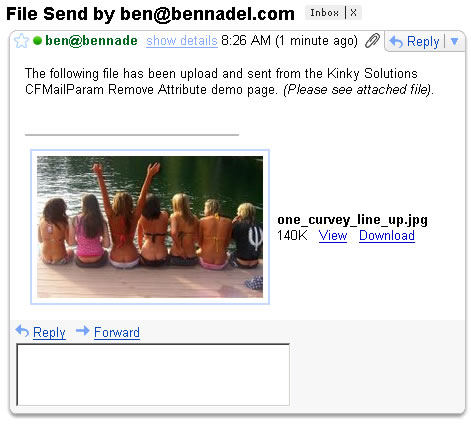
Now that the mail file has been processed, I once again jumped back over to my file server to see that the image file had been successfully removed without me having to do any additional work:

Woohoo! I hope I am not the only one who sees just how exciting this is. This is going to make life much much easier.

Reader Comments
How about when you are using a Bulk Email system in ColdFusion, how do you remove the attachments that could be sent using this?
@Raul,
Do you mean using the Query attribute of the CFMail tag to send a single email to many different people? I wonder what would happen. I have to assume that ColdFusion is smart enough to know how its attributes will interact, but I have not tested this.
Yes thats what I meant, I will test it out later today to see what happens :D
Ben, great stuff as always. Here is another method of sending files in e-mail from memory. http://blog.pengoworks.com/index.cfm/2007/10/26/Using-CFMAIL-to-send-attachments-stored-in-memory
In case the host does not allow CFFILE or you just don't want the file io for what ever reason.
@Raul, I would assume that it wouldn't be deleted until the final attachment got sent. This is within the same mail 'to/cc/bb' segment. If you're sending email #2 with the same attachment, then you're going to have to have a duplicate of that attachment as well.
@Ben,
Just out of curiosity, do you purposely avoid using <cfform> for any particular reason(s)? I'm not necessarily speaking of format="flash" either. I've just noticed several CF developers don't/aren't use/using it.
@Steve:
I can't speak for anyone else, but I personally try to avoid cfform where possible.
It does make life a lot easier in terms of automating client side validation and certain restrictions, but too often people forget that they need to implement server side validation too.
The main reason I avoid it, however, is that it has a history of automagically generating HTML that doesn't pass W3C validation - I understand that that's since been fixed in CF8, but nonetheless I prefer to have a finer degree of control over the content in my pages.
@Steve,
I have never gotten into CFForm. I don't really avoid it for any particular reason. I do all my data validation on the server and like all my CSS, so I just never bothered looking into CFForm. Some people really like it.
@Ben
What are the technical specifics behind this? How does ACF do this? Or is this just part of the tag-magic which we never should ask anything about and just use it?
;-)
@Sebastiaan,
To me, it's all voodoo magic :) A few years ago Dan Switzer wrote an amazing blog post on how to accomplish this with Java in ColdFusion:
http://blog.pengoworks.com/index.cfm/2007/2/8/Sending-email-attachments-in-CFMX-without-writing-data-to-disk
It's possible that ColdFusion has just encapsulated all of this mumbo jumbo behind the Remove attribute.
In any case, it's awesome and I am thankful.
I am using the remove attribute successfully on more than a dozen servers running CF 8.0.1 but on one server runnning 8,0,1,195765 I get an error when I try to use it: Error Occurred While Processing Request Attribute validation error for the mailparam tag. The tag does not have an attribute called remove.
Does anyone have any thoughts as to why this is happening?
@Jim,
That is beyond me. This tag should be part of 8.0.1. Have you checked to make sure that this server is using the same dot-releases as the other servers?
Hey Ben,
Do you have any idea why the following code is still removing the attached file after the mail is sent? Running CF 9.0.1
<cfmail from="you@you.com" to="me@me.com" subject="TESTING 123" type="html">
<cfmailparam file="myFiles/myPDF.pdf" remove="no">
Testing 123
</cfmail>
@Josh,
Looking in the documentation, "no" is supposed to work as you expect it to. Perhaps there is a patch or a hotfix you are not having yet? In the docs, there is a comment that you might try applying this:
http://kb2.adobe.com/cps/862/cpsid_86263.html
Also, does it still remove if you leave out the attribute altogether?
I think Railo now also supports this as of version 3.2+.
Just checked this with the Railo changelog:
http://classic.railo.ch/en/index.cfm?treeID=235
As of Railo 3.1.2.011 (dev) and Railo 3.2.001 (stable) this is supported. My ticket has been resolved and implemented ;-) Yeah! That sure feels good, kinda like having contributed a little to the development of a great CFML-engine.
Dear Ben,
I was looking at your convo with Josh from back in Jan. regarding the <cfmailparam>, specifically the 'remove' attribute...I am having a similar issue where the file gets deleted regardless of what I try, remove="no", remove="false" or omitting the attribute all together....I am looking at the suggested HOTFIX, but I just wanted to see if you have any other suggestions....
Thanks....
KB3
As a follow up, I have confirmed that the HOTFIX has already been applied....suggestions....?
Kelly and Ben: I'm having the same problem where the file enclosed in an attachment gets deleted regardless of what I try, remove="no", remove="false" or omitting the attribute all together....
Did you solve the problem? Any suggestion?
Thanks...
Dario
Regarding Josh, Kelly and Dario's problem where the attachment gets deleted regardless of the value of the remove attribute:
I had the same problem and then realized that the file attribute needs to correspond the file system, e.g.
C:\inetpub\wwwroot\[site]\images\my_image.jpg
as opposed to
/[virt dir]/images/my_image.jpg
thank you for posting ben, this helped me fix an issue I was having
I have an intermittent issue of two cfmail tags on the same page with their own differently named attachments, sometimes doubling up on their own attachments. Any ideas?
@Steve,
Your file system path solution solved my problem with the attachment being deleted. Thank you!
Neil