
CFHTTPSession.cfc For Multi-CFHttp Requests With Maintained Session
There was a chance that I was going to have to write a ColdFusion script that integrated with SalesForce.com. This script would have to login into a SalesForce.com, submit some report criteria, then download an Excel report file. I have done a lot of work with ColdFusion's CFHttp and CFHttpParam tags, so I wasn't too worries about the script; however, I felt that I could come up with a way to make this kind of work easier, not just for SalesForce.com, but for session-oriented CFHttp calls in general. To do this, I created the CFHTTPSession.cfc ColdFusion component. This ColdFusion component is meant to mimic a "real" browser session by wrapping around ColdFusion CFHttp calls and taking care of all the sending and receiving of session cookies behind the scenes. This way, you just make your Get() and Post() calls though the CFHTTPSession.cfc and it will take care of maintaining your session data.
To demonstrate this API action, I am going to run a quick example that logs into Dig Deep Fitness, my iPhone fitness application, and then makes a second page request to grab the list of exercises. The list-grab will only work if the second request announces itself as being part of the same session:
<!---
	Create the CFHttpSession object that will be sued to
	make our multiple calls to the same remote application.
--->
<cfset objHttpSession = CreateObject(
	"component",
	"CFHTTPSession"
	).Init()
	/>


<!---
	Make the first call to login into Dig Deep Fitness,
	the iPhone fitness application.
--->
<cfset objResponse = objHttpSession
	.NewRequest( "http://www.digdeepfitness.com/index.cfm" )
	.AddFormField( "go", "login" )
	.AddFormField( "submitted", 1 )
	.AddFormField( "email", "ben@XXXXXXXX.com" )
	.AddFormField( "password", "YYYYYYYYYYYYY" )
	.Post()
	/>

<!---
	Make the second to get the list of exercises (which will
	only be successful if the session is maintained across
	CFHTTP calls.
--->
<cfset objResponse = objHttpSession
	.NewRequest( "http://www.digdeepfitness.com/index.cfm" )
	.AddUrl( "go", "exercises" )
	.Get()
	/>


<!--- Output the resposne content. --->
<cfoutput>
	#objResponse.FileContent#
</cfoutput>
As you can see, we are creating an instance of the CFHTTPSession.cfc. Then, we create a NewRequest() for the login page, and Post() the data. Then, using the same CFHTTPSession.cfc instance, we create a second request and Get() the data for the exercises list. Running the above code, we get the following response content:
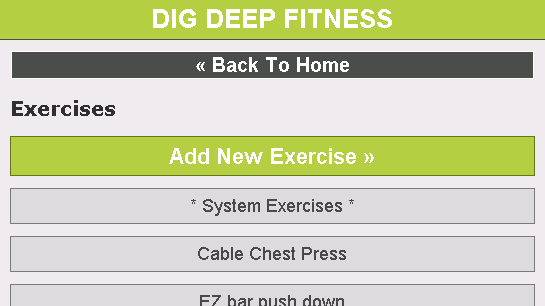
As you can see, we have maintained the session information across multiple ColdFusion CFHttp calls and gotten the secure page data.
The API for ColdFusion component is fairly simple and can handle the most common CFHttp use-cases (I didn't bother building them all in because I simply don't use them all). Whenever you want to create a new request, you use the NewRequest() method. This takes the URL of the request and prepares the object for a new request. Then, you have the Get() method and the Post() method which just uses the different actions (GET vs. POST). Get() and Post() both return the contents of the CFHttp call.
In between those method calls, you have the chance to add data to the outgoing request parameters. This can be done through AddParam() or through the easier, utility methods:
- AddCGI( Name, Value [, Encoded ] )
- AddCookie( Name, Value )
- AddFile( Name, Path [, MimeType ] )
- AddFormField( Name, Value [, Encoded ] )
- AddHeader( Name, Value )
- AddUrl( Name, Value )
- SetBody( Value )
- SetUserAgent( Value )
- SetXml( Value )
All of these methods return the THIS pointer to the CFHTTPSession.cfc instance so that these methods can be chained together for convenience.
The CFHTTPSession.cfc instance can be used on a single page or it can be cached in a persistent scope to be used across multiple page calls in the user's application. Of course, if the remote session times out, then the login will have to be created again - the object does not handle this for you.
I have not thoroughly tested this because, well frankly, I don't use CFHttp for many different use cases. However, much of the API relies on calling other parts of the API. As such, any bugs that pop up should be extremely easy to locate and iron out. Here is the code that is powers the CFHTTPSession.cfc ColdFusion component:
<cfcomponent
	output="false"
	hint="Handles a CFHTTP session by sending an receving cookies behind the scenes.">

	<!---
		Pseudo constructor. Set up data structures and
		default values.
	--->
	<cfset VARIABLES.Instance = {} />

	<!---
		These are the cookies that get returned from the
		request that enable us to keep the session across
		different CFHttp requests.
	--->
	<cfset VARIABLES.Instance.Cookies = {} />

	<!---
		The request data contains the various types of data that
		we will send with our request. These will be both for the
		CFHttpParam tags as well as the CFHttp property values.
	--->
	<cfset VARIABLES.Instance.RequestData = {} />
	<cfset VARIABLES.Instance.RequestData.Url = "" />
	<cfset VARIABLES.Instance.RequestData.UserAgent = "Mozilla/5.0 (Windows; U; Windows NT 5.1; en-GB; rv:1.8.1.6) Gecko/20070725 Firefox/2.0.0.6" />
	<cfset VARIABLES.Instance.RequestData.Params = [] />


	<cffunction
		name="Init"
		access="public"
		returntype="any"
		output="false"
		hint="Returns an initialized component.">

		<!--- Define arguments. --->
		<cfargument
			name="UserAgent"
			type="string"
			required="false"
			hint="The user agent that will be used on the subseqent page requests."
			/>

		<!--- Check to see if we have a user agent. --->
		<cfif StructKeyExists( ARGUMENTS, "UserAgent" )>
			<cfset THIS.SetUserAgent( ARGUMENTS.UserAgent ) />
		</cfif>

		<!--- Return This reference. --->
		<cfreturn THIS />
	</cffunction>


	<cffunction
		name="AddCGI"
		access="public"
		returntype="any"
		output="false"
		hint="Adds a CGI value. Returns THIS scope for method chaining.">

		<!--- Define arguments. --->
		<cfargument
			name="Name"
			type="string"
			required="true"
			hint="The name of the CGI value."
			/>

		<cfargument
			name="Value"
			type="string"
			required="true"
			hint="The CGI value."
			/>

		<cfargument
			name="Encoded"
			type="string"
			required="false"
			default="yes"
			hint="Determins whether or not to encode the CGI value."
			/>

		<!--- Set parameter and return This reference. --->
		<cfreturn THIS.AddParam(
			Type = "CGI",
			Name = ARGUMENTS.Name,
			Value = ARGUMENTS.Value,
			Encoded = ARGUMENTS.Encoded
			) />
	</cffunction>


	<cffunction
		name="AddCookie"
		access="public"
		returntype="any"
		output="false"
		hint="Adds a cookie value. Returns THIS scope for method chaining.">

		<!--- Define arguments. --->
		<cfargument
			name="Name"
			type="string"
			required="true"
			hint="The name of the CGI value."
			/>

		<cfargument
			name="Value"
			type="string"
			required="true"
			hint="The CGI value."
			/>

		<!--- Set parameter and return This reference. --->
		<cfreturn THIS.AddParam(
			Type = "Cookie",
			Name = ARGUMENTS.Name,
			Value = ARGUMENTS.Value
			) />
	</cffunction>


	<cffunction
		name="AddFile"
		access="public"
		returntype="any"
		output="false"
		hint="Adds a file value. Returns THIS scope for method chaining.">

		<!--- Define arguments. --->
		<cfargument
			name="Name"
			type="string"
			required="true"
			hint="The name of the form field for the posted file."
			/>

		<cfargument
			name="Path"
			type="string"
			required="true"
			hint="The expanded path to the file."
			/>

		<cfargument
			name="MimeType"
			type="string"
			required="false"
			default="application/octet-stream"
			hint="The mime type of the posted file. Defaults to *unknown* mime type."
			/>

		<!--- Set parameter and return This reference. --->
		<cfreturn THIS.AddParam(
			Type = "Cookie",
			Name = ARGUMENTS.Name,
			Value = ARGUMENTS.Value
			) />
	</cffunction>


	<cffunction
		name="AddFormField"
		access="public"
		returntype="any"
		output="false"
		hint="Adds a form value. Returns THIS scope for method chaining.">

		<!--- Define arguments. --->
		<cfargument
			name="Name"
			type="string"
			required="true"
			hint="The name of the form field."
			/>

		<cfargument
			name="Value"
			type="string"
			required="true"
			hint="The form field value."
			/>

		<cfargument
			name="Encoded"
			type="string"
			required="false"
			default="yes"
			hint="Determins whether or not to encode the form value."
			/>

		<!--- Set parameter and return This reference. --->
		<cfreturn THIS.AddParam(
			Type = "FormField",
			Name = ARGUMENTS.Name,
			Value = ARGUMENTS.Value,
			Encoded = ARGUMENTS.Encoded
			) />
	</cffunction>


	<cffunction
		name="AddHeader"
		access="public"
		returntype="any"
		output="false"
		hint="Adds a header value. Returns THIS scope for method chaining.">

		<!--- Define arguments. --->
		<cfargument
			name="Name"
			type="string"
			required="true"
			hint="The name of the header value."
			/>

		<cfargument
			name="Value"
			type="string"
			required="true"
			hint="The header value."
			/>

		<!--- Set parameter and return This reference. --->
		<cfreturn THIS.AddParam(
			Type = "Header",
			Name = ARGUMENTS.Name,
			Value = ARGUMENTS.Value
			) />
	</cffunction>


	<cffunction
		name="AddParam"
		access="public"
		returntype="any"
		output="false"
		hint="Adds a CFHttpParam data point. Returns THIS scope for method chaining.">

		<!--- Define arguments. --->
		<cfargument
			name="Type"
			type="string"
			required="true"
			hint="The type of data point."
			/>

		<cfargument
			name="Name"
			type="string"
			required="true"
			hint="The name of the data point."
			/>

		<cfargument
			name="Value"
			type="any"
			required="true"
			hint="The value of the data point."
			/>

		<cfargument
			name="File"
			type="string"
			required="false"
			default=""
			hint="The expanded path to be used if the data piont is a file."
			/>

		<cfargument
			name="MimeType"
			type="string"
			required="false"
			default=""
			hint="The mime type of the file being passed (if file is being passed)."
			/>

		<cfargument
			name="Encoded"
			type="string"
			required="false"
			default="yes"
			hint="The determines whether or not to encode Form Field and CGI values."
			/>

		<!--- Define the local scope. --->
		<cfset var LOCAL = {} />

		<!---
			Check to see which kind of data point we are dealing
			with so that we can see how to create the param.
		--->
		<cfswitch expression="#ARGUMENTS.Type#">

			<cfcase value="Body">

				<!--- Create the param. --->
				<cfset LOCAL.Param = {
					Type = ARGUMENTS.Type,
					Value = ARGUMENTS.Value
					} />

			</cfcase>

			<cfcase value="CGI">

				<!--- Create the param. --->
				<cfset LOCAL.Param = {
					Type = ARGUMENTS.Type,
					Name = ARGUMENTS.Name,
					Value = ARGUMENTS.Value,
					Encoded = ARGUMENTS.Encoded
					} />

			</cfcase>

			<cfcase value="Cookie">

				<!--- Create the param. --->
				<cfset LOCAL.Param = {
					Type = ARGUMENTS.Type,
					Name = ARGUMENTS.Name,
					Value = ARGUMENTS.Value
					} />

			</cfcase>

			<cfcase value="File">

				<!--- Create the param. --->
				<cfset LOCAL.Param = {
					Type = ARGUMENTS.Type,
					Name = ARGUMENTS.Name,
					File = ARGUMENTS.File,
					MimeType = ARGUMENTS.MimeType
					} />

			</cfcase>

			<cfcase value="FormField">

				<!--- Create the param. --->
				<cfset LOCAL.Param = {
					Type = ARGUMENTS.Type,
					Name = ARGUMENTS.Name,
					Value = ARGUMENTS.Value,
					Encoded = ARGUMENTS.Encoded
					} />

			</cfcase>

			<cfcase value="Header">

				<!--- Create the param. --->
				<cfset LOCAL.Param = {
					Type = ARGUMENTS.Type,
					Name = ARGUMENTS.Name,
					Value = ARGUMENTS.Value
					} />

			</cfcase>

			<cfcase value="Url">

				<!--- Create the param. --->
				<cfset LOCAL.Param = {
					Type = ARGUMENTS.Type,
					Name = ARGUMENTS.Name,
					Value = ARGUMENTS.Value
					} />

			</cfcase>

			<cfcase value="Xml">

				<!--- Create the param. --->
				<cfset LOCAL.Param = {
					Type = ARGUMENTS.Type,
					Value = ARGUMENTS.Value
					} />

			</cfcase>

		</cfswitch>


		<!--- Add the parameter for the next request. --->
		<cfset ArrayAppend(
			VARIABLES.Instance.RequestData.Params,
			LOCAL.Param
			) />

		<!--- Return This reference. --->
		<cfreturn THIS />
	</cffunction>


	<cffunction
		name="AddUrl"
		access="public"
		returntype="any"
		output="false"
		hint="Adds a url value. Returns THIS scope for method chaining.">

		<!--- Define arguments. --->
		<cfargument
			name="Name"
			type="string"
			required="true"
			hint="The name of the header value."
			/>

		<cfargument
			name="Value"
			type="string"
			required="true"
			hint="The header value."
			/>

		<!--- Set parameter and return This reference. --->
		<cfreturn THIS.AddParam(
			Type = "Url",
			Name = ARGUMENTS.Name,
			Value = ARGUMENTS.Value
			) />
	</cffunction>


	<cffunction
		name="Get"
		access="public"
		returntype="struct"
		output="false"
		hint="Uses the GET method to place the next request. Returns the CFHttp response.">

		<!--- Define arguments. --->
		<cfargument
			name="GetAsBinary"
			type="string"
			required="false"
			default="auto"
			hint="Determines how to return the file content - return as binary value."
			/>

		<!--- Return response. --->
		<cfreturn THIS.Request(
			Method = "get",
			GetAsBinary = ARGUMENTS.GetAsBinary
			) />
	</cffunction>


	<cffunction
		name="GetCookies"
		access="public"
		returntype="struct"
		output="false"
		hint="Returns the internal session cookies.">

		<cfreturn VARIABLES.Instance.Cookies />
	</cffunction>


	<cffunction
		name="NewRequest"
		access="public"
		returntype="any"
		output="false"
		hint="Sets up the object for a new request. Returns THIS scope for method chaining.">

		<!--- Define arguments. --->
		<cfargument
			name="Url"
			type="string"
			required="true"
			hint="The URL for the new request."
			/>

		<!--- Store the passed-in url. --->
		<cfset VARIABLES.Instance.RequestData.Url = ARGUMENTS.Url />

		<!--- Clear the request data. --->
		<cfset VARIABLES.Instance.RequestData.Params = [] />

		<!--- Return This reference. --->
		<cfreturn THIS />
	</cffunction>


	<cffunction
		name="Post"
		access="public"
		returntype="struct"
		output="false"
		hint="Uses the POST method to place the next request. Returns the CFHttp response.">

		<!--- Define arguments. --->
		<cfargument
			name="GetAsBinary"
			type="string"
			required="false"
			default="auto"
			hint="Determines how to return the file content - return as binary value."
			/>

		<!--- Return response. --->
		<cfreturn THIS.Request(
			Method = "post",
			GetAsBinary = ARGUMENTS.GetAsBinary
			) />
	</cffunction>


	<cffunction
		name="Request"
		access="public"
		returntype="struct"
		output="false"
		hint="Performs the CFHttp request and returns the response.">

		<!--- Define arguments. --->
		<cfargument
			name="Method"
			type="string"
			required="false"
			default="get"
			hint="The type of request to make."
			/>

		<cfargument
			name="GetAsBinary"
			type="string"
			required="false"
			default="auto"
			hint="Determines how to return body."
			/>

		<!--- Define the local scope. --->
		<cfset var LOCAL = {} />

		<!---
			Make request. When the request comes back, we don't
			want to follow any redirects. We want this to be
			done manually.
		--->
		<cfhttp
			url="#VARIABLES.Instance.RequestData.Url#"
			method="#ARGUMENTS.Method#"
			useragent="#VARIABLES.Instance.RequestData.UserAgent#"
			getasbinary="#ARGUMENTS.GetAsBinary#"
			redirect="no"
			result="LOCAL.Get">

			<!---
				In order to maintain the user's session, we are
				going to resend any cookies that we have stored
				internally.
			--->
			<cfloop
				item="LOCAL.Key"
				collection="#VARIABLES.Instance.Cookies#">

				<cfhttpparam
					type="cookie"
					name="#LOCAL.Key#"
					value="#VARIABLES.Instance.Cookies[ LOCAL.Key ].Value#"
					/>

			</cfloop>


			<!---
				At this point, we have done everything that we
				need to in order to maintain the user's session
				across CFHttp requests. Now we can go ahead and
				pass along any addional data that has been specified.
			--->


			<!--- Loop over params. --->
			<cfloop
				index="LOCAL.Param"
				array="#VARIABLES.Instance.RequestData.Params#">

				<!---
					Pass the existing param object in as our
					attributes collection.
				--->
				<cfhttpparam
					attributecollection="#LOCAL.Param#"
					/>

			</cfloop>

		</cfhttp>


		<!---
			Store the response cookies into our internal cookie
			storage struct.
		--->
		<cfset StoreResponseCookies( LOCAL.Get ) />


		<!---
			Check to see if there was some sort of redirect
			returned with the repsonse. If there was, we want
			to redirect with the proper value.
		--->
		<cfif StructKeyExists( LOCAL.Get.ResponseHeader, "Location" )>

			<!---
				There was a response, so now we want to do a
				recursive call to return the next page. When
				we do this, make sure we have the proper URL
				going out.
			--->
			<cfif REFindNoCase(
				"^http",
				LOCAL.Get.ResponseHeader.Location
				)>

				<!--- Proper url. --->
				<cfreturn THIS
					.NewRequest( LOCAL.Get.ResponseHeader.Location )
					.Get()
					/>

			<cfelse>

				<!---
					Non-root url. We need to append the current
					redirect url to our last URL for relative
					path traversal.
				--->
				<cfreturn THIS
					.NewRequest(
						GetDirectoryFromPath( VARIABLES.Instance.RequestData.Url ) &
						LOCAL.Get.ResponseHeader.Location
					)
					.Get()
					/>

			</cfif>

		<cfelse>

			<!---
				No redirect, so just return the current
				request response object.
			--->
			<cfreturn LOCAL.Get />

		</cfif>
	</cffunction>


	<cffunction
		name="SetBody"
		access="public"
		returntype="any"
		output="false"
		hint="Sets the body data of next request. Returns THIS scope for method chaining.">

		<!--- Define arguments. --->
		<cfargument
			name="Value"
			type="any"
			required="false"
			hint="The data body."
			/>

		<!--- Set parameter and return This reference. --->
		<cfreturn THIS.AddParam(
			Type = "Body",
			Name = "",
			Value = ARGUMENTS.Value
			) />
	</cffunction>


	<cffunction
		name="SetUserAgent"
		access="public"
		returntype="any"
		output="false"
		hint="Sets the user agent for next request. Returns THIS scope for method chaining.">

		<!--- Define arguments. --->
		<cfargument
			name="Value"
			type="string"
			required="false"
			hint="The user agent that will be used on the subseqent page requests."
			/>

		<!--- Store value. --->
		<cfset VARIABLES.Instance.RequestData.UserAgent = ARGUMENTS.UserAgent />

		<!--- Return This reference. --->
		<cfreturn THIS />
	</cffunction>


	<cffunction
		name="SetXml"
		access="public"
		returntype="any"
		output="false"
		hint="Sets the XML body data of next request. Returns THIS scope for method chaining.">

		<!--- Define arguments. --->
		<cfargument
			name="Value"
			type="any"
			required="false"
			hint="The data body."
			/>

		<!--- Set parameter and return This reference. --->
		<cfreturn THIS.AddParam(
			Type = "Xml",
			Name = "",
			Value = ARGUMENTS.Value
			) />
	</cffunction>


	<cffunction
		name="StoreResponseCookies"
		access="public"
		returntype="void"
		output="false"
		hint="This parses the response of a CFHttp call and puts the cookies into a struct.">

		<!--- Define arguments. --->
		<cfargument
			name="Response"
			type="struct"
			required="true"
			hint="The response of a CFHttp call."
			/>

		<!--- Define the local scope. --->
		<cfset var LOCAL = StructNew() />

		<!---
			Create the default struct in which we will hold
			the response cookies. This struct will contain structs
			and will be keyed on the name of the cookie to be set.
		--->
		<cfset LOCAL.Cookies = StructNew() />

		<!---
			Get a reference to the cookies that werew returned
			from the page request. This will give us an numericly
			indexed struct of cookie strings (which we will have
			to parse out for values). BUT, check to make sure
			that cookies were even sent in the response. If they
			were not, then there is not work to be done.
		--->
		<cfif NOT StructKeyExists(
			ARGUMENTS.Response.ResponseHeader,
			"Set-Cookie"
			)>

			<!--- No cookies were send back so just return. --->
			<cfreturn />

		</cfif>


		<!---
			ASSERT: We know that cookie were returned in the page
			response and that they are available at the key,
			"Set-Cookie" of the reponse header.
		--->


		<!---
			The cookies might be coming back as a struct or they
			might be coming back as a string. If there is only
			ONE cookie being retunred, then it comes back as a
			string. If that is the case, then re-store it as a
			struct.
		--->
		<cfif IsSimpleValue( ARGUMENTS.Response.ResponseHeader[ "Set-Cookie" ] )>

			<cfset LOCAL.ReturnedCookies = {} />
			<cfset LOCAL.ReturnedCookies[ 1 ] = ARGUMENTS.Response.ResponseHeader[ "Set-Cookie" ] />

		<cfelse>

			<!--- Get a reference to the cookies struct. --->
			<cfset LOCAL.ReturnedCookies = ARGUMENTS.Response.ResponseHeader[ "Set-Cookie" ] />

		</cfif>


		<!---
			At this point, we know that no matter how the
			cookies came back, we have the cookies in a
			structure of cookie values.
		--->
		<cfloop
			item="LOCAL.CookieIndex"
			collection="#LOCAL.ReturnedCookies#">

			<!---
				As we loop through the cookie struct, get
				the cookie string we want to parse.
			--->
			<cfset LOCAL.CookieString = LOCAL.ReturnedCookies[ LOCAL.CookieIndex ] />


			<!---
				For each of these cookie strings, we are going
				to need to parse out the values. We can treate
				the cookie string as a semi-colon delimited list.
			--->
			<cfloop
				index="LOCAL.Index"
				from="1"
				to="#ListLen( LOCAL.CookieString, ';' )#"
				step="1">

				<!--- Get the name-value pair. --->
				<cfset LOCAL.Pair = ListGetAt(
					LOCAL.CookieString,
					LOCAL.Index,
					";"
					) />

				<!---
					Get the name as the first part of the pair
					sepparated by the equals sign.
				--->
				<cfset LOCAL.Name = ListFirst( LOCAL.Pair, "=" ) />

				<!---
					Check to see if we have a value part. Not all
					cookies are going to send values of length,
					which can throw off ColdFusion.
				--->
				<cfif (ListLen( LOCAL.Pair, "=" ) GT 1)>

					<!--- Grab the rest of the list. --->
					<cfset LOCAL.Value = ListRest( LOCAL.Pair, "=" ) />

				<cfelse>

					<!---
						Since ColdFusion did not find more than
						one value in the list, just get the empty
						string as the value.
					--->
					<cfset LOCAL.Value = "" />

				</cfif>


				<!---
					Now that we have the name-value data values,
					we have to store them in the struct. If we
					are looking at the first part of the cookie
					string, this is going to be the name of the
					cookie and it's struct index.
				--->
				<cfif (LOCAL.Index EQ 1)>

					<!---
						Create a new struct with this cookie's name
						as the key in the return cookie struct.
					--->
					<cfset LOCAL.Cookies[ LOCAL.Name ] = StructNew() />

					<!---
						Now that we have the struct in place, lets
						get a reference to it so that we can refer
						to it in subseqent loops.
					--->
					<cfset LOCAL.Cookie = LOCAL.Cookies[ LOCAL.Name ] />


					<!--- Store the value of this cookie. --->
					<cfset LOCAL.Cookie.Value = LOCAL.Value />


					<!---
						Now, this cookie might have more than just
						the first name-value pair. Let's create an
						additional attributes struct to hold those
						values.
					--->
					<cfset LOCAL.Cookie.Attributes = StructNew() />

				<cfelse>

					<!---
						For all subseqent calls, just store the
						name-value pair into the established
						cookie's attributes strcut.
					--->
					<cfset LOCAL.Cookie.Attributes[ LOCAL.Name ] = LOCAL.Value />

				</cfif>

			</cfloop>


		</cfloop>


		<!---
			Now that we have all the response cookies in a
			struct, let's append those cookies to our internal
			response cookies.
		--->
		<cfset StructAppend(
			VARIABLES.Instance.Cookies,
			LOCAL.Cookies
			) />

		<!--- Return out. --->
		<cfreturn />
	</cffunction>

</cfcomponent>
I am looking forward to possibly putting this to the test with a ColdFusion / SalesForce.com integration, but really, this should work with any kind of cookie-based session application.
Want to use code from this post? Check out the license.

Reader Comments
dude, badass! I can see great potential for this kind of thing in programmatic, automated testing, too. Particularly "smoke test" kind of tests where you just want your tests to run through the site and make sure you don't get any 400/500 errors.
You should riaforge this!
Hey Ben
This is cool - is there a specific reason for using Firefox as the user agent?
Dom
Does this cfc handle cookies based on domain? I have a login that goes through several redirects between different servers, and through all the redirects, I only need to send the cookies based on the current domain. I have written something like this, but just a recursive function. It is not as clean as yours. Also does this handle the SSL certificates if I import them in the keystore?
Thanks, great post and source. This gives me a great example of coding, cause I´m still learning. Is there a special reason why to use Firefox as client?
@DrDom,
I use FireFox cause when I make a web call, I like to announce myself as the most awesome browser in town :)
@Matthew,
I never considered changing domains. I guess, this would just keep accumulating cookies and then send them across no matter what the next domain is. Since it manually follows the Location redirects sent back by CFLocation type tags, I think it will keep sending cookies.
Do you think I should make the cookies domain based? I could keep all the information keyed in a structure that is domain specific.
@Ray,
When I get some time, I will put it up.
No you dont have to worry about domain cookies. For my situation i just needed to hold onto the last set of cookies for that last redirect that was made.
I just dont want to send unecessary cookies. Once all the redirects happened, i just need the cookies from that final redirect.
Good job ben.
-Matthew
@Matthew,
Sounds good. If you see anywhere that this can be improved, let me know.
I was trying to write something like this the other day... couldn't figure it out and gave up. But THIS IS TOO COOL. Thanks for the lesson. Can't wait to try it out.
@Alan,
Glad you are excited about this. Let me know if you see any ways that it can be improved.
Coldfusion Server complained about the invalid token '{' in CFHTTPSession.cfc. Is it because we are running CFMX 6.1?
@Joshua,
Yeah, that's a version issue. This is ColdFusion 8 compatible code. The {} notation is an implicit struct. YOu can try to replace things like:
<cfset var LOCAL = {} />
... with:
<cfset var LOCAL = StructNew() />
There might be some other areas that are not compatible as well, but I believe that all of this should be able to be converted in ColdFusion MX 6 compatible.
Unfortunately, I don't have access to an MX6 machine and cannot test any of the code.
Okay. What about []? Put in ArrayNew(1)?
After I did just that, I am now looking at this piece of code where attribute, "array" is not supported.
<cfloop index="LOCAL.Param" array="#VARIABLES.Instance.RequestData.Params#">
@Joshua,
<cfloop index="LOCAL.Param" array="#VARIABLES.Instance.RequestData.Params#">
Becomes:
<cfloop
index="LOCAL.ParamIndex"
from="1"
to="#ArrayLen( VARIABLES.Instance.RequestData.Params )#"
step="1">
<!--- Get short hand to next param. --->
<cfset LOCAL.Param = VARIABLES.Instance.RequestData.Params[ LOCAL.ParamIndex] />
@Ben
I am now looking at the error where cfhttpparam's attribute, "attributecollection" is not supported.
Note: It has been few years since I last worked with ColdFusion. Much appreciated for your help!
@Joshua,
Oooh :( That's a bit of a tougher one! You have to take a little bit more code here to actually get that to work. Instead of just passing in the attribute collection, you are gonna have to define the individual CFHttpParam tags.
For example:
<cfcase value="Header">
<cfhttpparam
type="header"
name="#LOCAL.Param.Name#"
value="#LOCAL.Param.Value#"
/>
</cfcase>
<cfcase value="CGI">
<cfhttpparam
type="cgi"
name="#LOCAL.Param.Name#"
value="#LOCAL.Param.Value#"
encode="#LOCAL.Param.Encode#"
/>
</cfcase>
Basically, you have to enumerate each CFCase tag rather than just using the one tag.
@Ben
After putting in a bunch of code replacing a single line of attribute collection. I no longer get any compile error from CFHTTPSession.cfc.
I am now figuring out why I would get different JSESSIONID on every request against java/jsp off a tomcat. Am I supposed to see same JSESSION on every request?
Thanks.
@Joshua,
I don't know too much about jsessionID. I think you should keep it from page to page. Hmmm :( That's awesome that you got it to compile, though. Very well done.
@Joshua,
I have another person who is having trouble with maintaining session across pages. I am gonna try to debug that at lunch; I might find some good stuff. I will let you know.
Very good article.
When you call a cfhttp it will always open up a new request, unless you store the cookie info (jsession) in a session, or some kind of persistant state.
When i do these types of things with Cfhttp, i hold on to the object in a session so the cookies persist.
Hope that makes sense.
-Matthew
@Matthew,
The CFHTTPSession.cfc object should be passing back any cookies that it receives. It doesn't care what type of cookie they are - jsessionID, CFID, CFTOKEN, etc.
There must be something that is breaking.
I tested another site off different tomcat and noticed that it did return JSESSIONID cookie on the first request and did _not_ on the second request. Am assuming that it means it is carrying a session.
One thing I noticed is the difference in value for JSESSIONID between the first site (that fails) and the second site (that works). The first site returns something like "JSESSIONID=3609E7C2868A6A9D5136DBF8A61F592F.jvm1" while the second site would return about the same but without ".jvm1". I have not looked closely at the code or debugged yet but I wonder off head if the period (.) upsets CFHTTPSession?
@Joshua,
The (.) shouldn't do anything to upset the functionality, at least not that I can think of.
Just FYI, SalesForce.com has an extremely exhaustive API available, which doesn't require this sort of screen scraping. They offer it in various flavors, including WSDL, which should be extremely easy to consume from ColdFusion.
Screen scraping their site is against their terms of service, and if they found out it was happening, it could result in your client being charged back-fees as if they had purchased the API since the time you started screen scraping, or even worse losing their SalesForce account (which for most people I know who use SalesForce would essentially halt their business). Probably would depend on how much traffic you were running through there.
We had investigated doing this at my last job (which was a heavy SalesForce.com user), and decided the risk to the business was too much.
Not to belittle your component, it's still very cool, just warning you of the landscape; SalesForce are some pretty aggressive folks.
@Eric,
I appreciate the heads up. However, rest assured that I have talked to people from SalesForce.org and this is actually what they recommended that I do.
Actually, now that I look at what I said in the post, I misspoke. I was going to be doing a SalesForce.org integration, but the problem was not so much on their end as it was with another vendor. I need to login into this other vendor, run contact information and registration reports and then upload those to SalesForce.org using their API.
Sorry about the incorrect description of my problem :) I was more excited about the CFHttpSession.cfc and probably didn't proof read very well. I did run this by people as both SalesForce.org and with this third-party vendor and it was agreed that this screen scraping method was the best way to get the communication done.
Thanks for pointing out the error in my description.
BTW - I got the:
invalid token '{' in CFHTTPSession.cfc.
with CF 7.1 as well... Tried it on sever different servers. All the same. I will try the work-around discussed above to see if I can get it working tomorrow.
@Al,
The code is built for CF8. To see how to convert it into CF7 compatible code, check the comments above. I walked someone else through the process.
Thanks... I did spend about an hour with this thread last night trying to get my arms around it... I'm sure the problem is me... But I just couldn't get there... Too deep..
BUT - I do want to say that spending the time going through your code allowed me to break through the metal barrier I was having around how to maintain session state with CFHTTP. I did, in the end, solve my problem. Starting at your code helped me understand how to tease the cookie information out of the 'Set-Cookie' portion of the response-header. I had previously only ever used the FileContent portion, so this was very instructional. Once I saw how you were teasing the Set-Cookie info out in your CFC, I was able to reproduce that in my own code without the use of the CFC (which is really the understanding I lack)....
So, for anyone else who needs a solution to maintain session state between CFHTTP calls, but is not up to the task of using the CFC, there are a couple other ways around this... In the end, I am storing the cookie info in the database so I can pull it across different CF pages with different CFHTTP calls....
One other little trick I came across. I was getting "Cookies not enabled on your browser" for a while until I realized I needed to visit the site with a GET (rather than a POST) first, just for the purpose of seeing the cookie structure. Once you have the cookies, you can echo them back to the site on subsequent visits and all will be good.
Thanks again.. Very very helpful page here... There just isn't too much on this topic around the Internet that I could find...
Cheers....
@Al,
Glad that I could help out in some way, even if it was just for inspiration. Sounds like you have things moving along very nicely now.
I am trying to use your cfc to do a https login then switch to another page to do some scraping on the Pitney Bowes site in order to grab delivery information about our shipments. However it appears that the cfc is not functioning correctly for some reason.
I just get "Connection Failure" with nothing returned. I have debugging turned on in CF and see the page trying to call the cfc in its correct location, but the execution times are long, like 2500ms+
Does this cfc even support HTTPS ?
If so, any ideas on what the Connection Failure is being caused by?
I'm running CF8.
Oh, I have tried using the cfhttp tag but can't seem to get that to work either...
@Steve,
Hmm, I am not sure if I have tried HTTPS explicitly. It should work. I think it uses all the same cookies and stuff. If you cannot get straight up CFHTTP to work, then CFHttpSession definitely won't work.
Connection failure might have to do with the User Agent that is being used. The server might deny a given user agent... maybe? I am guessing. If you can get this connection failure on a public page, I can fool around with it.
I can log in with firefox 2.0.0.8 which is close to the 2.0.0.6 that you are using in the cfc. I have gotten your cfc to work on another site to log me in without https so I know I am using and coding it correctly.
I just can't get it to work on the pb.com site. Perhaps they are blocking login requests which do not originate from their website? If so, then I'm out of luck. I called their customer service yesterday and a guy said he would check and get back to me today, time will tell if they will give me any type of answer LOL
Is there any way to spoof a refering url via your cfc or cfhttp ?
@Steve,
I just looked at the code and I am a bit shocked that I dont' already have referer spoofing in there! Bananas! I will try to add that today.
Guys,
Ive had to add some additional headers to get connections to work over http(s) on certain domains.
I was receiving a connection failure as well.
Look at this and see if it helps.
http://www.talkingtree.com/blog/index.cfm/2004/7/28/20040729
I tried
<cfhttpparam type="Header" name="Accept-Encoding" value="deflate;q=0">
<cfhttpparam type="Header" name="TE" value="deflate;q=0">
and
<cfhttpparam type="Header" name="Accept-Encoding" value="*">
<cfhttpparam type="Header" name="TE" value="deflate;q=0">
in the cfhttp tag but they didn't make a difference. I also tried
.AddHeader( "Accept-Encoding", "*" )
.AddHeader( "TE", "deflate;q=0" )
in the cfc and no change. I'm really starting to wonder if they are denying this type of a login attempt as it is not coming from a page on their server.
@Steve,
I have update the CFHttpSession.cfc component to include automatic referral spoofing with possible manual overrides:
www.bennadel.com/index.cfm?dax=blog:1215.view
I have tested logging into PayPal.com and can properly log into HTTPS pages. Take a look and see if that helps.
I need to specify redirect="false" for the site I'm attempting to login to. I noticed that the default in the cfc is set to "no." Regardless, the header still returns a status-code of 200 rather than 302. Any clues for the utterly clueless? Thanks!
@Gernot,
The CFHttp grabs are set to ignore redirects... but that is because the redirect is then handled afterwards, programmatically. I am curious as to why you need to stop the redirect?
I'm submitting data collected from a pdf (livecycle) form to Coghead via their REST API . Because the login form redirects into the coghead UI, I need to stop the redirect to continue making requests via the api. I'm not sure why this is necessary but unless I specify redirect="false" as a cfhttp attribute, it appears that I lose my authentication token within the first call.
Since I'm only making a few requests to submit the data and I'm only receiving one cookie, I've found it to work to simply store the value in a variable then pass it back in each request via a named cfhttpparam tag. This is also interesting because I need to send it as a header rather than a cookie.
I'm thinking that I'm past most of these quirks and hope to be successfully creating records by the end of the afternoon (it's a massive form being submitted).
Thank you so much, Ben, for all of your examples esp. maintaining cfhttp sessions. It's a very timely resource that has taught me alot.
@Gernot,
Interesting problem. I am not sure how to advise on it. But, it looks like you are on the right track. Good luck.
If anyone's still wondering about the JSessionID with a period (.) in it --
I ran into a similar problem involving a hyphen (-) in a JSessionID. CF was urlencoding the hyphen to %2D, even if i specify encoded="yes". Same thing happens with the period going to %2E. I think the server I was trying to get to was expecting the hyphen to be unencoded. CF8 decodes the hyphen properly, though if I recall correctly, CF7 doesn't (unfortunately, that server recently died, so I can't easily check). Best solution I've found is to send the header manually, using Java's URLEncoder:
<cfset ue = CreateObject('java', 'java.net.URLEncoder')>
...
<cfhttpparam type="header" encoded="yes" name="Cookie"
value="#ue.encode(name)#=#ue.encode(value)#">
Not really sure why it seems CF's URLEncodedFormat doesn't use Java's URLEncoder, but oh well...
Excellent resource. This has probably saved me a few hours of searching. Thank you very much!
Is it possible to grab a third party's application session (non CF) and use that throughout the user's session?
For example, I managed to have it work with Moodle at initial login but after that Moodle knows that the sessions were not created yet so when a user clicks on say, their profile page, it forces them to login again.
Basically, we're building a SSO application.
How can I do this?
thanks
LN
Not that my comment will explain what causes the issue mentioned above. Just a comment that I am using CAS for SSO with Moodle and it works out nicely and all the more when you have multiple apps of different languages (php, dot net, coldfusion, etc) leveraging the same SSO.
Good Luck.
thanks Joshua.
We are a Novell shop and we are using iChain, a Novell product that has a SSO tool called Form Fill. We found out there is a but in iChain that chunks data during post/get of packets and so we get 504 timeout errors.
What is your CAS infrastruce like and how does it work with CF specifically? Any detailed examples you can share with me?
thanks.
Christopher
bctechnology@gmail.com
@Al,
this cfc doesn't work for me either because I have CF MX7. I just need to do 2 cfhttp requests. The first would set a session (page language). And the second should use the same session to obtain the response in the right language..
how did you solve your problem without this cfc?
thank you for helping!
@Joshua Shaffner,
after I did that I receive the error:
Context validation error for tag cfhttpparam.
The tag must be nested inside a cfhttp tag.
what else did you do? where did put the surrounding <cfhttp tag?
It's a fantastic and I have no troubles with it at all. :-) maintaining the session information across multiple CFHttp calls and gotten the secure page data was very useful for me. I tryed implementing it into our site www.scooble.de.
Somehow i got to your page but sorry i dont know something about programming or scripting. But one thing i can say - dude you look like Jack from Lost ;-)
CF 8 Standard Edition Issue
Hi Ben
Thanks for another excellent post. Trying to make this work on standard edition and I get this error:
"A License exception has occurred : You tried to access a restricted feature for the Standard edition: JSP
coldfusion.license.LicenseManager$LicenseIllegalAccessException: A License exception has occurred : You tried to access a restricted feature for the Standard edition: JSP"
The website I am trying to connect to might be using JSP pages I am not really sure but as far as I understand this is only an issue when the getPageContext() function is used. I can't see your cfc using this.
Any ideas on how this code can be modified to connect to JSP pages using Standard Edition.
Thank you
George
@George,
The server you are connecting to might be having licensing issues. The CFHTTPSession.cfc has no concept of target scripting languages, JSP, PHP, CF, ASP, etc. All it does it connect via HTTP calls. It's up to the target server to function properly.
Hey Ben,
Your site is quickly becoming my "go-to" place for CF answers. Great job!
I've bumped in to a similar "Connection Error" problem caused by server side compression that's been described above. My initial fix was to add the 'Accept-Encoding' parameters to each call before sending the request. This worked for some, but not all of the calls. Ask my wife, it's driven me crazy for 3 days.
The problem turned out to be redirects + server compression. It looks like HttpSession does not maintain header values from the initial request to the forwarded request. This means that the initial request goes through, but the page that you were forwarded to will still give you a "Connection Error". Damn.
My fix was to hack your original HttpSession object. I'm happy to share it with you if you'd like, but be warned: it no longer looks like the code you originally posted.
A simpler fix might be to force the Accept-Encoding value into every http call. It seems like enough people have had this problem that it would make sense to set this as a default value for every get() and post().
Thanks again for posting great insights, useful tools, and for digging in to the far reaches of ColdFusion.
@Ben,
Yeah, I've recently been hit with an accept-encoding issue when using the Campaign Monitor API (they turned on GZip). That's a good idea to put the encoding header in each request.
Just found a small bug in the CFHTTPSession component; Passing in a different UserAgent to the Init or SetUserAgent functions causes an exception.
This is caused because the SetUserAgent function has the wrong Argument name. (Value instead of UserAgent.) Easy enough to fix-- I guess nobody has used that feature up to now?
@Arthur,
Ah, awesome catch. I'll add that as a fix.
Today I came across teh same error mentioned here:
---
A License exception has occurred: You tried to access a restricted feature for the Standard edition: JSP
---
Can anybody tell me what IS the error? What restriction did I violate? This didn't happen on my CF7 but on CF9 Standard/Linux instead. :/
Ronald
@Ron,
I've seen that error happen when you try to Include() JSP pages. I think it was something like:
<cfset getPageContext().include( ...you jsp file... ) />
Of course, if you are getting this error hitting another page, it might be an error on *their* page and you just happen to see in your CFHTTP response?
@Arthur,
I finally got around to fixing this error. I updated the project page. As it turns out, the entire file-upload (file post) functionality was also completely busted - I guess no one ever tried to do that either.
hey that's awesome! we are finally upgrading from CF7 to CF9 so I will definitely get some great use out of this (instead of the ugly hacked up mess I ended up using) thanks & keep up the great work!
It worked for what I needed perfectly the first try... this is huge, you have made my week!
@Arthur, @Tom,
Thanks guys. Glad you're getting / going to get some value out of it. If you think of any upgrades, let me know.
Hi Ben
What can I say? whenever I type anything about coldfusion your site comes up, so sorry about hassling you!
I have a situation where I need to do multiple cfhttp requests in quick succession, as i'm getting feeds from lots of different urls is there a way that I can do these requests at once? I think waiting for each of these requests is slowing my page down (although it is getting cached every 20 seconds) The more feeds I add the slower the page will get and i'll end up with a huge lag time.
@Matt,
For something like that, I'd look into CFThread perhaps (if you are using CF8+).
For someone that more than frequently uses cfhttp, this, my friend, is the most bad ass-est thing I have ever seen! Words can't begin to describe how thankful I am to browse your blog...
@Jim,
Most excellent! I'm super glad you like it! I actually have an update to make to this project that I have failed to for sooo long. It has to do with the way some values get escaped in cookies. This reminds to actually do something about that :)
hi, thanks for this. really useful.
Just noticed your AddFile function is passing "Cookie" as the Type parameter when calling AddParam.
oops nevermind, i found your project page!
I am trying to put/post via api into Rally Software's apis. The GET works great - using cfhttp with username/password and url and data returns wonderfully. When attempting to POST the added security of a key is needed. So cfhttp first to authenticate and get a key and they url append the key=xxxxyyyxxx for the actual PUT/POST to create a user. Regardless what I try to main the session I get their same error "Not authorized to perform action: Invalid key" message with according to them ONLY happens if session not maintained. I have used the reading cookies and sending as cfparam. I have used this cfhttpsession.cfc and all have the same errors. They are on cloudflare-nginx server (??). If not attempting to build out of their canned java or ruby sdk the info is limited. I cant possibly be the only CF person to try connecting to this 'incredible' piece of development software in their workplace?? ;-)
I encountered a similar problem when trying to use this cfc to log into Square.com's backend to automatically download our recent sales history to import it into our database for processing.
I encountered the same thing. They are using some type of newer system to help detect and block this exact type of thing. (And hackers I would think) It seems to not work if you are not on a 'real' browser.
I gave up and just made a page for one of our employees to just upload the .csv file they manually saved from square.com's site.
If there is a way around these newfangled security methods, I sure would like to hear about it! :)
I have been using CFHTTPSession for many years (thank you Ben!). I have been trying to log into Amazon's Vendor page to download some reports for a long time. I got really fancy with getting the key and never had any luck. I dumbed down the page as much as I could and made an html file with only this:
<form action="https://vendorcentral.amazon.com/gp/flex/sign-in/" method="POST" >
<input type="hidden" name="action" value="sign-in" />
<input type="text" name="email" />
<input type="password" name="password" />
<button type="submit">Sign In</button>
</form>
I can login just fine from this html page, so I assume it is not a key issue. No matter what I do with CFHTTPSession (or CURL), I keep getting kicked back to the login page.
Any ideas?
I had to add a 'referrer' to the cfhttp request on one usage of this I implemented.
Basically, it needs the url of the page where you are faking the form submission so it thinks the request came from the proper page.
I had to add this:
So it looks like:
The 'login' was added as it is the name of the submit button and it was required on the site I was working on. May want to try adding that too.
Look at every element of the page you are emulating and make sure you have all named fields included as they may be checked by the server during the form submit validation process.
I have our ordering process automated with SEDI at Amazon, and I know how much of a pain they are to deal with.
Good Luck!
Steve
@Steve,
Thanks for the tip. I tried adding the referrer but it still didn't do the trick. I have copied all of their fields. #uniqueid# is taken from the form on the previous page. It was not needed, since the form I posted above worked in normal browser. I obviously tried with just those as well.
<cfset objResponse = objHttpSession
.NewRequest( "https://vendorcentral.amazon.com/gp/flex/sign-in/#uniqueid#" )
.AddFormField( "action", "sign-in" )
.AddFormField( "successUrl", "/gp/vendor/auth/login-redirect.html" )
.AddFormField( "successProtocol", "https" )
.AddFormField( "signInFormUrl", "/gp/vendor/sign-in" )
.AddFormField( "email", "my@username" )
.AddFormField( "password", "mypassword" )
.AddHeader( "Referer", "https://vendorcentral.amazon.com/gp/vendor/sign-in?ie=UTF8&originatingURI=%2Fgp%2Fvendor%2Fmembers%2Fhome" )
.Post()
/>