Dig Deep Fitness iPhone Fitness Application Prototype
Last weekend, I put down some initial thoughts and screen ideas for Dig Deep Fitness, my iPhone fitness application. This is basically just a way for me to combine my love of ColdFusion with my love of working out while simultaneously breaking into the mobile device world. Since last weekend, I have taken my rough ideas and fleshed them out into an XHTML and ColdFusion prototype which can be seen at www.DigDeepFitness.com.
Designing for a small, iPhone based fitness application is very different than designing a web based application even though they are both technically using the Safari web browser. I have to say that I was very thrown by this. For starters, there is extremely little screen real estate to work with. The viewport is only 320 by 480; of course, that is for portrait - for landscape that switches, which presents a little more complication (that I ended up not caring about). But, when the iPhone loads your web page, it doesn't care how wide your data is, it opens up to a viewport designed to fit a web page that is 920 pixels wide which is what it considers to be the average width of web sites.
My iPhone fitness software application is designed to only be 320 pixels wide, so to deal with this, I had to set some Meta data in the HTML head:
<!-- Scale property for iPhone. -->
<meta name="viewport" content="width = device-width"></meta>
<meta name="viewport" content="user-scalable = no"></meta>
Here, I am telling the iPhone to default to a viewport meant to accommodate web sites that are as wide as the "device-width". I am using device-width because that is what Apple suggested as a best practice, but this could also have been a numeric value. Device-width simply tells the iPhone to have no default zoom since the site will be as wide as the actual viewport.
I am also turning off the user's ability to scale the interface using the double-tab or pinch technique. Now, I know, a lot of web usability people are probably rolling over in their graves right now, but I just felt like this is an application and doesn't need to be zoomed. I don't see how you could zoom into this iPhone fitness application and still have any sort of usability. Therefore, I just turned it off so as not to have people zoom by accident.
Once I had those tags in place, I was all set to design a "web site" that was 320 pixels wide. Of course, I had to keep in mind that I was designing my fitness software for the iPhone and that that iPhone works on the painfully slow EDGE network. As such, I am writing my CSS to the page itself as well as not using any images. This is to keep the page from making any additional server requests that would slow the load time down. Now, you may think that I am crazy as I am getting rid of any ability to cache external files; however, after some testing, I definitely felt that the page load times were faster after removing the linked CSS files. Maybe that is all in my head, but I am pretty sure that linked file caching wasn't doing anything to help me.
I have also wrapped the whole page in a ColdFusion custom tag so that I could strip out all the excess white space that could slow down the page load by adding additional bandwidth requirements. Normally, I wouldn't care about such things, but I think that in order to make this fitness software usable on the iPhone and the EDGE network, I really have to take every little care to optimize the page download time.
That being said, here are a few screens that can be seen at www.DigDeepFitness.com. I am not totally happy with the colors, but I tried to keep it very clean and consistent; the bottom line is that I didn't want my lack of design skills to slow down the development process as design can always be tweaked later:

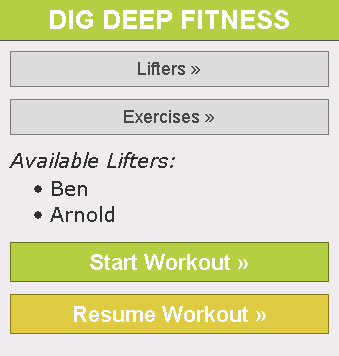
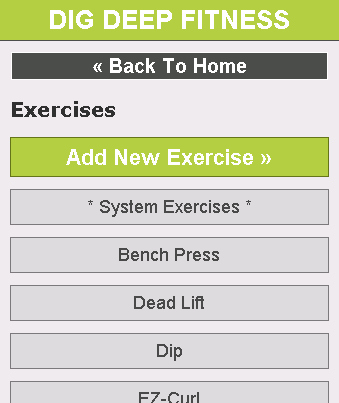
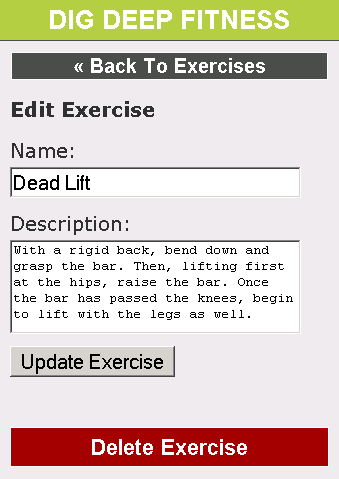
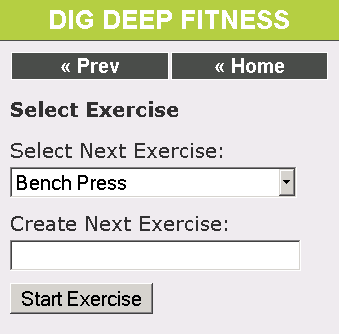
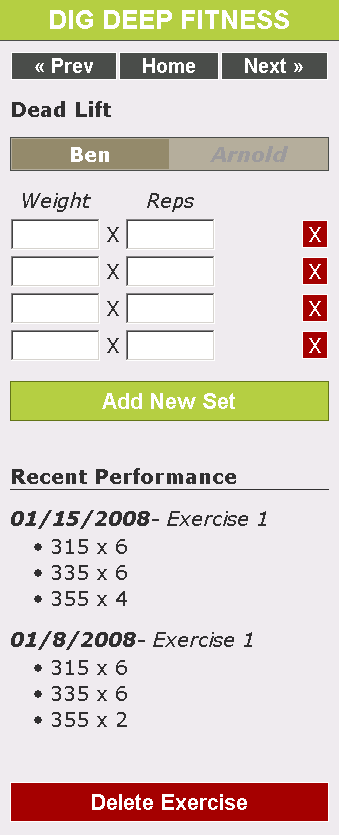
So there you have it; that's the mostly-clickable prototype for Dig Deep Fitness, my fitness software application for the iPhone. I've been viewing it on my iPhone and it is a bit slow, but I think it will be usable. The trick will be to keep the Javascript AJAX code really small so that it doesn't kill the download time. I would have loved to use jQuery, but I think the 20+K is just going to be too large for the tiny subset of features that I need.
I think adding the database and the actual ColdFusion functionality should be fairly easy to do. Hopefully I can have this up and running in the next week so that I can do some field testing (namely, me lifting some serious steel and storing the weights).
Want to use code from this post? Check out the license.

Reader Comments
Looks good, Ben.
I just finished a little proof-of-concept project that involved reformatting some small ColdFusion-powered apps for use on an iPhone/iPod Touch. One thing that caught me off-guard was that when you tapped a drop-down box like the one you have for selecting the next exercise, the iPod would zoom in slightly on the box and display the choices in the keyboard pop-up area. Fine and dandy, but after tapping the Done button to make the choice, it wouldn't zoom out again. In my case, that meant it hid the button to the left of the drop-down box for submitting the form.
Do you see the same thing with yours? It probably wouldn't affect your layout as much as the rest of the elements on that screen fall underneath the drop-down.
@Brian,
I did not notice this; but, remember that I disabled the ability for my users to zoom the browser since the app was designed to fit exactly on the screen. That might be preventing this from happening on my app.
Cool little app!
I thought of the same thing myself this morning at the gym! The only problem is that it forces you to go online to record your progress.
I wonder if it would be possible to install Air onto the iPhone or some other way of keeping track of progress on a local data store ?
Dam the picture at the end is awesome.
@David: Funny, my wife didn't think so.
"NSFW" can also mean "Not Safe For Wife" :)
Ha ha ha, Not safe for wife :)
Who is that girl, wow!
fantastic
nice ;)
umm? that chick is sooooo fat!
look at thise friggen chucnky thighs!
get a skinny(and alot younger) blonde and....... maybe one without a retarted face!!!!!!
actually yeah she is fat!
Pat, Henery you need to learn the difference between fat and muscle, I'm sure she would be mightily impressed with you two as wel!!
Any way on to the reason for the post.
Ben, love the app. Have been using it for a few months now and was wondering if there was some way of incorporating supersets into the system. At the moment I create a new excersice which incorporates both halves of the superset then alternate the weights and rep info, it's all a bit cumbersome.
Also is there any progress on being able to transfer the info into a spreadsheet/database?
look at er legss!! n arms i woulndt want to bang a chick that had arms bigger thn mine, mmhhmmhh no thankyou!
@Ian,
The idea of a super set is something that I have struggled with a long time. I've wanted to build a fitness app for so long and could never quite figure out what the good interface for super sets would be. I think I have an idea though.
What kind of export would you want? That would be fairly easy.
I'm glad you like that app. I wish I had more time to devote to it. I want to rebuild it from the ground-up!
Hi Ben,
re export from dig deep.
Anything that would allow me to view details from a chosen date to current on selected excersises and store them as a file on my mac.
Don't really need to see details on everything just the main ones - bench press, bent rows, shoulder press, squat (front and back), deadlift
Though if it makes life easier for you and gives you more time to train details on all exercises from a set date to current would be cool!
@Ian,
Sounds like a good idea. Let me work on it.
waaaaaaaaaaaaaaaaaw
thank you . Ben Nadel
looks pretty
Love the pic of Mavi Gioia :) She's beautiful.
@Justin,
Agreed - she maintains a nice feminine edge that some of the other lose along the way.
please send me alot of style of gym or body building
She is not nice!!!
Umm no thats all muscle, she could probly knock the living daylights out of both of you with those muscles:)
mmm....nice she hit
yup, she looks extremely wonderful.