EasyCaptcha() For Multi-Image CAPTCHA Creation
I was thinking of functions to add to the imageUtils.cfc ColdFusion image manipulation component, when I started to think about CAPTCHA. CAPTCHA is a cool thing, but one of the problems with it is that in order to fool bots, sometimes you have to make it unreadable even to humans. I wondered if the fact that it is a single image has anything to do with bot's and spider's ability to beat the CAPTCHA. To play around with this idea, I have created a method called EasyCaptcha(). This method takes the string you want to use in a CAPTCHA image and creates a separate image for each letter and writes it to the browsers response buffer. This way, I figured it might be very easy for humans to read, but more difficult for spiders and bots to figure out on which images it needs to perform character recognition (OCR).
In addition to the text you are going to use, EasyCaptcha() also optionally takes the font size, the canvas background color, and the text color:
<cffunction
	name="EasyCaptcha"
	access="public"
	returntype="array"
	output="true"
	hint="Outputs a CAPTCHA problem using a series of images rather than one image.">

	<!--- Define arguments. --->
	<cfargument
		name="Text"
		type="string"
		required="true"
		hint="The text that will be output in the CAPTCHA."
		/>

	<cfargument
		name="FontSize"
		type="string"
		required="false"
		default="20"
		hint="The font size to use for the CAPTCHA."
		/>

	<cfargument
		name="BackgroundColor"
		type="string"
		required="false"
		default="##FAFAFA"
		hint="The canvas color."
		/>

	<cfargument
		name="Color"
		type="string"
		required="false"
		default="##333333"
		hint="The drawing (Text) color."
		/>

	<!--- Define the local scope. --->
	<cfset var LOCAL = {} />

	<!--- Set the font properties. --->
	<cfset LOCAL.FontProperties = {
		Font = "Courier New",
		Size = ToString( ARGUMENTS.FontSize ),
		Style = "normal"
		} />


	<!---
		Create the array in which we are going to store the
		individual images. Each image will represent a single
		characer in the CAPTCHA.
	--->
	<cfset LOCAL.Images = [] />


	<!--- Loop over the characters in the given text. --->
	<cfloop
		index="LOCAL.CharacterIndex"
		from="1"
		to="#Len( ARGUMENTS.Text )#"
		step="1">

		<!--- Get character. --->
		<cfset LOCAL.Character = Mid(
			ARGUMENTS.Text,
			LOCAL.CharacterIndex,
			1
			) />

		<!--- Get character dimensions. --->
		<cfset LOCAL.Dimensions = THIS.GetTextDimensions(
			LOCAL.Character,
			LOCAL.FontProperties
			) />

		<!--- Create a new image. --->
		<cfset LOCAL.Image = ImageNew(
			"",
			(LOCAL.Dimensions.Width + 6),
			Ceiling( LOCAL.Dimensions.Height * 1.5 ),
			"rgb",
			ARGUMENTS.BackgroundColor
			) />

		<!--- Set the drawing color. --->
		<cfset ImageSetDrawingColor(
			LOCAL.Image,
			ARGUMENTS.Color
			) />

		<!--- Draw character on canvas. --->
		<cfset ImageDrawText(
			LOCAL.Image,
			LOCAL.Character,
			3,
			Ceiling( LOCAL.Dimensions.Height * 1.1 ),
			LOCAL.FontProperties
			) />

		<!--- Add the image to the return array. --->
		<cfset ArrayAppend(
			LOCAL.Images,
			LOCAL.Image
			) />

	</cfloop>


	<!---
		Create a local buffer to which to save the images. We
		are doing this so that we can strip out the white space
		between the individual images to make a cleaner output.
	--->
	<cfsavecontent variable="LOCAL.Buffer">

		<!--- Loop over images array. --->
		<cfloop
			index="LOCAL.Image"
			array="#LOCAL.Images#">


			<!--- Write character to response buffer. --->
			<cfimage
				action="writetobrowser"
				source="#LOCAL.Image#"
				format="gif"
				/>

		</cfloop>

	</cfsavecontent>

	<!--- Strip out all white space that is not in a tag. --->
	<cfset LOCAL.Buffer = Trim(
		REReplace(
			LOCAL.Buffer,
			"\s+(?=<)",
			"",
			"all"
			)
		) />

	<!--- Write the buffer out to the repsonse. --->
	<cfset WriteOutput( LOCAL.Buffer ) />


	<!--- Return image array. --->
	<cfreturn LOCAL.Images />
</cffunction>
Be careful, the EasyCaptcha() ColdFusion user defined function makes use of another UDF, GetTextDimensions() so that it can figure out how big to make the individual letter images. The images are written to the browser such that no white space is included between the individual images; I figured this would allow for the most flexibility in styling. To demonstrate, I have created a little test page that outputs EasyCaptcha() using two different styles:
<!DOCTYPE html PUBLIC "-//W3C//DTD XHTML 1.0 Transitional//EN" "http://www.w3.org/TR/xhtml1/DTD/xhtml1-transitional.dtd">
<html>
<head>
	<title>EasyCaptcha() Demo</title>

	<style type="text/css">

		p#captcha-one {}

		p#captcha-two img {
			background-color: #E0E0E0 ;
			border: 2px solid #000000 ;
			margin-right: 10px ;
			padding: 2px 2px 2px 2px ;
			}

	</style>
</head>
<body>

	<p id="captcha-one">
		<cfset EasyCaptcha(
			"MadSexy",
			18,
			"##660000",
			"##FFFFFF"
			) />
	</p>

	<p id="captcha-two">
		<cfset EasyCaptcha(
			"MadSexy",
			18,
			"##660000",
			"##FFFFFF"
			) />
	</p>

</body>
</html>
Running the above code, we get the following output:
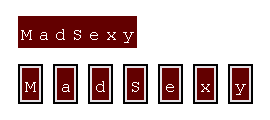
As you can see, we can have the CAPTCHA present to the user as if it was a single image or we can style it so that it looks like individual images. I am not sure if one or the other will affect the effectiveness at defeating bots. Heck, I am not sure if this will be effective at defeating bots at all, but I thought it would be a cool experiment. My hope is that this can create a CAPTCHA that is really easy for web users to understand but much more difficult for bots to decipher.
Want to use code from this post? Check out the license.

Reader Comments
While it looks cool, I don't think it's a real "CAPTCHA" per-say. There has to be some kind of background noise or retarded letter distortion that makes you guess at the word for at least 30 minutes.
Ha ha, 30 minutes :) I have seen CAPTCHA that I couldn't solve even with repeated bouts of incorrect submissions.
@Ben:
The reason CAPTCHA uses all the background noises and tilted letter is to try to prevent OCR programs from reading the images. Of course supposedly now spammers have built code that can bypass some of the more common CAPTCHA images.
Anyway, splitting the images is interesting, but I wonder if splitting the images up in the *middle* of each letter might be more effective.
Granted, a computer could still possibly stitch the image back together, but you might be able to obfuscate that enough. Besides, if it's not a widely adopted CAPTCHA implementation, the odds of a spammer righting code to circumvent it is very slim.
@Dan,
I considered the splitting up of images mid-character at first. I was actually thinking of writing the image and cutting it up in something like 10x10 pixel images and then putting a pixel space between each image. But, then I decided to just start out simple and see what people thought.
But I agree, as long as it's not a popular CAPTCHA method, the chances are someone will take time to write out the OCR algorithm, especially for us bloggers, is slim.
You underestimate the sheer power of being able to spam blogs with links to porn site, etc. This is an SEO war and bloggers are unfortunately aiding and abetting.
I read in the news once, I believe on MSNBC.com, that spammers were passing around this little porn widget. A little stripper would dance. Then she would stop and a little message would appear "If you'd like her to continue, type the phrase in the box." What was it? It was a captcha. Little did they know that people were involved in a social engineering tool of helping spammers crack captcha by building an image library.
Article:
http://www.msnbc.msn.com/id/21566341/
@Todd,
I hadn't heard about that scam! You have to admit that's rather clever. If your software can't beat the Turing test, then you just trick some humans into helping you. Could be a great plotline on The Sarah Connor Chronicles!
In all seriousness, any individual CAPTCHA technique is only going to be effective for a limited time, until spammers figure out how to circumvent it. Which requires us to continually invent new techniques. It's an arms race, and new ideas like Ben's are exactly what we need to keep the other side at bay.
Rock on, Ben!
@Todd,
That article is bananas!
@Dave,
It's not too hard to come up with something that will be a bot... the problem is that so often that ALSO beats humans :) I have definitely come up against several CAPTCHA style problems that I could not seem to get. The trick is to make something that is easy for the human brain and very hard for the computer one.
Absolutely, the trick is to make something that is easy for the human brain and very hard for the computer one. Sadly, one of the great purposes of software development and microchip development is to make a computer brain that works exactly like a human's does. There are lots of little advances that we all think are cool and useful-- such as OCR software for scanning documents, stitching pictures together to make virtual 3-D tours, or even object recognition for baggage scanners at airports-- which are in turn useful to those who want to make bots appear to be human. I'm not sure where the balance will come out, personally.
Now if only someone could require all bots to be built with Asimov's 3 Laws of Robotics...
Hahah that's a captcha? Bitmap comparison defeats it, OCR defeats it. There is nothing hard about it.
btw, I came across an interesting blog post:
http://www.codinghorror.com/blog/archives/001067.html
@Not Me,
I was hoping that it was the fact that it was multiple images that would make it hard, not the actual characters.
I've been contemplating different CAPTCHA schemes for a while as well, including one similar to yours. Nice work on the project. I think it might be tougher if a) you split the letters, b) you picked different fonts for each letter, c) fuzzed the image somewhat and d) scrambled them but with numeric cues to let a human put them in the right order. I'm working on a project to attempt all of these and test their utility.
@Chris,
Sounds like a cool project. Please post your results here (or a link to them) when you are done.