
I have added a user defined function to the imageUtils.cfc ColdFusion image manipulation component. This function, GetTextDimensions(), takes a string and a font-properties struct and determines the height and width dimensions of the rendered text in a ColdFusion image. This can be used to more precisely layout text elements of a generated ColdFusion image. In fact, this functionality is what is powering my ImageDrawTextarea() and the imageUtils.cfc DrawTextarea() functions.
<cffunction
	name="GetTextDimensions"
	access="public"
	returntype="struct"
	output="false"
	hint="Give the string and the font properties, the width and height of the text is calculated. If the font properties struct is missing any values, ColdFusion's default values will be used.">

	<!--- Define arguments. --->
	<cfargument
		name="Text"
		type="string"
		required="true"
		hint="The text whose dimensions we are going to calculate."
		/>

	<cfargument
		name="FontProperties"
		type="struct"
		required="true"
		hint="The font properties used to calculate the text dimensions."
		/>

	<!--- Define the local scope. --->
	<cfset var LOCAL = {} />

	<!---
		Create an canvas to work with. We won't actually need
		to draw on this, we just need it to get access to some
		of the default values that ColdFusion uses plus we can
		get access to some of the utility methods.
	--->
	<cfset LOCAL.Image = ImageNew( "", 1, 1, "rgb" ) />

	<!---
		From our temporary ColdFusion image, get the underlying
		Java AWT object. This will allow us access to properties
		that we will need to space and style the font.
	--->
	<cfset LOCAL.Graphics = ImageGetBufferedImage( LOCAL.Image )
		.GetGraphics()
		/>

	<!---
		Get the font that is currently set in the image. From
		this, we will be able to default the properties of our
		text attributes (any that were not set explicitly).
	--->
	<cfset LOCAL.CurrentFont = LOCAL.Graphics.GetFont() />


	<!---
		Now, we are going to check to see if the passed in
		font properties has all the properties that we need to
		properly render the new font. If it does not, then we
		are going to use the ColdFusion default values that are
		supplied with our temporary canvas.
	--->

	<!--- Check for a defined size.--->
	<cfif NOT StructKeyExists( ARGUMENTS.FontProperties, "Size" )>

		<!--- Get size from current font. --->
		<cfset ARGUMENTS.FontProperties.Size = LOCAL.CurrentFont.GetSize() />

	</cfif>


	<!--- Check for a defined font. --->
	<cfif NOT StructKeyExists( ARGUMENTS.FontProperties, "Font" )>

		<!--- Get font name from current font. --->
		<cfset ARGUMENTS.FontProperties.Font = LOCAL.CurrentFont.GetFontName() />

	</cfif>


	<!--- Check for a defined style. --->
	<cfif NOT StructKeyExists( ARGUMENTS.FontProperties, "Style" )>

		<!---
			When it comes to defaulting the style, we need to
			build not only the font attributes, but also the
			font style argument for creating our new font (for
			the Font Metrics). Because of that, we will be
			building a bit-mask for the style.

			Because the Styles are just constants, we can pull
			them out of our Current Font object.
		--->
		<cfif (
			LOCAL.CurrentFont.IsBold() AND
			LOCAL.CurrentFont.IsItalic()
			)>

			<!--- Set the style. --->
			<cfset ARGUMENTS.FontProperties.Style = "bolditalic" />

			<!--- Set the bit mask. --->
			<cfset LOCAL.FontStyleMask = BitOR(
				LOCAL.CurrentFont.BOLD,
				LOCAL.CurrentFont.ITALIC
				) />

		<cfelseif LOCAL.CurrentFont.IsBold()>

			<!--- Set the style. --->
			<cfset ARGUMENTS.FontProperties.Style = "bold" />

			<!--- Set the bit mask. --->
			<cfset LOCAL.FontStyleMask = LOCAL.CurrentFont.BOLD />

		<cfelseif LOCAL.CurrentFont.IsItalic()>

			<!--- Set the style. --->
			<cfset ARGUMENTS.FontProperties.Style = "italic" />

			<!--- Set the bit mask. --->
			<cfset LOCAL.FontStyleMask = LOCAL.CurrentFont.ITALIC />

		<cfelse>

			<!--- Set the style. --->
			<cfset ARGUMENTS.FontProperties.Style = "plain" />

			<!--- Set the bit mask. --->
			<cfset LOCAL.FontStyleMask = LOCAL.CurrentFont.PLAIN />

		</cfif>

	<cfelse>

		<!--- Set the plain font mask. --->
		<cfset LOCAL.FontStyleMask = LOCAL.CurrentFont.PLAIN />

	</cfif>


	<!---
		ASSERT: At this point, we have fully set up our font
		properties struct (filling in any gaps that the user
		missed), as well as create a style bit-mask based on
		those properties. We now have enough information to
		create a new Java Font object.
	--->


	<!---
		Now that we have our Font attributes all paramed, we
		need to create a new Font object (that will be used to
		get the Font Metrics for the passed-in text).
	--->
	<cfset LOCAL.NewFont = CreateObject(
		"java",
		"java.awt.Font"
		).Init(
			JavaCast( "string", ARGUMENTS.FontProperties.Font ),
			JavaCast( "int", LOCAL.FontStyleMask ),
			JavaCast( "int", ARGUMENTS.FontProperties.Size )
			)
		/>

	<!---
		Now that we have our new Font set up, get the
		Font Metrics for our graphic in the context of
		the new Font.
	--->
	<cfset LOCAL.FontMetrics = LOCAL.Graphics.GetFontMetrics(
		LOCAL.NewFont
		) />

	<!---
		Using the Font Metrics, get the bounds of the
		current text line with the addition of the next
		word.
	--->
	<cfset LOCAL.TextBounds = LOCAL.FontMetrics.GetStringBounds(
		JavaCast( "string", ARGUMENTS.Text ),
		LOCAL.Graphics
		) />


	<!--- Now that we have the font metrics, let's create the dimensions return value. --->
	<cfset LOCAL.Return = {
		Width = Ceiling( LOCAL.TextBounds.GetWidth() ),
		Height = Ceiling( LOCAL.TextBounds.GetHeight() )
		} />

	<!--- Return text dimensions. --->
	<cfreturn LOCAL.Return />
</cffunction>
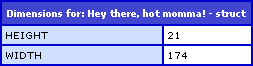
It returns a structure that has Width and Height keys. Here, you can see it in action:
<!--- Set text string. --->
<cfset strText = "Hey there, bad momma!" />

<!--- Set font properties. --->
<cfset objProperties = {
	Font = "Times New Roman",
	Size = "18"
	} />

<!--- Get text dimensions. --->
<cfset objDimensions = GetTextDimensions(
	strText,
	objProperties
	) />

<!--- Dump out dimensions. --->
<cfdump
	var="#objDimensions#"
	label="Dimensions for: #strText#"
	/>
Running the above code, we get the following CFDump output:

Reader Comments
As always, your posts are immensely helpful. Thank you for sharing your hard work.
There is a bug in the bit where it sets the LOCAL.FontStyleMask value if the user provided a Style. The FontStyleMask is always getting set to PLAIN, regardless of the Style the user passes in. Instead of setting the FontStyleMask inside the block where ' NOT StructKeyExists("Style") ', you can move the bit mask parts out into a separate block following that and base it off of the now corrected ARGUMENTS.FontProperties.Style.
@Jim,
Thank you for your debugging. I will definitely look into that.