
Google Mail Search Frustration
I've been using Google Mail and Google Hosted Mail for a long time and I have to say that I totally love it. However, there is one tiny thing that really irks me and it just came up again so I thought I would do a little venting. I often times find the mail search very frustrating. Well, maybe not "often", but certainly enough times that it sticks out in my mind as not working well. As you may or may not know, Josh Adams just accepted a Systems Engineer position in the role of ColdFusion Specialist with Adobe Systems, Inc.. I posted a blog comment about this awesome news, and since then, I have gotten several alerts that further comments have been posted. Having read these comments on his blog, I wanted to do a quick search for all the email alerts so that I could delete them all at one time.
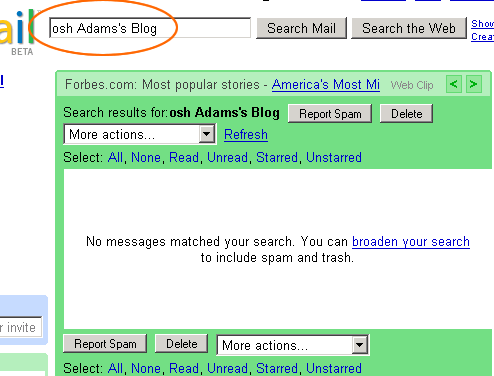
To accomplish this, I copied and pasted part of the subject line in the Google Mail search box and submitted. Here's where the frustration begin - GMail returned zero results:
| |
|
|
||
| |
 |
|
||
| |
|
|
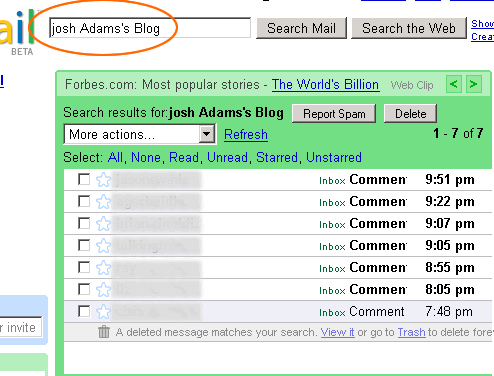
Can you see what happened? Look at the search criteria. When copying from the subject line, I accidentally forgot to copy the "J" in "Josh". The partial word and the other two words still form an exact matching phrase, and yet, no results. Now, when I go and put in the missing "J" and search again, I get my results:
| |
|
|
||
| |
 |
|
||
| |
|
|
This, to me, is extremely frustrating. How can one missing letter at the beginning of a phrase make the entire search criteria invalid?
When I showed this to Clark Valberg, he suggested that maybe Google was doing this on purpose to limit the search, making it more user friendly; he theorized that most of the time, when performing a search, the problem is not too few results, but rather too many results, most of which are irrelevant to your intended search. This is an excellent point, but I think this search would be more suited to a web search rather than an email search. Think about the gesture of email searching; when I think about the times I search my email, it's usually when I am looking for an email that is months and months old and I remember almost nothing about it. For example, maybe I remember PART of someone's email address, and that's all I can recall. That's when searching is hugely useful. However, that seems to be when Gmail is at its weakest.
Don't get me wrong, I dig GMail. I just needed to vent about this one tiny issue. Google is the king of the jungle when it comes to searching, so it just seems to out of place for any of their search functionality to fall short.

Reader Comments
Sounds like quite a flaw in the search, especially for those of us that can't spell to save our lives. I often search just on a couple of words or parts of words that i can remember in a mail that is months old.
A lot of people have recommended the gmail hosted mail, we currently run a combination of ftgate and sendmail and although ftgate is very good i think there are very few good anti-spam systems out there. But i expect that googles is superb.
I hate spam!
Well that's my two-penny-worth
@Tom,
GMail's anit-spam stuff is pretty fantastic. As of late, I have started to get more "Loan Offers" that aren't getting flagged as spam, but for the most part, its pretty fantastic.
I have to totally disagree with you on this one. First off, Google web search, and just about all other Google products have the same "bug": You can only search for whole words, not parts of words.
The reason for this is valid too. When Google is indexing stuff, it puts individual words in a hash table, which gives (Theoretically) a O(1) access time. hving such a fast access time comes at the price of a big hash table. If you were to be able to search all substrings, the size of the index database would grow exponentially.
However, I sometimes do find GMail search annoying, mainly because it's not as fine edged in terms of search options. I'd also like to see a refernce of the modifiers you can use with GMail search.
@nitro2k01,
I see what you're saying; I never thought about it from access / look up perspective before. That is totally valid.
However, when it comes to email, which is a personal collection of data, I feel that the search should be more partial. Like I said, I generally use the search when I am trying to locate something that was not files well or that I simply don't remember much about. I feel for the web, that doesn't make sense, but email searching should be much more relaxed.
One of the largest problems with all software development is a lack of usability testing. Whole-keyword-search-only behavior for an email search is not useable. It causes FALSE results whereby a user can easily think the search term does not exist, when in fact it does. This violates an essential and fundamental rule of software behavior. Google was told about this more than 2 years ago. The problem exists due to a narrow minded design mentality and lack of usability testing. A within-email search and a web search are two totally DIFFERENT types of searches and google managers do not understand the difference. I have written close to a million lines of (mostly mission critical) code in my lifetime and I know what I'm talking about here. Software should meet usability requirements and not the other way 'round.
@GL,
Good explanation. I think, regardless of the number of lines of code, usability of an application is by far, the most important factor and is why most software projects end up failing.
I agree, this is sooo frustrating! It's sometimes impossible to find old emails, just because it doesn't find partial words.
Yahoo email searches by part of word and correspondingly I easily find all my old emails. I switched to gmail because yahoo was getting slower and the nice ability of gmail to group emails in 'conversations'. I am switching back to yahoo cause I'm tired of gmail incapability of finding my old email because I have to remember the exact and complete spelling of all the words I'm searching for.