
When I was building my POIUtility.cfc, I started to dabble with parsing CSS in ColdFusion for use with Excel formatting. I love CSS; I think it's such an awesome, efficient, easy-to-read, and usable way to define the format of things. I have a few projects floating around in my head that could use some easy formatting, including updates to the POIUtility.cfc and so, I thought it was time to sit down and formalize some ColdFusion CSS parsing and modeling that could be use in a repeatable way. I came up with the CSSRule.cfc ColdFusion component. The CSSRule.cfc is meant do model a single rule in a style sheet. There are of course, no concepts of inherited properties, as that is greater than the rule itself - that is part of the rule application. I am also modelling just a sub-set of the CSS, albeit, a large sub-set that includes short hands for things like "font" and "background".
Each rule is modelled internally using the simplest rules possible. For example, internally, I don't have a "margin" property; instead, I have a margin-top, margin-right, margin-bottom, and margin-left properties. And, when you set the margin property, it, in turn, sets all four sub-properties. This felt like the easiest way to maintain the CSS data.
Before, I show you how it works internally, let's just take a look at a small example:
<!--- Create the CSS rule. --->
<cfset objCSS = CreateObject( "component", "CSSRule" ).Init() />

<!---
	Add CSS to test values to make sure that the appropriate
	properties are populating. The AddCSS() returns a reference
	to the CSS Rule so that you can chain these method calls
	for better readability. Also notice that I am using several
	short hands just as "Background" and "Font".
--->
<cfset objCSS
	.AddCSS( "background: ##000000 url( 'back.jpg' ) repeat-y ;" )
	.AddCSS( "border: 2px solid green ; " )
	.AddCSS( "border-bottom: 5px dotted ##FF0000 ;" )
	.AddCSS( "font: bold italic 11px verdana ;" )
	.AddCSS( "list-style: none ;" )
	.AddCSS( "margin: 0px ; padding: 20px 10px ;" )
	.AddCSS( "text-align: justify ; text-decoration: underline ;" )
	.AddCSS( "white-space: nowrap ; z-index: 500" )
	.AddCSS( "bottom: 5px ; top: 2px ; left: 1px ; right: 3px ;" )
	.AddCSS( "display: block ; position: relative ;" )
	.AddCSS( "white-space: nowrap ; width: 500px ;" )
	/>

<!--- Dump out CSS property map. --->
<cfdump
	var="#objCSS.GetPropertyMap()#"
	label="CSS Rule Property Map"
	/>
As you can see, there is a simple AddCSS() method which takes CSS property strings. You can add as many semi-colon-delimited properties per method call as you want, but I have broken them up here for easier viewing (and to demonstrate the chainability of the method). Once all the properties are all set, you can either get each property value individually using the GetProperty() method (not shown), or you can get the entire property map using GetPropertyMap(). Running the above code, we get the following CFDump output:
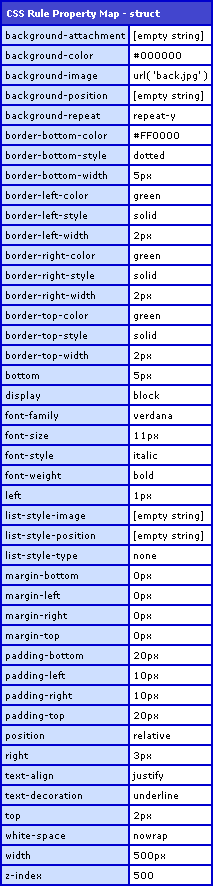
As you can see, not only were simple values like "text-align" set, CSS short hands like "background", "font", and "list-style" all parsed and were set properly into their own sub-properties.
I don't want to get into how it works so much, since I have "real" work that I need to get done, but it has some nifty stuff and uses regular expressions to validate the values for each property. I am sure there are cleaner ways that I can do some of this stuff, but this was my first pass. Here is the code for the CSSRule.css ColdFusion component:
<cfcomponent
	output="false"
	hint="Handles a single CSS rule.">

	<!--- Set up internal structure. --->
	<cfset VARIABLES.Instance = {} />

	<!--- Set up the default CSS properties for this rule. --->
	<cfset VARIABLES.Instance.CSS = {} />
	<cfset VARIABLES.Instance.CSS[ "background-attachment" ] = "" />
	<cfset VARIABLES.Instance.CSS[ "background-color" ] = "" />
	<cfset VARIABLES.Instance.CSS[ "background-image" ] = "" />
	<cfset VARIABLES.Instance.CSS[ "background-position" ] = "" />
	<cfset VARIABLES.Instance.CSS[ "background-repeat" ] = "" />
	<cfset VARIABLES.Instance.CSS[ "border-top-width" ] = "" />
	<cfset VARIABLES.Instance.CSS[ "border-top-color" ] = "" />
	<cfset VARIABLES.Instance.CSS[ "border-top-style" ] = "" />
	<cfset VARIABLES.Instance.CSS[ "border-right-width" ] = "" />
	<cfset VARIABLES.Instance.CSS[ "border-right-color" ] = "" />
	<cfset VARIABLES.Instance.CSS[ "border-right-style" ] = "" />
	<cfset VARIABLES.Instance.CSS[ "border-bottom-width" ] = "" />
	<cfset VARIABLES.Instance.CSS[ "border-bottom-color" ] = "" />
	<cfset VARIABLES.Instance.CSS[ "border-bottom-style" ] = "" />
	<cfset VARIABLES.Instance.CSS[ "border-left-width" ] = "" />
	<cfset VARIABLES.Instance.CSS[ "border-left-color" ] = "" />
	<cfset VARIABLES.Instance.CSS[ "border-left-style" ] = "" />
	<cfset VARIABLES.Instance.CSS[ "bottom" ] = "" />
	<cfset VARIABLES.Instance.CSS[ "display" ] = "" />
	<cfset VARIABLES.Instance.CSS[ "font-family" ] = "" />
	<cfset VARIABLES.Instance.CSS[ "font-size" ] = "" />
	<cfset VARIABLES.Instance.CSS[ "font-style" ] = "" />
	<cfset VARIABLES.Instance.CSS[ "font-weight" ] = "" />
	<cfset VARIABLES.Instance.CSS[ "left" ] = "" />
	<cfset VARIABLES.Instance.CSS[ "list-style-image" ] = "" />
	<cfset VARIABLES.Instance.CSS[ "list-style-position" ] = "" />
	<cfset VARIABLES.Instance.CSS[ "list-style-type" ] = "" />
	<cfset VARIABLES.Instance.CSS[ "margin-top" ] = "" />
	<cfset VARIABLES.Instance.CSS[ "margin-right" ] = "" />
	<cfset VARIABLES.Instance.CSS[ "margin-bottom" ] = "" />
	<cfset VARIABLES.Instance.CSS[ "margin-left" ] = "" />
	<cfset VARIABLES.Instance.CSS[ "padding-top" ] = "" />
	<cfset VARIABLES.Instance.CSS[ "padding-right" ] = "" />
	<cfset VARIABLES.Instance.CSS[ "padding-bottom" ] = "" />
	<cfset VARIABLES.Instance.CSS[ "padding-left" ] = "" />
	<cfset VARIABLES.Instance.CSS[ "position" ] = "" />
	<cfset VARIABLES.Instance.CSS[ "right" ] = "" />
	<cfset VARIABLES.Instance.CSS[ "text-align" ] = "" />
	<cfset VARIABLES.Instance.CSS[ "text-decoration" ] = "" />
	<cfset VARIABLES.Instance.CSS[ "top" ] = "" />
	<cfset VARIABLES.Instance.CSS[ "white-space" ] = "" />
	<cfset VARIABLES.Instance.CSS[ "width" ] = "" />
	<cfset VARIABLES.Instance.CSS[ "z-index" ] = "" />

	<!---
		Set up the validation rules for the CSS properties. Each
		property must fit in a certain format. These formats
		will be defined using regular expressions and will be
		used to match the entire value (no partial matching).
	--->
	<cfset VARIABLES.Instance.CSSValidation = {} />
	<cfset VARIABLES.Instance.CSSValidation[ "background-attachment" ] = "scroll|fixed" />
	<cfset VARIABLES.Instance.CSSValidation[ "background-color" ] = "\w+|##[0-9ABCDEF]{6}" />
	<cfset VARIABLES.Instance.CSSValidation[ "background-image" ] = "url\([^\)]+\)" />
	<cfset VARIABLES.Instance.CSSValidation[ "background-position" ] = "(top|right|bottom|left|\d+(\.\d+)?(px|%|em)) (top|right|bottom|left|\d+(\.\d+)?(px|%|em))" />
	<cfset VARIABLES.Instance.CSSValidation[ "background-repeat" ] = "(no-)?repeat(-x|-y)?" />
	<cfset VARIABLES.Instance.CSSValidation[ "border-top-width" ] = "\d+(\.\d+)?px" />
	<cfset VARIABLES.Instance.CSSValidation[ "border-top-color" ] = "\w+|##[0-9ABCDEF]{6}" />
	<cfset VARIABLES.Instance.CSSValidation[ "border-top-style" ] = "none|dotted|dashed|solid|double|groove" />
	<cfset VARIABLES.Instance.CSSValidation[ "border-right-width" ] = "\d+(\.\d+)?px" />
	<cfset VARIABLES.Instance.CSSValidation[ "border-right-color" ] = "\w+|##[0-9ABCDEF]{6}" />
	<cfset VARIABLES.Instance.CSSValidation[ "border-right-style" ] = "none|dotted|dashed|solid|double|groove" />
	<cfset VARIABLES.Instance.CSSValidation[ "border-bottom-width" ] = "\d+(\.\d+)?px" />
	<cfset VARIABLES.Instance.CSSValidation[ "border-bottom-color" ] = "\w+|##[0-9ABCDEF]{6}" />
	<cfset VARIABLES.Instance.CSSValidation[ "border-bottom-style" ] = "none|dotted|dashed|solid|double|groove" />
	<cfset VARIABLES.Instance.CSSValidation[ "border-left-width" ] = "\d+(\.\d+)?px" />
	<cfset VARIABLES.Instance.CSSValidation[ "border-left-color" ] = "\w+|##[0-9ABCDEF]{6}" />
	<cfset VARIABLES.Instance.CSSValidation[ "border-left-style" ] = "none|dotted|dashed|solid|double|groove" />
	<cfset VARIABLES.Instance.CSSValidation[ "bottom" ] = "-?\d+(\.\d+)?px" />
	<cfset VARIABLES.Instance.CSSValidation[ "display" ] = "inline|block|block" />
	<cfset VARIABLES.Instance.CSSValidation[ "font-family" ] = "((\w+|""[^""]""+)(\s*,\s*)?)+" />
	<cfset VARIABLES.Instance.CSSValidation[ "font-size" ] = "\d+(\.\d+)?(px|pt|em|%)" />
	<cfset VARIABLES.Instance.CSSValidation[ "font-style" ] = "normal|italic" />
	<cfset VARIABLES.Instance.CSSValidation[ "font-weight" ] = "normal|lighter|bold|bolder|[1-9]00" />
	<cfset VARIABLES.Instance.CSSValidation[ "left" ] = "-?\d+(\.\d+)?px" />
	<cfset VARIABLES.Instance.CSSValidation[ "list-style-image" ] = "none|url\([^\)]+\)" />
	<cfset VARIABLES.Instance.CSSValidation[ "list-style-position" ] = "inside|outside" />
	<cfset VARIABLES.Instance.CSSValidation[ "list-style-type" ] = "disc|circle|square|none" />
	<cfset VARIABLES.Instance.CSSValidation[ "margin-top" ] = "\d+(\.\d+)?(px|em)" />
	<cfset VARIABLES.Instance.CSSValidation[ "margin-right" ] = "\d+(\.\d+)?(px|em)" />
	<cfset VARIABLES.Instance.CSSValidation[ "margin-bottom" ] = "\d+(\.\d+)?(px|em)" />
	<cfset VARIABLES.Instance.CSSValidation[ "margin-left" ] = "\d+(\.\d+)?(px|em)" />
	<cfset VARIABLES.Instance.CSSValidation[ "padding-top" ] = "\d+(\.\d+)?(px|em)" />
	<cfset VARIABLES.Instance.CSSValidation[ "padding-right" ] = "\d+(\.\d+)?(px|em)" />
	<cfset VARIABLES.Instance.CSSValidation[ "padding-bottom" ] = "\d+(\.\d+)?(px|em)" />
	<cfset VARIABLES.Instance.CSSValidation[ "padding-left" ] = "\d+(\.\d+)?(px|em)" />
	<cfset VARIABLES.Instance.CSSValidation[ "position" ] = "static|relative|absolute|fixed" />
	<cfset VARIABLES.Instance.CSSValidation[ "right" ] = "-?\d+(\.\d+)?px" />
	<cfset VARIABLES.Instance.CSSValidation[ "text-align" ] = "left|right|center|justify" />
	<cfset VARIABLES.Instance.CSSValidation[ "text-decoration" ] = "none|underline|overline|line-through" />
	<cfset VARIABLES.Instance.CSSValidation[ "top" ] = "-?\d+(\.\d+)?px" />
	<cfset VARIABLES.Instance.CSSValidation[ "white-space" ] = "normal|pre|nowrap" />
	<cfset VARIABLES.Instance.CSSValidation[ "width" ] = "\d+(\.\d+)?(px|pt|em|%)" />
	<cfset VARIABLES.Instance.CSSValidation[ "z-index" ] = "\d+" />


	<cffunction
		name="Init"
		access="public"
		returntype="any"
		output="false"
		hint="Returns an initialized component.">

		<!--- Define arguments. --->
		<cfargument
			name="CSS"
			type="string"
			required="false"
			default=""
			hint="Default CSS properties for this rule (may have multiple properties separated by semi-colons)."
			/>

		<!--- Add this properties. --->
		<cfset THIS.AddCSS( ARGUMENTS.CSS ) />

		<!--- Return THIS reference. --->
		<cfreturn THIS />
	</cffunction>


	<cffunction
		name="AddCSS"
		access="public"
		returntype="any"
		output="false"
		hint="Adds CSS properties to this rule and return THIS for chaining.">

		<!--- Define arguments. --->
		<cfargument
			name="CSS"
			type="string"
			required="true"
			hint="CSS properties for this rule (may have multiple properties separated by semi-colons)."
			/>

		<!--- Set up local scope. --->
		<cfset var LOCAL = {} />

		<!--- Loop over the list of properties passed in. --->
		<cfloop
			index="LOCAL.Property"
			list="#ARGUMENTS.CSS#"
			delimiters=";">

			<!--- Add this property to the rule. --->
			<cfset THIS.AddProperty( Trim( LOCAL.Property ) ) />

		</cfloop>

		<!--- Return THIS reference for chaining. --->
		<cfreturn THIS />
	</cffunction>


	<cffunction
		name="AddProperty"
		access="public"
		returntype="boolean"
		output="false"
		hint="Parses the given property and adds it to the rule.">

		<!--- Define arguments. --->
		<cfargument
			name="Property"
			type="string"
			required="true"
			hint="The name-value pair property that will be added to the CSS rule."
			/>

		<!--- Set up local scope. --->
		<cfset var LOCAL = {} />

		<!---
			The property should be in name=value pair format. Break up the
			property into the two parts. Also, make sure that we only have
			one property being set (as delimited by ";").
		--->
		<cfset LOCAL.Pair = ListToArray(
			Trim( ListFirst( ARGUMENTS.Property , ";" ) ),
			":"
			) />

		<!---
			Check to see if we have two parts. If we have
			anything but two parts, then this is not a valid
			name-value pair.
		--->
		<cfif (ArrayLen( LOCAL.Pair ) EQ 2)>

			<!--- Trim both parts of the pair. --->
			<cfset LOCAL.Name = Trim( LOCAL.Pair[ 1 ] ) />
			<cfset LOCAL.Value = Trim( LOCAL.Pair[ 2 ] ) />

			<!---
				When it comes to parsing the property, they might be
				using a simple one that we have. If not, we have to
				get a little more creative with the parsing.
			--->
			<cfif THIS.IsValidValue( LOCAL.Name, LOCAL.Value )>

				<!--- This value has validated. Add it to the CSS properties. --->
				<cfset VARIABLES.Instance.CSS[ LOCAL.Name ] = LOCAL.Value />

				<!--- Return true for success. --->
				<cfreturn true />

			<cfelse>

				<!---
					We were not given a simple value; we were given a value that
					we will have to parse out into the individual properties.
				--->
				<cfswitch expression="#LOCAL.Name#">

					<cfcase value="background">
						<cfset THIS.SetBackground( LOCAL.Value ) />
					</cfcase>

					<cfcase value="border,border-top,border-right,border-bottom,border-left" delimiters=",">
						<cfset THIS.SetBorder( LOCAL.Name, LOCAL.Value ) />
					</cfcase>

					<cfcase value="font">
						<cfset THIS.SetFont( LOCAL.Value ) />
					</cfcase>

					<cfcase value="list-style">
						<cfset THIS.SetListStyle( LOCAL.Value ) />
					</cfcase>

					<cfcase value="margin" delimiters=",">
						<cfset THIS.SetMargin( LOCAL.Value ) />
					</cfcase>

					<cfcase value="padding" delimiters=",">
						<cfset THIS.SetPadding( LOCAL.Value ) />
					</cfcase>

				</cfswitch>

			</cfif>

		</cfif>

		<!---
			Return out. If we made it this far, then we
			didn't add a valid property.
		--->
		<cfreturn false />
	</cffunction>


	<cffunction
		name="GetProperty"
		access="public"
		returntype="string"
		output="false"
		hint="Returns the given property.">

		<!--- Define arguments. --->
		<cfargument
			name="Property"
			type="string"
			required="true"
			hint="The CSS property."
			/>

		<!--- Check to make sure that the property exists. --->
		<cfif StructKeyExists( VARIABLES.Instance.CSS, ARGUMENTS.Property )>

			<!--- Return given property. --->
			<cfreturn VARIABLES.Instance.CSS[ ARGUMENTS.Property ] />

		<cfelse>

			<!--- Invalid property name, so just return empty string. --->
			<cfreturn "" />

		</cfif>
	</cffunction>


	<cffunction
		name="GetPropertyMap"
		access="public"
		returntype="struct"
		output="false"
		hint="Returns the CSS properties for this rule.">

		<!--- Return a duplicate of the CSS properties. --->
		<cfreturn StructCopy( VARIABLES.Instance.CSS ) />
	</cffunction>


	<cffunction
		name="GetPropertyTokens"
		access="public"
		returntype="array"
		output="false"
		hint="Parsese the property value into individual tokens.">

		<!--- Define arguments. --->
		<cfargument
			name="Value"
			type="string"
			required="true"
			hint="The value we want to parse into an array of tokens."
			/>

		<!---
			Get the tokens. These are the smallest meaningful
			pieces of any CSS property.
		--->
		<cfreturn REMatch(
			(
				"(?i)" &
				"url\([^\)]+\)|" &
				"""[^""]+""|" &
				"##[0-9ABCDEF]{6}|" &
				"([\w\.\-%]+(\s*,\s*)?)+"
			),
			ARGUMENTS.Value
			) />
	</cffunction>


	<cffunction
		name="IsValidValue"
		access="public"
		returntype="boolean"
		output="false"
		hint="Checks to see if the given value validated for a given property.">

		<!--- Define arguments. --->
		<cfargument
			name="Property"
			type="string"
			required="true"
			hint="The property we are checking for."
			/>

		<cfargument
			name="Value"
			type="string"
			required="true"
			hint="The value we are checking for validity."
			/>

		<!---
			Return whether it validates. If the property is not
			valid, we are returning false (same as an invalid value).
		--->
		<cfreturn (
			StructKeyExists( VARIABLES.Instance.CSS, ARGUMENTS.Property ) AND
			REFind( "(?i)^#VARIABLES.Instance.CSSValidation[ ARGUMENTS.Property ]#$", ARGUMENTS.Value )
			) />
	</cffunction>


	<cffunction
		name="ParseQuadMetric"
		access="public"
		returntype="array"
		output="false"
		hint="Takes a quad metric and returns a four-point array.">

		<!--- Define arguments. --->
		<cfargument
			name="Value"
			type="string"
			required="true"
			hint="The metric which may have between one and four values."
			/>

		<!--- Set up local scope. --->
		<cfset var LOCAL = {} />

		<!--- Grab metric values. --->
		<cfset LOCAL.Values = REMatch( "\d+(\.\d+)?(px|em)", ARGUMENTS.Value ) />

		<!--- Set up the return array. --->
		<cfset LOCAL.Return = [ "", "", "", "" ] />

		<!--- Check to see how many values we have. --->
		<cfif (ArrayLen( LOCAL.Values ) EQ 1)>

			<!--- Copy to all positions. --->
			<cfset ArraySet( LOCAL.Return, 1, 4, LOCAL.Values[ 1 ] ) />

		<cfelseif (ArrayLen( LOCAL.Values ) EQ 2)>

			<!--- Copy 2 and 2. --->
			<cfset LOCAL.Return[ 1 ] = LOCAL.Values[ 1 ] />
			<cfset LOCAL.Return[ 2 ] = LOCAL.Values[ 2 ] />
			<cfset LOCAL.Return[ 3 ] = LOCAL.Values[ 1 ] />
			<cfset LOCAL.Return[ 4 ] = LOCAL.Values[ 2 ] />

		<cfelseif (ArrayLen( LOCAL.Values ) EQ 3)>

			<!--- Copy 3 and 1. --->
			<cfset LOCAL.Return[ 1 ] = LOCAL.Values[ 1 ] />
			<cfset LOCAL.Return[ 2 ] = LOCAL.Values[ 2 ] />
			<cfset LOCAL.Return[ 3 ] = LOCAL.Values[ 3 ] />
			<cfset LOCAL.Return[ 4 ] = LOCAL.Values[ 1 ] />

		<cfelseif (ArrayLen( LOCAL.Values ) GTE 4)>

			<!--- Copy first four values. --->
			<cfset LOCAL.Return[ 1 ] = LOCAL.Values[ 1 ] />
			<cfset LOCAL.Return[ 2 ] = LOCAL.Values[ 2 ] />
			<cfset LOCAL.Return[ 3 ] = LOCAL.Values[ 3 ] />
			<cfset LOCAL.Return[ 4 ] = LOCAL.Values[ 4 ] />

		</cfif>

		<!--- Return results. --->
		<cfreturn LOCAL.Return />
	</cffunction>


	<cffunction
		name="SetBackground"
		access="public"
		returntype="void"
		output="false"
		hint="Parses the background short-hand and sets the equivalent CSS properties.">

		<!--- Define arguments. --->
		<cfargument
			name="Value"
			type="string"
			required="true"
			hint="The background short hand value."
			/>

		<!--- Set up local scope. --->
		<cfset var LOCAL = {} />

		<!--- Set up base properties that make up the background short hand. --->
		<cfset LOCAL.CSS[ "background-attachment" ] = "" />
		<cfset LOCAL.CSS[ "background-color" ] = "" />
		<cfset LOCAL.CSS[ "background-image" ] = "" />
		<cfset LOCAL.CSS[ "background-position" ] = "" />
		<cfset LOCAL.CSS[ "background-repeat" ] = "" />

		<!--- Get property tokens. --->
		<cfset LOCAL.Tokens = THIS.GetPropertyTokens( ARGUMENTS.Value ) />

		<!---
			Now that we have all of our tokens, we are going to loop over the
			tokens and the properties and try to apply each. We want to apply
			tokens with the hardest to accomodate first.
		--->
		<cfloop
			index="LOCAL.Token"
			array="#LOCAL.Tokens#">

			<!--- Loop over properties, most restrictive first. --->
			<cfloop
				index="LOCAL.Property"
				list="background-attachment,background-position,background-repeat,background-image,background-color"
				delimiters=",">

				<!---
					Check to see if this value is valid. If this property
					already has a value, then skip.
				--->
				<cfif (
					(NOT Len( LOCAL.CSS[ LOCAL.Property ] )) AND
					THIS.IsValidValue( LOCAL.Property, LOCAL.Token )
					)>

					<!--- Assign to property. --->
					<cfset LOCAL.CSS[ LOCAL.Property ] = LOCAL.Token />

					<!--- Move to next token. --->
					<cfbreak />

				</cfif>

			</cfloop>

		</cfloop>


		<!--- Loop over local CSS to apply property. --->
		<cfloop
			item="LOCAL.Property"
			collection="#LOCAL.CSS#">

			<!--- Set properties. --->
			<cfif Len( LOCAL.CSS[ LOCAL.Property ] )>
				<cfset VARIABLES.Instance.CSS[ LOCAL.Property ] = LOCAL.CSS[ LOCAL.Property ] />
			</cfif>

		</cfloop>

		<!--- Return out. --->
		<cfreturn />
	</cffunction>


	<cffunction
		name="SetBorder"
		access="public"
		returntype="void"
		output="false"
		hint="Parses the border short-hand and sets the equivalent CSS properties.">

		<!--- Define arguments. --->
		<cfargument
			name="Name"
			type="string"
			required="true"
			hint="The name of the pseudo property that we want to set."
			/>

		<cfargument
			name="Value"
			type="string"
			required="true"
			hint="The border short hand value."
			/>

		<!--- Set up local scope. --->
		<cfset var LOCAL = {} />

		<!---
			Set up base properties. We will use the top-border as our base
			since all borders act the same and we have validation set up for it.
		--->
		<cfset LOCAL.CSS = {} />
		<cfset LOCAL.CSS[ "border-top-width" ] = "" />
		<cfset LOCAL.CSS[ "border-top-color" ] = "" />
		<cfset LOCAL.CSS[ "border-top-style" ] = "" />

		<!--- Get property tokens. --->
		<cfset LOCAL.Tokens = THIS.GetPropertyTokens( ARGUMENTS.Value ) />

		<!---
			Now that we have all of our tokens, we are going to loop over the
			tokens and the properties and try to apply each. We want to apply
			tokens with the hardest to accomodate first.
		--->
		<cfloop
			index="LOCAL.Token"
			array="#LOCAL.Tokens#">

			<!--- Loop over properties, most restrictive first. --->
			<cfloop
				index="LOCAL.Property"
				list="border-top-style,border-top-width,border-top-color"
				delimiters=",">

				<!---
					Check to see if this value is valid. If this property
					already has a value, then skip.
				--->
				<cfif (
					(NOT Len( LOCAL.CSS[ LOCAL.Property ] )) AND
					THIS.IsValidValue( LOCAL.Property, LOCAL.Token )
					)>

					<!--- Assign to property. --->
					<cfset LOCAL.CSS[ LOCAL.Property ] = LOCAL.Token />

					<!--- Move to next token. --->
					<cfbreak />

				</cfif>

			</cfloop>

		</cfloop>


		<!---
			If we are dealing with the main border, then we have to apply
			these results to all four borders. Otherwise, we are only dealing
			with the given property.
		--->
		<cfif (ARGUMENTS.Name EQ "border")>

			<!--- All four borders. --->
			<cfset LOCAL.PropertyList = "border-top,border-right,border-bottom,border-left" />

		<cfelse>

			<!--- Just the given property. --->
			<cfset LOCAL.PropertyList = ARGUMENTS.Name />

		</cfif>

		<!--- Loop over list to apply CSS. --->
		<cfloop
			index="LOCAL.Property"
			list="#LOCAL.PropertyList#"
			delimiters=",">

			<!--- Set properties. --->
			<cfif Len( LOCAL.CSS[ "border-top-color" ] )>
				<cfset VARIABLES.Instance.CSS[ "#LOCAL.Property#-color" ] = LOCAL.CSS[ "border-top-color" ] />
			</cfif>

			<cfif Len( LOCAL.CSS[ "border-top-style" ] )>
				<cfset VARIABLES.Instance.CSS[ "#LOCAL.Property#-style" ] = LOCAL.CSS[ "border-top-style" ] />
			</cfif>

			<cfif Len( LOCAL.CSS[ "border-top-width" ] )>
				<cfset VARIABLES.Instance.CSS[ "#LOCAL.Property#-width" ] = LOCAL.CSS[ "border-top-width" ] />
			</cfif>

		</cfloop>

		<!--- Return out. --->
		<cfreturn />
	</cffunction>


	<cffunction
		name="SetFont"
		access="public"
		returntype="void"
		output="false"
		hint="Parses the font short-hand and sets the equivalent CSS properties.">

		<!--- Define arguments. --->
		<cfargument
			name="Value"
			type="string"
			required="true"
			hint="The font short hand value."
			/>

		<!--- Set up local scope. --->
		<cfset var LOCAL = {} />

		<!--- Set up base properties that make up the font short hand. --->
		<cfset LOCAL.CSS[ "font-family" ] = "" />
		<cfset LOCAL.CSS[ "font-size" ] = "" />
		<cfset LOCAL.CSS[ "font-style" ] = "" />
		<cfset LOCAL.CSS[ "font-weight" ] = "" />

		<!--- Get property tokens. --->
		<cfset LOCAL.Tokens = THIS.GetPropertyTokens( ARGUMENTS.Value ) />

		<!---
			Now that we have all of our tokens, we are going to loop over the
			tokens and the properties and try to apply each. We want to apply
			tokens with the hardest to accomodate first.
		--->
		<cfloop
			index="LOCAL.Token"
			array="#LOCAL.Tokens#">

			<!--- Loop over properties, most restrictive first. --->
			<cfloop
				index="LOCAL.Property"
				list="font-style,font-size,font-weight,font-family"
				delimiters=",">

				<!---
					Check to see if this value is valid. If this property
					already has a value, then skip.
				--->
				<cfif (
					(NOT Len( LOCAL.CSS[ LOCAL.Property ] )) AND
					THIS.IsValidValue( LOCAL.Property, LOCAL.Token )
					)>

					<!--- Assign to property. --->
					<cfset LOCAL.CSS[ LOCAL.Property ] = LOCAL.Token />

					<!--- Move to next token. --->
					<cfbreak />

				</cfif>

			</cfloop>

		</cfloop>


		<!--- Loop over local CSS to apply property. --->
		<cfloop
			item="LOCAL.Property"
			collection="#LOCAL.CSS#">

			<!--- Set properties. --->
			<cfif Len( LOCAL.CSS[ LOCAL.Property ] )>
				<cfset VARIABLES.Instance.CSS[ LOCAL.Property ] = LOCAL.CSS[ LOCAL.Property ] />
			</cfif>

		</cfloop>

		<!--- Return out. --->
		<cfreturn />
	</cffunction>


	<cffunction
		name="SetListStyle"
		access="public"
		returntype="void"
		output="false"
		hint="Parses the list style short-hand and sets the equivalent CSS properties.">

		<!--- Define arguments. --->
		<cfargument
			name="Value"
			type="string"
			required="true"
			hint="The list style short hand value."
			/>

		<!--- Set up local scope. --->
		<cfset var LOCAL = {} />

		<!--- Set up base properties that make up the list style short hand. --->
		<cfset LOCAL.CSS[ "list-style-image" ] = "" />
		<cfset LOCAL.CSS[ "list-style-position" ] = "" />
		<cfset LOCAL.CSS[ "list-style-type" ] = "" />

		<!--- Get property tokens. --->
		<cfset LOCAL.Tokens = THIS.GetPropertyTokens( ARGUMENTS.Value ) />

		<!---
			Now that we have all of our tokens, we are going to loop over the
			tokens and the properties and try to apply each. We want to apply
			tokens with the hardest to accomodate first.
		--->
		<cfloop
			index="LOCAL.Token"
			array="#LOCAL.Tokens#">

			<!--- Loop over properties, most restrictive first. --->
			<cfloop
				index="LOCAL.Property"
				list="list-style-type,list-style-image,list-style-position"
				delimiters=",">

				<!---
					Check to see if this value is valid. If this property
					already has a value, then skip.
				--->
				<cfif (
					(NOT Len( LOCAL.CSS[ LOCAL.Property ] )) AND
					THIS.IsValidValue( LOCAL.Property, LOCAL.Token )
					)>

					<!--- Assign to property. --->
					<cfset LOCAL.CSS[ LOCAL.Property ] = LOCAL.Token />

					<!--- Move to next token. --->
					<cfbreak />

				</cfif>

			</cfloop>

		</cfloop>


		<!--- Loop over local CSS to apply property. --->
		<cfloop
			item="LOCAL.Property"
			collection="#LOCAL.CSS#">

			<!--- Set properties. --->
			<cfif Len( LOCAL.CSS[ LOCAL.Property ] )>
				<cfset VARIABLES.Instance.CSS[ LOCAL.Property ] = LOCAL.CSS[ LOCAL.Property ] />
			</cfif>

		</cfloop>

		<!--- Return out. --->
		<cfreturn />
	</cffunction>


	<cffunction
		name="SetMargin"
		access="public"
		returntype="void"
		output="false"
		hint="Parses the margin short hand and sets the equivalent properties.">

		<!--- Define arguments. --->
		<cfargument
			name="Value"
			type="string"
			required="true"
			hint="The margin short hand value."
			/>

		<!--- Set up local scope. --->
		<cfset var LOCAL = {} />

		<!--- Parse the quad metric value. --->
		<cfset LOCAL.Metrics = THIS.ParseQuadMetric( ARGUMENTS.Value ) />

		<!--- Set properties. --->
		<cfif IsValidValue( "margin-top", LOCAL.Metrics[ 1 ] )>
			<cfset VARIABLES.Instance.CSS[ "margin-top" ] = LOCAL.Metrics[ 1 ] />
		</cfif>

		<cfif IsValidValue( "margin-right", LOCAL.Metrics[ 2 ] )>
			<cfset VARIABLES.Instance.CSS[ "margin-right" ] = LOCAL.Metrics[ 2 ] />
		</cfif>

		<cfif IsValidValue( "margin-bottom", LOCAL.Metrics[ 3 ] )>
			<cfset VARIABLES.Instance.CSS[ "margin-bottom" ] = LOCAL.Metrics[ 3 ] />
		</cfif>

		<cfif IsValidValue( "margin-left", LOCAL.Metrics[ 4 ] )>
			<cfset VARIABLES.Instance.CSS[ "margin-left" ] = LOCAL.Metrics[ 4 ] />
		</cfif>

		<!--- Return out. --->
		<cfreturn />
	</cffunction>


	<cffunction
		name="SetPadding"
		access="public"
		returntype="void"
		output="false"
		hint="Parses the padding short hand and sets the equivalent properties.">

		<!--- Define arguments. --->
		<cfargument
			name="Value"
			type="string"
			required="true"
			hint="The padding short hand value."
			/>

		<!--- Set up local scope. --->
		<cfset var LOCAL = {} />

		<!--- Parse the quad metric value. --->
		<cfset LOCAL.Metrics = THIS.ParseQuadMetric( ARGUMENTS.Value ) />

		<!--- Set properties. --->
		<cfif IsValidValue( "padding-top", LOCAL.Metrics[ 1 ] )>
			<cfset VARIABLES.Instance.CSS[ "padding-top" ] = LOCAL.Metrics[ 1 ] />
		</cfif>

		<cfif IsValidValue( "padding-right", LOCAL.Metrics[ 2 ] )>
			<cfset VARIABLES.Instance.CSS[ "padding-right" ] = LOCAL.Metrics[ 2 ] />
		</cfif>

		<cfif IsValidValue( "padding-bottom", LOCAL.Metrics[ 3 ] )>
			<cfset VARIABLES.Instance.CSS[ "padding-bottom" ] = LOCAL.Metrics[ 3 ] />
		</cfif>

		<cfif IsValidValue( "padding-left", LOCAL.Metrics[ 4 ] )>
			<cfset VARIABLES.Instance.CSS[ "padding-left" ] = LOCAL.Metrics[ 4 ] />
		</cfif>

		<!--- Return out. --->
		<cfreturn />
	</cffunction>

</cfcomponent>

Reader Comments
Ben, I'm familiar with using POI to generate Excel docs, but I've never heard of the use of CSS with it. Does Excel actually use CSS rules?
Otherwise, I think your CSS parser/generator is rather handy if you have to create dynamic styles. Nice work!
@Tom,
The POI library doesn't use CSS inherently. However, through my POIUtility.cfc, you can use some CSS to format the Excel. The POIUtility.cfc will translate that CSS into something that the Excel file can use.
But, what I really want to do here is create a standard, programmatic representation for CSS that can be used by several projects, including updates to my POIUtility.cfc. The hard part is parsing the CSS, so I wanted to encapsulate that into something cohesive, reusable, and highly transportable.
Oops! I was just deleting a bunch of spam (I was attacked) and deleted Sana's legit comment:
Hi Ben,
Nice tutorial; Only one thing I really don't like is (LOCAL) word, I bitten by this many times. So I would suggest don't use this word.
Thanks
@Sana,
Do you have another suggestion outside of LOCAL? I have found it a very useful as a visual delimiter from non-local values. The only time that I have ever been hurt by it is when performing a ColdFusion query of queries. Other than that, I can't think of where it would go wrong.
... and just to say, you can get around the LOCAL in Query of Queries by escaping [LOCAL].
What's with all the spammers targeting your site? They managed to get another post in at the Anonymous CF survey post.
@Gareth,
I don't know! Some dude hit me last night on like 50 different posts. So frustrating. I think it was just one person / bot. Seems to have subsided. What the heck is wrong with these people?