
Using Inline List Elements
List elements (the LI within UL and OL elements) are, by default, block level elements. As we, as a community, have moved more towards web standards, many of us have began to use lists for our navigation claiming that semantically, navigation is a "list" of links to sections of our site. To do this, many of us, myself included, have turned list elements from block level displays to float elements (float: left or float: right). Up until just recently, I had only every considered these two types of display styles.
Then, last weekend, I was working on a project that had a list of navigation links that I was having a lot of trouble formatting. For one, they were not really formatted in any special way - no background images, no crazy padding. And, they were supposed to be aligned right. It was the right-alignment that was really tripping me up. How could I get the links to align right if they were float: left? I couldn't make them float: right, because then the links would have to be in the HTML in reverse order (which just didn't feel like an acceptable solution). I also didn't want to make the UL a "tight" width so as to make it appear that the links were right aligned as that would not leave any room for text size increases.
I kept thinking about how easy this would be if I just made the links standard Anchor tags within in a Paragraph and just aligned the paragraph left. That's when it dawned on me! Inline list elements. What if I could just make the UL act like it was a paragraph and the LI elements were just like Span tags within it?!? That would solve all my text alignment problems for simple navigation lists.
I don't think I have really ever seen that, or if I have, I brushed it off, so I thought I would give it a shot:
<!DOCTYPE html PUBLIC "-//W3C//DTD XHTML 1.0 Transitional//EN" "http://www.w3.org/TR/xhtml1/DTD/xhtml1-transitional.dtd">
<html>
<head>
	<title>Inline List Elements</title>

	<style type="text/css">

		body {
			font-family: georgie, verdana, arial ;
			font-size: 100% ;
			}

		ul {
			background-color: #F0F0F0 ;
			border-bottom: 2px solid #999999 ;
			list-style-type: none ;
			margin: 0px 0px 20px 0px ;
			padding: 7px 5px 7px 5px ;
			}

		ul.left {}

		ul.right {
			text-align: right ;
			}

		ul li {
			display: inline ;
			padding: 0px 3px 0px 3px ;
			}

	</style>
</head>
<body>

	<h1>
		Inline List Elements
	</h1>

	<!---
		This list element will have left-align text (and
		therefore left aligned list elements).
	--->
	<ul class="left">
		<li>
			<a href="##">Home</a>
		</li>
		<li>
			<a href="##">Archive</a>
		</li>
		<li>
			<a href="##">Contact Us</a>
		</li>
	</ul>


	<!---
		This list element will have right-aligned text (and
		therefore right-aligned list elements).
	--->
	<ul class="right">
		<li>
			<a href="##">Home</a>
		</li>
		<li>
			<a href="##">Archive</a>
		</li>
		<li>
			<a href="##">Contact Us</a>
		</li>
	</ul>

	<p>
		This is an example of inline list elements with
		text alignment.
	</p>

</body>
</html>
Notice that the LI style is display: inline. Running the above code, we get the following web page:
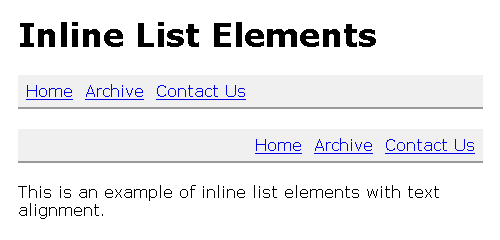
That works quite nicely. No need to mess around with floats; no need to take elements out of the document flow. All I want to do is change the way it works and making it inline gets 'er done. This was tested in FireFox 2 and IE 6.
Want to use code from this post? Check out the license.

Reader Comments
Ben,
Using display:inline for list items is at least as common as floating them for navigation. The disadvantage is that the elements are now using the inline box model, but in this case, that doesn't really matter, and as you point out, it's the most effective way to achieve your desired result.
@Rob,
I figured it was common. Maybe my brain just tuned it out whenever I encountered it.
There are a whole bunch of display types other than block and inline to check out too, although browser support can vary; inline-block and table-cell to name a couple which I find useful.
For your navigation you might also have been able to put float:right on the UL and float:left on the LI's to achieve what you wanted with the nav on the right and the items appearing in the correct order :)
@Justin,
I have seen those other displays used before, but I never really looked into them. Cross browser support is very important in my work, most of the time (but not always). I will look into it.
As for the float-right / float-left thing, good suggestion, but it would not quite work. The UL itself is being absolutely positioned within a parent DIV and such the UL on the float would not do anything. But with static positioning, I think that would have worked. Thanks.
Oh yeah, if you need to absolutely position the UL then floting it to the right is out (unless you can put it inside another element that is absolutely positioned instead)... Generally it should work fine though :)
@Justin,
Good call with the parent element.
I really like this approach however loosing the block model cannot specify the size (width and height)of the A tag.
Could I use your technique specified the size of the A elements. Very important to me as I need to display image background with different image size.
Thanks
@Seb,
I have seen some different behavior in the different browsers. In some browsers, I have found that setting the A elements to "display: block" works. However, I think in IE this doesn't always work; in those cases, I typically have the A tag FLOAT in the same direction as the inline list element.
So, I might have something like this:
li { float: left ; }
li a { float: left ; }
This should give you styling ability (width, height, etc).
For those looking for a good CSS/List tutorial we have our friends at ALA to thank for this;
http://www.alistapart.com/articles/taminglists/
@ben: thank you very much - that helped me a lot ;)
That helped me, thanks man!
Very help full thing it is. I was searching for the same thing and suddenly i got this. I'm glad to save time by not re inventing the wheel.
Thank you very much
regards,
Taimoor
thank you, very helpful! i now know how to do inline lists thanks to you.