
Ask Ben: Converting XML Data To ColdFusion Queries
I work at a veterinary hospital and am generating xml from an IBM UniVerse DB which may or may not contain multi-valued data, and parsing/displaying it via CF8. I have written custom java classes take the user input from the cfform, handle the db transactions and pass back an xml object which is then parsed in CF. (the multi-value data driver does funky things with the data and causes CF to drop the connection intermittently.)
<MAIN _ID = "1081693">
<LAST_MV LAST = "MALLIK"/>
<FIRST_MV FIRST = "A.K. BOBBY"/>
<AN_NAME_MV AN_NAME = "BOTAR"/>
<AN_NAME_MV AN_NAME = "BONES"/>
<AN_BREED_MV AN_BREED = "MIXB"/>
<AN_BREED_MV AN_BREED = "GERM"/>
<ADDRESS_MV ADDRESS = "555 HAPPY ST"/>
<ADDRESS_MV/>
<CITY_MV CITY = "PHILADELPHIA"/>
<AN_NUM_MV AN_NUM = "647873"/>
<AN_NUM_MV AN_NUM = "645692"/>
</MAIN>
<MAIN _ID = "1173319">
<LAST_MV LAST = "MALLIK"/>
<FIRST_MV FIRST = "JOE"/>
<AN_NAME_MV AN_NAME = "SMOKEY"/>
<AN_BREED_MV AN_BREED = "MIXB"/>
<ADDRESS_MV ADDRESS = "512 SAD ST "/>
<ADDRESS_MV/>
<CITY_MV CITY = "PHILADELPHIA"/>
<AN_NUM_MV AN_NUM = "762268"/>
</MAIN>
</ROOT>Notice that the first owner has two animals, listing the name, breed, and animal number (respectively), while the second owner has one. I am having the worst time building a query object from this xml. We don't know how many animals a given owner will have. The query object may repeat the owner info, which is fine, as the "key" needs to be the animal number. Any tips would be extremely helpful and greatly appreciated. Thank you.
You could move all this data into one query, but I am not sure if that would help you all that much. While you can build queries manually, any way you want, we should probably try to stick to "better practices" when it comes to database table creation. That being said, when I see your XML data, I see two different queries: one for customers and one for pets. Doing this gives us the ability to create multiple pets for a single customer and then relating them in a one-to-many relationship without having to unnecessarily duplicate data.
To do this, we are going to create a customer table with the following fields:
- id
- last_name
- first_name
- street
- city
Then, we are going to have a pets table with the following fields:
- id
- name
- breed
- customer_id
Here, it is the "customer_id" column that relates the pet back to the customer table. The customer_id is the foreign key constraint that matches the "id" column of the customer table. Doing this allows you to access the data in a more dynamic and flexible way.
The plan is easy, but getting the XML data into the query is not so easy. It's not too complicated, it just take a lot of foot work and elbow grease. We're going to be using XPath() to search for nodes and then take that node data and populating the various queries. The tricky thing about working with XML data (especially for ME working in an unknown system) is that we can't always be sure WHAT data will always exist. While not all of this is up in the air, since I have never worked with this system or with an IBM UniVerse Database, I am putting potentially excessive "existence checking" for many of the nodes and attribute values. If you know that these nodes will always be there, then you can take a lot of the CFIF logic out.
That being said, here is my solution:
<!---
	Create XML document that would be parsed from the
	data returned by the IBM UniVerse DB. NOTE: No animals
	were harmed in the parsing of this XML.
--->
<cfxml variable="xmlData">

	<ROOT>
		<MAIN _ID = "1081693">
			<LAST_MV LAST = "MALLIK"/>
			<FIRST_MV FIRST = "A.K. BOBBY"/>
			<AN_NAME_MV AN_NAME = "BOTAR"/>
			<AN_NAME_MV AN_NAME = "BONES"/>
			<AN_BREED_MV AN_BREED = "MIXB"/>
			<AN_BREED_MV AN_BREED = "GERM"/>
			<ADDRESS_MV ADDRESS = "555 HAPPY ST"/>
			<ADDRESS_MV/>
			<CITY_MV CITY = "PHILADELPHIA"/>
			<AN_NUM_MV AN_NUM = "647873"/>
			<AN_NUM_MV AN_NUM = "645692"/>
		</MAIN>
		<MAIN _ID = "1173319">
			<LAST_MV LAST = "MALLIK"/>
			<FIRST_MV FIRST = "JOE"/>
			<AN_NAME_MV AN_NAME = "SMOKEY"/>
			<AN_BREED_MV AN_BREED = "MIXB"/>
			<ADDRESS_MV ADDRESS = "512 SAD ST "/>
			<ADDRESS_MV/>
			<CITY_MV CITY = "PHILADELPHIA"/>
			<AN_NUM_MV AN_NUM = "762268"/>
		</MAIN>
	</ROOT>

</cfxml>


<!---
	Create the two queries that we want to work with. One
	will be the human customer and one will be for the pets
	that that owner brings to the clinic.
--->
<cfset qCustomer = QueryNew(
	"id, last_name, first_name, street, city",
	"varchar, varchar, varchar, varchar, varchar,"
	) />

<!---
	For the pet query object, be sure to have a customer_id -
	this is our foreign key to the ID in the qCustomer query.
	This is how we link multiple pets to one customer.
--->
<cfset qPet = QueryNew(
	"id, name, breed, customer_id",
	"varchar, varchar, varchar, varchar"
	) />


<!---
	Now that we have our query and our parsed XML document,
	time to start moving data to the query objects. Let's
	start off by searching for all MAIN nodes - thse are our
	customer nodes (remember that Xpath is case sensitive
	to our upper case nodes names).
--->
<cfset arrMainNodes = XmlSearch(
	xmlData,
	"//MAIN[ @_ID != '' ]"
	) />


<!---
	For each MAIN (customer) node, we want to create a record
	in our query. Let's loop over the XML nodes returned in our
	XPath search.
--->
<cfloop
	index="xmlMainNode"
	array="#arrMainNodes#">

	<!--- Create a new record for our customer query. --->
	<cfset QueryAddRow( qCustomer ) />

	<!---
		Set the customer ID. Remember, when setting values into
		a Query object, it is important to set the propert Java
		data type (especially since we are going to later be
		querying these).
	--->
	<cfset qCustomer[ "id" ][ qCustomer.RecordCount ] = JavaCast(
		"string",
		xmlMainNode.XmlAttributes._ID
		) />


	<!--- Check to see if last name exists. --->
	<cfif (
		StructKeyExists( xmlMainNode, "LAST_MV" ) AND
		StructKeyExists( xmlMainNode.LAST_MV[ 1 ].XmlAttributes, "LAST" )
		)>

		<!--- Set last name. --->
		<cfset qCustomer[ "last_name" ][ qCustomer.RecordCount ] = JavaCast(
			"string",
			xmlMainNode.LAST_MV[ 1 ].XmlAttributes.LAST
			) />

	</cfif>


	<!--- Check to see if first name exists. --->
	<cfif (
		StructKeyExists( xmlMainNode, "FIRST_MV" ) AND
		StructKeyExists( xmlMainNode.FIRST_MV[ 1 ].XmlAttributes, "FIRST" )
		)>

		<!--- Set last name. --->
		<cfset qCustomer[ "first_name" ][ qCustomer.RecordCount ] = JavaCast(
			"string",
			xmlMainNode.FIRST_MV[ 1 ].XmlAttributes.FIRST
			) />

	</cfif>


	<!---
		Check to see if address exists. There might be more
		than one address node (as you can see in the XML),
		but for our purposes, we are only going to grab the
		first one.
	--->
	<cfif (
		StructKeyExists( xmlMainNode, "ADDRESS_MV" ) AND
		StructKeyExists( xmlMainNode.ADDRESS_MV[ 1 ].XmlAttributes, "ADDRESS" )
		)>

		<!--- Set last name. --->
		<cfset qCustomer[ "street" ][ qCustomer.RecordCount ] = JavaCast(
			"string",
			xmlMainNode.ADDRESS_MV[ 1 ].XmlAttributes.ADDRESS
			) />

	</cfif>


	<!--- Check to see if city exists. --->
	<cfif (
		StructKeyExists( xmlMainNode, "CITY_MV" ) AND
		StructKeyExists( xmlMainNode.CITY_MV[ 1 ].XmlAttributes, "CITY" )
		)>

		<!--- Set last name. --->
		<cfset qCustomer[ "city" ][ qCustomer.RecordCount ] = JavaCast(
			"string",
			xmlMainNode.CITY_MV[ 1 ].XmlAttributes.CITY
			) />

	</cfif>


	<!---
		ASSERT: At this point, we have fully populated
		the contact data.
	--->


	<!---
		When it comes to populating the pet table, we are
		really tied to the pet ID. Therefore, we have to
		go off the number of valid Pet IDs. Query for all
		pet IDs in this node that have a length.
	--->
	<cfset arrPetNodes = XmlSearch(
		xmlMainNode,
		"AN_NUM_MV[ @AN_NUM != '' ]"
		) />


	<!---
		Loop over pet ID nodes. We can't use an array loop
		at this point because we need to know which index
		of the pet we are viewing within the current customer.
	--->
	<cfloop
		index="intPetIndex"
		from="1"
		to="#ArrayLen( arrPetNodes )#"
		step="1">

		<!--- Add a row to the pet table. --->
		<cfset QueryAddRow( qPet ) />

		<!--- Get a short hand to the current pet node. --->
		<cfset xmlPetNode = arrPetNodes[ intPetIndex ] />


		<!---
			Set the pet ID. Remember again that is is
			important to be storing these values using the
			propery Java types.
		--->
		<cfset qPet[ "id" ][ qPet.RecordCount ] = JavaCast(
			"string",
			xmlPetNode.XmlAttributes.AN_NUM
			) />

		<!---
			Set the contact ID to which this pet will be
			associated.
		--->
		<cfset qPet[ "customer_id" ][ qPet.RecordCount ] = JavaCast(
			"string",
			xmlMainNode.XmlAttributes._ID
			) />


		<!---
			Now that we have our pet row in place, we need to
			check for addition pet data including name and breed.
			We just have to be careful to ONLY get the node
			index corresponding to this ID.
		--->


		<!--- Check for pet name. --->
		<cfif (
			StructKeyExists( xmlMainNode, "AN_NAME_MV" ) AND
			ArrayIsDefined( xmlMainNode.AN_NAME_MV, intPetIndex ) AND
			StructKeyExists( xmlMainNode.AN_NAME_MV[ intPetIndex ].XmlAttributes, "AN_NAME" )
			)>

			<!--- Set pet name. --->
			<cfset qPet[ "name" ][ qPet.RecordCount ] = JavaCast(
				"string",
				xmlMainNode.AN_NAME_MV[ intPetIndex ].XmlAttributes.AN_NAME
				) />

		</cfif>


		<!--- Check for pet breed. --->
		<cfif (
			StructKeyExists( xmlMainNode, "AN_BREED_MV" ) AND
			ArrayIsDefined( xmlMainNode.AN_BREED_MV, intPetIndex ) AND
			StructKeyExists( xmlMainNode.AN_BREED_MV[ intPetIndex ].XmlAttributes, "AN_BREED" )
			)>

			<!--- Set pet name. --->
			<cfset qPet[ "breed" ][ qPet.RecordCount ] = JavaCast(
				"string",
				xmlMainNode.AN_BREED_MV[ intPetIndex ].XmlAttributes.AN_BREED
				) />

		</cfif>

	</cfloop>

</cfloop>


<!---
	ASSERT: At this point, we have moved all of our XML data
	into two ColdFusion queries - qCustomer and qPet. These
	two queries are related through the customer_id columdn.
--->


<!--- Dump out the two tables. --->
<cfdump
	var="#qCustomer#"
	label="qCustomer Data"
	/>

<cfdump
	var="#qPet#"
	label="qPet Data"
	/>
Running the code, you can see that we get our two populated ColdFusion query tables:
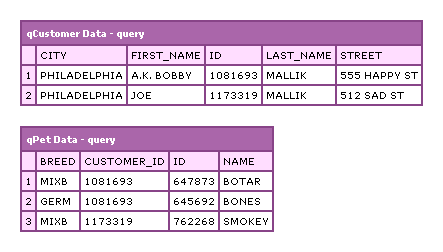
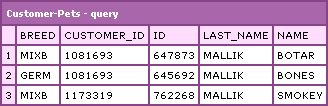
Now that we have this data, we can start to access it. You can either query each table individually, or join the two tables to get related information as in this example:
<!--- Now, we can join the data as needed. --->
<cfquery name="qCustomerPet" dbtype="query">
	SELECT
		qPet.id,
		qPet.name,
		qPet.breed,
		( qCustomer.id ) AS customer_id,
		qCustomer.last_name
	FROM
		qCustomer,
		qPet
	WHERE
		qCustomer.id = qPet.customer_id
	ORDER BY
		last_name ASC,
		first_name ASC
</cfquery>

<!--- Dump out customer pets. --->
<cfdump
	var="#qCustomerPet#"
	label="Customer-Pets"
	/>
Running the above code, we get the following CFDump output:
XML is a really great data transportation language and XPath() support in ColdFusion makes it fairly easy to work with; but, it's still very labor intensive. ColdFusion 8 has added additional support for XPath() to make it even easier. I hope that this has helped in some way.
Want to use code from this post? Check out the license.

Reader Comments
Wow. I'd gotten so stuck on the idea of continuing the multi-value flow from the db, it hadn't occurred to me to normalize it post-xml. Your solution has helped me greatly, and spared me from pulling the few hairs I have left. Thank you so much.
@Chris,
Glad to help :) Working with XML is mostly grunt work - once you get it into nice queries, you can really access it easily.
For anyone else interested, there is some ColdFusion 8 only stuff, but all of it can be easily modified to work with ColdFusion 7.
There is also a rather handy tags that convert XML to cf structures for easier handling.
CFX_XML
http://www.adobe.com/cfusion/exchange/index.cfm?event=extensionDetail&extid=1002711
CF_EASYXML
http://www.adobe.com/cfusion/exchange/index.cfm?event=extensionDetail&extid=1019203
Hi Ben;
This is exactly what i need. Thanks. But I am getting a loop error
Attribute validation error for tag CFLOOP.
The tag does not allow the attribute(s) ARRAY. The valid attribute(s) are COLLECTION,CONDITION,DELIMITERS,ENDROW,FROM,INDEX,ITEM,LIST,QUERY,STARTROW,STEP,TO.
Please try the following:
Enable Robust Exception Information to provide greater detail about the source of errors. In the Administrator, click Debugging & Logging > Debugging Settings, and select the Robust Exception Information option.
Check the ColdFusion documentation to verify that you are using the correct syntax.
Search the Knowledge Base to find a solution to your problem.
Browser Mozilla/4.0 (compatible; MSIE 7.0; Windows NT 5.1; Tablet PC 1.7; .NET CLR 1.0.3705; .NET CLR 1.1.4322; FDM; InfoPath.1; .NET CLR 2.0.50727; .NET CLR 3.0.04506.648; .NET CLR 3.5.21022)
Remote Address 127.0.0.1
Referrer
Date/Time 20-Apr-08 12:00 PM
Is there a way to resolve this?
Thanks
Lakshmi
@Lakshmi,
The "Array" attribute is a ColdFusion 8 feature. If you are pre-ColdFusion 8, you have to convert the array loop into an index loop:
<cfloop
index="xmlMainNode"
array="#arrMainNodes#">
... becomes:
<cfloop
index="intNodeIndex"
from="1"
to="#ArrayLen( arrMainNodes )#"
step="1">
<cfset xmlMainNode = arrMainNodes[ intNodeIndex ] />
Hope that helps.
Ben -
I know its a bit late to be posting......I'm trying to come up with a slick way to display XML in a CFGrid simply by using the "query" attribute of CFGRID.
The method you have described above is sufficient.....but what if you don't know the column names ahead of time? Maybe you want to display lots of XML sources that have differing schemas.....
Is there a easy way to dynamically create the column names based on the XML schema?
-Jim
@Jim,
I think not knowing the xml node names would make this much more difficult. Maybe try checking out the custom tag that someone mentioned above.
Ben -
Thanks for the quick response, you are the man! I looked a bit more into this last night. The custom tags above are pretty defunct, circa 2002.
I've already got my XML converting into a struct but the thing is a struct isn't necessarily going to translate "nicely" into a query object. The nature of a struct doesn't imply uniformly formated "rows" or "recordsets".
I was thinking of recursive looping through the structure and adding some custom logic to "guess" the most logical column names and record sets for a query object.
Does that sound like a good approach?
I know this whole idea is a bit strange.....
@Jim,
Is there a reason you need it to be a query in the first place? There are tools in ColdFusion that makes XML fairly pleasant to work with.
Well I suppose it doesn't have to be a query object....but I always have to start with XML of unknown structure.
The idea is to be able to take in XML and auto-generate a database table from it. Turn the XML from flat data into a RDBMS without necessarily knowing the schema.
The database would have to be "clean" and not fubar'd up.
A quick example would be taking in XML something like:
<Photos>
<Photo>
<FileName>6_flags_garbagecan.jpg</FileName>
<Title>six flags - garbage can</Title>
<Description>published in graphis new talent annual '07/'08</Description>
<SortOrder>2</SortOrder>
</Photo>
<Photo>
<FileName>6_flags_redwagon.jpg</FileName>
<Title>six flags - red wagon</Title>
<Description>published in graphis new talent annual '07/'08</Description>
<SortOrder>3</SortOrder>
</Photo>
</Photos>
and creating a table that looked like this:
Photos Table
Columns
id,FileName,Title,Description,SortOrder
Records
1,6_flags_garbagecan.jpg,six flags - garbage can,published in graphis new talent annual '07/'08,2
2,6_flags_redwagon.jpg,six flags - red wagon,published in graphis new talent annual '07/'08,3
Does that make any sense? Am I being a retard, missing something obvious, and making something simple complex? o.O
@JimBastard,
I think this is something that you can do; even if you don't always know the tables that come in, as long as you know the table structure - ie. all tables are top-level nodes in the XML doc - then you should be able to loop over the nodes looking for names.
Do all XML "record" nodes have all the required "column" nodes? If they do not, then the trouble might be that you don't know what all possible columns are. But, as long as the record nodes have all the possible column nodes, you should be good.
In your example, your first photo record node would be (not tested):
xmlDoc.XmlRoot.Photos[ 1 ].XmlChildren[ 1 ]
This will give you the "Photo" node. Then, you could loop over that using the childnodes and get the XmlName to find the column name and the column value:
xmlDoc.XmlRoot.Photos[ 1 ].XmlChildren[ 1 ].XmlChildren[ intIndex ].XmlName
xmlDoc.XmlRoot.Photos[ 1 ].XmlChildren[ 1 ].XmlChildren[ intIndex ].XmlText
Does that help at all? I can see if I can come up with a better example.
Ben -
Thanks for trying to help, I appreciate it. If we know the structure of the XML and what we'd like our database to look like it's just some simple parsing... you kinda missed the whole point.
What this problem really boils down to is AI, as I do not know the table structure or XML structure ahead of time. I'd have to create a script to intelligently suggest what the possible table structures could be (could be multiple tables with relationships) and have some sort of user interaction/confirmation before creating the databases. In the example I've posted we can look at the XML and assume the data structure since we can examine the XML by eye before writing the code.
Due to time constraints I've been forced to hardcode the XPath location of the "records" which is this case would be: "/PhotoSet/Group/Photos/Photo" (note: the XML I posted is a small subset from a much larger document hence the additional "PhotoSet" and "Group" path) and hardcode the "structure" of the "photo" for the database.
I've got what I need up and working it's just kinda lame since it requires manually inspecting the XML. I'll let you know if I have time to revisit this.
Thanks!
@JimBastard,
Sorry, I thought you were talking about just creating tables based on a single XML file that top-level tables. When you start to deal with tables nested inside of tables (to create complex relationships), I doubt there is any way to do this. The XML might be different than the ultimate DB creation.
For example, what if you had:
< attorney >
. . . . <name></name>
. . . . <phone></phone>
. . . . < address >
. . . . . . . . <street1></street1>
. . . . . . . . <city></city>
. . . . </ address >
</ attorney >
Here, you might think that "address" is a table that relates back to the attorney... but maybe you really just want to have street1 and city be part of the "attorney" record rather than a related table. Or maybe you want the related table because later on you are gonna add multiple addresses.
I really don't think you can automate database design based on an XML file. That's why database architects are so gosh darned expensive ;)
Well hopefully....one day we can replace those DBA's with my 1337 scripts. ^_^
See you around the NYC! Let me know if you ever head out to the Hamptons, pool party at my house.
@JimBastard,
If you can limit to a certain number of "styles" of table or something, then that gives you something to work with. But, dealing with just any XML I think will be way too compliated.
Hi Ben,
I am just starting out with xml and CF. I don't get alot of opportunity to go much beyond cfquery and cfoutput so I have welcomed the chance to get into an xml project.
This post has helped me a great deal but I am still having trouble. The xml that I am being supplied has the <id> at the same level of the data I need to relate to it. Here is the xml:
<cfxml variable="xmlData">
<?xml version="1.0" encoding="UTF-8" ?>
<mainDocument>
<informationTableData>
<id>0001393825</id>
<saleDataInfo>
<sundayData>
<saleDate>2008-10-26</saleDate>
<saleDataList>
<nameOfCompany>Acme Explosives</nameOfCompany>
<start>N/A</start>
<sold>0</sold>
<end>N/A</end>
</saleDataList>
<saleDataList>
<nameOfCompany>Beavis Inc.</nameOfCompany>
<start>100</start>
<sold>25</sold>
<end>75</end>
</saleDataList>
</sundayData>
</saleDataInfo>
</informationTableData>
<informationTableData>
<id>2221393333</id>
<saleDataInfo>
<sundayData>
<saleDate>2008-10-26</saleDate>
<saleDataList>
<nameOfCompany>Hot Fusion</nameOfCompany>
<start>500</start>
<sold>10</sold>
<end>490</end>
</saleDataList>
<saleDataList>
<nameOfCompany>Smith Cousins</nameOfCompany>
<start>150</start>
<sold>50</sold>
<end>100</end>
</saleDataList>
</sundayData>
</saleDataInfo>
</informationTableData>
</mainDocument>
</cfxml>
So I need to get all the <sundayData> information related to the <id>. I can't seem to grasp it. I have spun my wheels for days now and I think the following code is close but can't seem to get that extra step out of my brain:
<cfset mainNodes = XmlSearch(
xmlData,
"mainDocument/informationTableData"
) />
<cfset sundayNodes = XmlSearch(
xmlData,
"mainDocument/informationTableData//sundayData/"
) />
<cfloop
index="mainNodeIndex"
from="1"
to="#ArrayLen( mainNodes )#"
step="1">
<cfset xmlMainNode = mainNodes[ mainNodeIndex ] />
<cfloop
index="sundayNodeIndex"
from="1"
to="#ArrayLen( sundayNodes )#"
step="1">
<cfset xmlSundayNode = sundayNodes[ sundayNodeIndex ] />
</cfloop>
</cfloop>
I know I need two loops, one for the array of <id>s and one for the array of <sundayData>, but how do I relate the two for each given <id>? I am tearing my hair out. Any help would be most appreciated.
@Robert,
What do you want the final out come to be? Do you want an ID-based struct with the Sunday XML data in it? For example (pseudo):
< data[ "0001393825" ] = xmlSundayNode >
I think this is what you mean. If not, let me know more about what it means for them to be "related."
Hi Ben,
That's right. Right now I am being supplied an xml document with only one <id> so it's easy to loop through all the Sunday Data (and every other day for that matter). But now that it's ok to have more than one <id> in the same xml document, I am having trouble. That's what I mean by being related. Relating each <id> to the Sunday data beneath it.
@Robert,
Take a look at this:
www.bennadel.com/blog/1593-Ask-Ben-Collection-And-Relating-Sibling-XML-Nodes-In-A-ColdFusion-XML-Document.htm
Why not just use cfwddx ACtion="WddX2CFML"
@Chris,
WDDX is a great standard; but it requires a lot of extra markup in order to be compatible with queries.
I have a client that has a similar setup but they are working with a news provider and want to receive news feeds from that provider. Apparently they want us to listen on a port for an XML feed. I'm pretty good with dealing with the feeds when they are uploaded or if cfschedule grabs them but what exactly does "listen on a port" entail? Probably CFHTTP but not sure and I cant find anything online about it.
@Erik Ickes,
you need to look at event gateways, although this will only help if the feed is actually being pushed out.
http://help.adobe.com/en_US/ColdFusion/9.0/Developing/WSc3ff6d0ea77859461172e0811cbec22c24-77e4.html
@Erik, @Snake,
Yeah, "port listening" is definitely outside my understanding, sorry.
Well i'm getting the right table layout when I CFdump, but all the values are empty "[String Empty]" again and again. My XML is structured like this:
(I'm trying to populate with opportunity data) And the code I'm trying to use is as follows:
I'm going cross-eyed trying to figure out where I went wrong. I'm sure someone with actual skills will spot my mistakes right away. I don't need IF's because the XML has text in every element, and of course i keep repeating the cfset action to populate each item (or at least trying to). Think it has something to do with the fact that i'm on an older version of coldfusion?
@Jared,
It looks like you're not using the variable that just created with xmlSearch(). If you look at your code, you get this variable:
arrMainNodes
... but then, right afterward, you don't actually loop over it - you try to loop over the original XLMContent variable. I am not sure what you are doing there.
@Ben
Well that was it! I knew it was something too obvious for me to see. Thanks for helping my palm find it's way to my forehead. I've been looking for this solution for way, way too long! Glad to have finally found it.
@Jared,
No problem :)