
Maintaining Line Breaks In An HTML-Excel File
Just a minor thing that I learned yesterday. As you might know, creating a pseudo Excel document is really easy using HTML. However, when you start to play around with idea, you will quickly notice that standard break tags (<br />) will create a new cell in the next row rather than creating a line break within the current cell. To get around this, all you have to do is add some Microsoft proprietary CSS to the BR tag:
<br style="mso-data-placement:same-cell;" />
Now, just to see a quick little example in action:
<!--- Store Excel-HTML output. --->
<cfsavecontent variable="strData">

	<table border=".5pt">
	<thead>
		<tr>
			<th>
				Degree
			</th>
			<th>
				Year
			</th>
		</tr>
	</thead>
	<tbody>
		<tr valign="top">
			<td>
				Highschool Diploma
				<br style="mso-data-placement:same-cell;" />

				Hackley School
			</td>
			<td>
				1998
			</td>
		</tr>
		<tr valign="top">
			<td>
				Bachelor of Science in Computer Science
				<br style="mso-data-placement:same-cell;" />

				Tufts University
			</td>
			<td>
				2002
			</td>
		</tr>
	</tbody>
	</table>

</cfsavecontent>


<!--- Set header for file attachment. --->
<cfheader
	name="content-disposition"
	value="attachment; filename=data.xls"
	/>

<!--- Stream the content. --->
<cfcontent
	type="application/excel"
	variable="#ToBinary( ToBase64( strData ) )#"
	/>
Running this code, we immediately get prompted to save this Excel file:
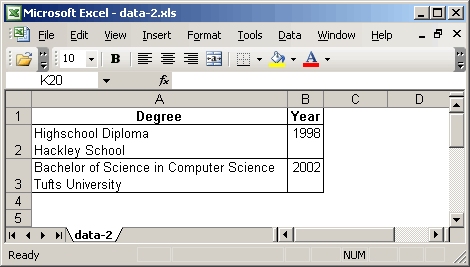
Notice that the line breaks within the first column did not create new cells. Again, a minor note but hugely useful when you want to whip together a quick little pseudo Excel file using HTML.
Want to use code from this post? Check out the license.

Reader Comments
Hi Ben, sort of off topic, but I was wondering if you can add some insight. I'm using your POIUtility to read an excel file I get from a customer, and the header takes up the top 7 rows (the column headers start at row 8). The HasHeaderRow feature only ignores the top row. Any way I can get it to ignore the top 8 and start reading at row 9?
I clicked the wrong link! Sorry, I meant to report a typo to you, not "Ask Ben." The typo is "is really easing using HTML." < Really EASY.
@Todd,
No worries man. Thanks for the catch. It has been fixed.
That's great to know :)
the problem with the pseudo html xls files is that excel chokes when the file gets too big
the way around that is then to wack your data into a database and then suck it in via odbc into excel, but use '~' or '|' as your new line character and then do a search a replace on that character and type alt-0010 and the replacement character and click replace all
long winded but it works....
@Zac,
Also a good solution to the problem. For small, ad-hoc reports, however, HTML is a really quick and easy solution - I just don't want to down play that fact.
Ben,
I'm working on some data export tools that use use the HTML-Excel shortcut. Is there somewhere that you know of that has a good reference for these Microsoft pseudo classes?
Thanks,
Daniel Shaw
@Daniel,
I am not aware of any solid resource. I found this tip by doing Googling around for the specific problem. One way that I found to learn about the formatting (at least in Word documents) is to do a File > Save As > Web Page, and then look at the resultant page source.
@Ben - Excellent suggestion. Thanks.
man oh man, the time you saved me posting this - exactly what I needed for exactly what I am working on right now, and Google found it for me right away. Great job ... thanks so much!
Great post!
I understood the HTML-Excel-Line feed problem, but I couldn't figure out the solution. I'll never get back the last 4 hours of futility, but, thanks to your post, I won't have struggle with this again.
Thanks!
@Mrando,
Glad to have helped.
Thanks a lot! First hit and could never have figured it out myself.
This is a big help! Been trying for hours to figure out why I was getting so many extra rows... Much appreciated.
Thank you so much! This is exactly what I needed!!!
Neat, but there's a problem: Yes this CSS does allow line breaks in a single cell, but on the other hand excel still uses the full width of the unbroken text to calculate the column width. So it's really an incomplete fix (since the reason to use line breaks in a single cell would almost always be to conserve horizontal space)... Would love to see a solution that also resizes the column appropriately.
I'm running into the same issues as Charlottesville Media Group mentioned. Trying to figure out how to get excel to shrink the column width to fit the wrapped data. I can double click on the column divider after it's open in excel then it is shrunk the the data width. I wish Excel would auto size it this way when opening.
If you are looking for a reference for ALL that you can do... Google "Microsoft Office HTML and XML Reference" You will find a downloadable help file from Microsoft that tells you everything you can do. It is a bit overwhelming how much control you actually have! I just haven't found in that document how to "auto size" the columns the way I want!
@Charlottesville, @Silly,
Hmmm, that must have changed in new versions of Excel. If you look at my screen shot, the column only takes the width of the longest single line of text. My whole system just crashed last week and I actually switched to Mac, so I don't even have an Excel file to test with.
That's simply great! Exactly what I was looking for. Thank you so much!
Battled with this for a few hours. Couldn't get it to work on my Mac. Moved to my VM and it worked great.
Thanks a lot for this. Spent 3+ hrs trying to get this to work. Using it with BIRT reporting tool and Java. Thanks!!!
Thx a lot!!! I have built some views in lotus notes to open directly in excel and was getting crazy with this "problem"! thx again!
Alex
I was looking all over for this answer until I came across your post. This was a HUGE help, thanks!
Thanks Ben for this tip!
thanks a lot. fix my problem
How to put multiple paragraph in a single cell in XL sheet.
Ben, thank you very much, your article was very helpful for me.
You just saved my life. Thanks!