I had a series of blog posts a while back that discussed ColdFusion session management and spiders. In those posts, I was actually disabling session management for users that were believed to be spiders or bots. This was a technique that I originally learned from Michael Dinowitz. Some time later, in a discussion also with Michael Dinowitz, he was explaining to me that he no longer did this. Instead, he used a slightly altered technique in which all users get session management with the caveat that the session timeout given to spiders and bots is much smaller (around 2 seconds).
When you have one user that gets session management and one user that does not, your page requires additional logic in all places that touch the user's session object; certain code will have to be excluded from execution if a user has no session. This new technique allows the page to execute without exception cases while at the same time accounting for the "pseudo memory leak" caused by extensive and cookieless spider traffic.
The entries that I have been posting recently about sessions that expire mid-page were in preparation for this post. I wanted to make sure that giving a user a very short session timeout would not cause problems on pages that had a longer than usual execution time. And, since we have found that the SESSION object is available for the entire request no matter what happens in terms of a timeout, I now feel it is safe to introduce this code.
While I use Application.cfc almost exclusively, I have decided to demonstrate this using Application.cfm. Some people have asked to see my original session management posts with the CFApplication tag, and since these are along the same lines, I figured I would downgrade the example to cover more bases.
All the important logic here takes place in the Application.cfm where the ColdFusion application is defined:
<!---
	Check to see if we have a standard user or a spider. We
	can test the user agent for commonly known spider bots.
	First, let's get the user agent in lower case so that we
	can do faster non-case-sensitive testing.
--->
<cfset REQUEST.UserAgent = LCase( CGI.http_user_agent ) />


<!---
	Now, let's check for a spider and set the session timeout
	accordingly (we will single out the session timeout so that
	we can define the application in a single place).

	In addition, we are adding a special diagnostic test
	so that the user can test the short session (since it's
	more complicated to spoof a spider).
--->
<cfif (
	<!--- Run diagnostic test. --->
	StructKeyExists( URL, "TestShortSession" ) OR

	<!--- Test user agents. --->
	(NOT Len( REQUEST.UserAgent )) OR
	REFind( "bot\b", REQUEST.UserAgent ) OR
	Find( "crawl", REQUEST.UserAgent ) OR
	REFind( "\brss", REQUEST.UserAgent ) OR
	Find( "feed", REQUEST.UserAgent ) OR
	Find( "news", REQUEST.UserAgent ) OR
	Find( "blog", REQUEST.UserAgent ) OR
	Find( "reader", REQUEST.UserAgent ) OR
	Find( "syndication", REQUEST.UserAgent ) OR
	Find( "coldfusion", REQUEST.UserAgent ) OR
	Find( "slurp", REQUEST.UserAgent ) OR
	Find( "google", REQUEST.UserAgent ) OR
	Find( "zyborg", REQUEST.UserAgent ) OR
	Find( "emonitor", REQUEST.UserAgent ) OR
	Find( "jeeves", REQUEST.UserAgent )
	)>

	<!---
		This is a spider, so set a really small timeout. In
		this case, we are going to go with 2 seconds.
	--->
	<cfset REQUEST.SessionTimeout = CreateTimeSpan( 0, 0, 0, 2 ) />

<cfelse>

	<!---
		This is a standard web user, so allocate a standard
		session timeout of 20 minutes.
	--->
	<cfset REQUEST.SessionTimeout = CreateTimeSpan( 0, 0, 20, 0 ) />

</cfif>


<!---
	ASSERT: At this point, no matter what type of user is
	visiting the site, we know what session timeout to supply.
--->


<!--- Define the application with given session timeout. --->
<cfapplication
	name="SessionTesting"
	applicationtimeout="#CreateTimeSpan( 0, 1, 0, 0 )#"
	sessionmanagement="true"
	sessiontimeout="#REQUEST.SessionTimeout#"
	/>


<!--- Set page request settings. --->
<cfsetting
	showdebugoutput="false"
	requesttimeout="20"
	/>
When it comes to defining the CFApplication tag with our goal in mind, the only different is the SessionTimeout property. Everything else about the CFApplication tag is exactlt the same. As such, we are using our logic to store the session timeout in a variable and then just defining the application in one place with one CFApplication tag.
In order to set the proper session timeout, we are testing the user agent making the page request. As discussed in my previous posts on ColdFusion session management, many popular spiders, bots, and RSS feed readers have special user agents that set them apart from your standard FireFox, Safari, and IE users. Therefore, by testing the existence of these markers, we can figure out (with good success) who is who.
In addition to testing user agents, you will notice that the first line of my CFIF statement checks for the TestShortSession key in the URL scope. This is a hook for developers to test page requests that have short sessions without having to spoof a spider's user agent.
Then, just to test to make sure this was working, I set up a simple index.cfm page that does a CFDump of the application settings using the undocumented GetApplicationSettings() method:
<!---
	Display the applicaiton settings using the undocumented
	function, GetApplicationSettings(), which gives us access
	to all the application properties.
--->
<cfdump
	var="#APPLICATION.GetApplicationSettings()#"
	label="Application Settings"
	/>
Now, running the page as a standard user, we get the following CFDump output:
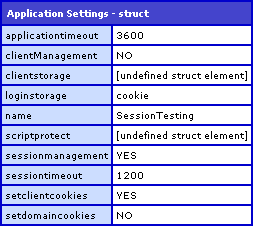
Notice that the SessionTimeout has the value 1200. This is the number of seconds allocated for session timeout (1200 seconds = 20 minutes * 60 seconds). This is just what we want for a standard user.
Now, when we re-run the page, putting ?TestShortSession in the URL, we get the following CFDump output:
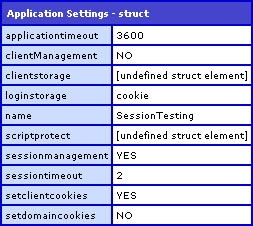
Notice that this time, the SessionTimeout value is 2 seconds. This is just what we want for spiders and bots so that even if a spider hits your site 10,000 consecutive times, creating a new session each time, at least that memory usage explosion will be very short lived.

Reader Comments
This is a great idea. I hadn't realized until recently that bots don't carry sessions. I just hadn't thought about it before. However in my sessiontracker app I am building (to be released soon I am recoding it for flex/air) I can see right now 15 active sessions on my blog (10 min in length) and of them 12 are bots. And those are just the bots I identify. There is SO much more bot activity on my sites than I realized. All it takes is one bad one to try to index everything before you have problems.
@Joshua,
Yeah. And can you imagine something like House Of Fusion which probably has hundreds of thousands of pages?!? The traffic from spiders must just be insane.
For application here is the same code...ish for application cfcs.
<code>
<cfset this.sessionTimeout="#createtimespan(0,1,0,0)#" />
<!--- Check for bots - give a short lifespan --->
<cfif Len(CGI.HTTP_USER_AGENT) GT 0>
<cfloop list="bot\b,crawl,\brss,feed,news,blog,reader,syndication,coldfusion,slurp,google,zyborg,emonitor,jeeves" index="bot" delimiters=",">
<cfif find(bot, CGI.HTTP_USER_AGENT)>
<cfset this.sessionTimeout="#createtimespan(0,0,0,2)#" />
</cfif>
</cfloop>
<cfelse>
<cfset this.sessionTimeout="#createtimespan(0,0,0,2)#" />
</cfif>
</code>
@Randy,
Good stuff. I know it's only "code...ish", but my only suggestions would be to make the first session timeout the default "standard user" timeout. That way, we don't need an ELSE statement in our logic. The Bot timeout simply becomes the override for special cases. Also, we could throw a CFBreak tag in the loop if we find a match. The second we find a bot type, we don't need to keep checking.
Good points... revised:
<cfset this.sessionTimeout="#createtimespan(0,1,0,0)#" />
<!--- Check for bots - give a short lifespan --->
<cfif Len(CGI.HTTP_USER_AGENT)>
<cfloop list="bot\b,crawl,\brss,feed,news,blog,reader,syndication,coldfusion,slurp,google,zyborg,emonitor,jeeves" index="bot" delimiters=",">
<cfif find(bot, CGI.HTTP_USER_AGENT)>
<cfset this.sessionTimeout="#createtimespan(0,0,0,2)#" />
<cfbreak />
</cfif>
</cfloop>
</cfif>
Niiice.
Cool post Ben, very interesting. I'm very surprised how making a change in the CFAPPLICATION tag only gets applied to the session for the current request/user. I would have thought that once you set the session timeout to 2 seconds, that EVERYBODY's session would time out.
It would be nice if someone from the CF team could comment on this technique for giving different users different session timeouts. I'm curious if there are any unforeseen negative consequences.
One things that concerns me is that I wonder if it's possible for a "spider" and regular user to execute the CFAPPLICATION block at the same time (using the 2 second timeout), causing both users to get assigned the 2 second session timeout. I know the timeout value is request scoped so the values themselves are safe from each other; I just don't know the internals of CFAPPLICATION as I've never really had to do anything special with it before. Does anybody KNOW the answer to this? Sean?
Maybe I'm just being paranoid.
@Kurt,
You don't have to worry about a spider and a user hitting the CFApplication tag at the exact same time. Remember, applications aren't really "running". Applications are just some chunk of memory that each request associates with using a special key (the app name). As such, each page request isn't really running the CFApplication tag to start the app, each page request is really just associating itself to that application as define in the CFApplication tag.
Then, the session management stuff is assigned to the current user of that page request. So, even if two users hit the tag at the same time, they still get individual results. Don't think of session management as defining the Application... rather, think of it as defining the page request that is associated to the given application.
At least that is how I think about it. I hope I am not totally misleading people here!
Google only indexes about 55,000 pages a day on House of Fusion. It'll be more once I put the new SEO forums code into effect. I love onMissingTemplate(). :)
(I cover all this in my next FAQU article.)
The bot list WhosOnCFC uses (thank you Joshua) is fairly comprehensive, but no where near complete. I have found that a lot of spiders/bots don't always play nice and mask their user-agent. I know one site in Beijing, China that will generally jump my user count up to around 200 slurping down pages. Easy.
Looking at how you have your application setup, I will probably add it to my major public applications. I was also thinking of ways to work it into WhosOnCFC since you are able to see where the IP address is originating from. Several client's from one IP address is understandable. 200 is something altogether different.
I also had some misgivings about setting two separate session timeouts in the application. Now I think it is definitely something to look into.
Great article Ben.
There are only a handfull of bots that really have to be worried about. Blocking the major search engines should be all that's needed.
An alternative to all this is to have a piece of code in the onRequestEnd() that checks if the visitor is a bot and then kills the session. This guarantees that the session will exist as long as the page run did.
I tried this before but then I got users saying they lost their shopping cart so had to turn it off. Ideas?
<cfscript>
isRegVisit = 1;
if(REFind("bot|spider|crawl|google|yahoo|slurp|scooter|lycos|gulliver|infoseek|architext|ia_archiver|crawler|shop|scrubby|teoma|robozilla|nutch|asterias|zyborg|sidewinder", httpUA)) { // it's a search spider. (bot and spider cover many.)
isRegVisit = 0; //use below for session management
}
</cfscript>
<cfapplication name="#request.DS#" clientmanagement="Yes" sessionmanagement="Yes" setclientcookies="Yes" sessiontimeout="#CreateTimeSpan(isRegVisit*1, 0, 0, 1)#">
@Ziggy,
Have you been able to duplicate the "losing cart" scenario? Or is this what you hear from some users? If it is just a few users, the session timeout is not the issue. Maybe they are not accepting cookies. Maybe they have a really strange User Agent value that is showing up like a spider.
When, and how, did you discover the getApplicationSettings() method of the App object? It is pretty interesting. For app.cfc, it seems to just mirror the This scope. I'm thinking of filing a ER to ask Adobe to "open" this as a real (documented) method. Ie, something you could use as a function by itself, not off the App scope.
@Ray,
I discovered it when I was answering a question about testing for session management:
www.bennadel.com/index.cfm?dax=blog:943.view
I have a UDF that just dumps out all the Java methods on a given object and I happen to notice it. But certainly, this should totally be a documented function. Seems pretty useful. It's even named like ColdFusion method :)
>>If it is just a few users, the session timeout is not the issue. Maybe they are not accepting cookies.
Yes, only some users, but enough. I recall they were on regular browsers. All I can say is when I made the change people started complaining. I think it was related to pages with internal redirects, I'm not sure. I couldn't reproduce it or figure it out myself. I put it back and the complaints stopped.
Why don't you use a regex like my code? Seems much tidier.
@Ziggy,
I hate that! When it's impossible to reproduce something that other people complain about. That's like the most impossible thing to debug; like fighting a ghost.
As for the regular expressions, I actually used to do it your way. But, then I switched to the Find() statements for two reasons:
1. It felt easier to maintain.
2. I have it in my head that short-circuited IF/Find() combinations are faster than regular expressions. I don't quite know if this is fact. A while back, there was a big discussion on which was faster:
www.bennadel.com/index.cfm?dax=blog:410.view
Even after just re-reading the comments (which is where the meat of the conversation takes place), I am not 100% I would go one way or the other.
Basically, as the number of spiders gets bigger, I just find the Find() cases easier to read than the "|" statements. At this point, though, especially with the small set of matches, it's really just a preference thing.
@Ben,
I was thinking... I have a site that does a high volume of traffic in a short period of time, which is a real problem for accumulation of sessions. Not only are bots a problem, but the vast majority of users really don't need a session while on my site (only needed when logged in). The latter is the kicker.
I don't like that I have to maintain an agent list with the method in this post. It's just one more thing to worry about maintaining. So, I thought, "Hey, the real problem in spawning sessions is cookie vs non cookie. Not bot vs human."
If a spider (or human for that matter) doesn't accept cookies, we have an unnecessary build up of sessions. So, I tweaked the code to check for a cookie (which I see you did in an earlier post -- is there a reason the idea was abandoned?) and it helped, but it wasn't enough.
Since only users who are logged into the site really need sessions, I don't want every user getting a long session. I can set a cookie upon login to identify them as needing a longer, reasonable session.
So, ALL traffic to my site gets a default of a 2 second session. When a user logs in and sets "cookie.keepSession", I then give the session a longer expiration to utilize the interactive features of the site.
It comes down to this tiny bit of code in App.cfc:
<cfset SessionTimeSpan = createtimespan(0,0,0,2)>
<cfif structKeyExists(cookie,"keepSession")>
<cfset SessionTimeSpan = createtimespan(0,0,30,0)>
</cfif>
<cfset this.sessionTimeout = SessionTimeSpan>
I just implemented this on my site and went from 900+ sessions (even with the bot checker) to about 10 at any given time.
I'm commenting on this old post for 2 reasons:
1) Get feedback from you and others regarding this method. Pros/cons? Seems like it's working for my setup.
2) To contribute. Your site has been invaluable and I'm just sharing what I can. Thanks.
@Rob,
That is a great idea. And, I think it makes perfect sense. Since I don't think it's unreasonable for you to require cookies for a session (we all pretty much do that anyway), I have no problem with your strategy. Good stuff!
Hello Ben,
I know this is an old post to be replying on, but I read your post and then I read this post:
http://www.ghidinelli.com/2008/03/26/minimizing-memory-damage-from-bot-created-sessions-in-coldfusion
And I thought it might be a good one to cross link on. I wound up using an adaptation of the solution on Brian's blog and I am just posting it for any possibly interested parties.
<cfif IsUserLoggedIn()>
<cfset this.sessiontimeout = CreateTimeSpan(0,0,30,0) />
<cfelseif StructKeyExists(cookie, "cfid")>
<cfset this.sessiontimeout = CreateTimeSpan(0,0,10,0) />
<cfelse>
<cfset this.sessiontimeout = CreateTimeSpan(0,0,1,0) />
</cfif>
Except that the structKeyExists(cookie, "cfid") test will return true, even if you have cookies disabled. I just tested this in Safari, with no cookies, and cookies disabled, and it plainly showed that cookie.cfid existed. It just doesn't persist. It's set at the beginning of the request and gets lost. You can't use that check.
<cfapplication name="foooooo" sessionManagement="true">
<cfoutput>#structKeyExists(cookie, "cfid")#</cfoutput>
<cfdump var="#cookie#">
<cfdump var="#session#">
Odd Ray,
This worked for my in FireFox and IE. Actually I did wind up seeing 2 possible hickups with this as well and I am still testing them.
1) If you are able to keep your original session going (in my example it is set to 1 minute) and something important session wise gets set then the first time that 1 minute session timeout gets reached, you will get the new 10 minute timeout, but you lose the data from that first session.
2) My first if statement only works if I am forcing an new session at login (which in some cases I have wanted to do this, but not always).
I am seeing for this to be effective you would have to have a really short timeout on the on the initial contact (1 or 2 seconds) like Ben does in his examples.
I was just hoping to find a way to accomplish what Ben was doing without having to do all the bot/spider comparisons. I guess it's back to looking.
Ray, I just realized, did you try doing the StructKeyExists above your <cfapplication> tag? Does it work then?
It makes no difference. Here is a new script with an additional test as well. Notice I can clearly set and increment cookie.test. It exists. But it doesn't PERSIST. That's the rub...
<cfif not structKeyExists(cookie, "test")>
<cfset cookie.test = 0>
</cfif>
<cfset cookie.test++>
<cfoutput>before: #structKeyExists(cookie, "cfid")#<br></cfoutput>
<cfapplication name="foooooo" sessionManagement="true">
<cfoutput>after #structKeyExists(cookie, "cfid")#<br></cfoutput>
<cfdump var="#cookie#">
<cfdump var="#session#">
Guys, I had a brain fart. While I had used a cfapp tag in the script, I forgot I _also_ had a App.cfc in the request. Duh. When I removed that, the test worked fine.
I still want to ensure folks know that _generic_ cookie testing with "set/check in the same request" is a bad idea. I reacted too quickly on this as I ran into a client using code like that in the past few weeks.
I swear, I only try to post when I think I have something useful to contribute. ;)
Ok, so just for clarities sake I am posting the cfapplication/application.cfm code that worked for me and the Application.cfc code:
Application.cfm
<cfif not structKeyExists(cookie, "cfid")>
<cfset sessionTimeout = CreateTimeSpan(0,0,0,2) />
<cfelse>
<cfset sessionTimeout = CreateTimeSpan(0,0,30,0) />
</cfif>
<cfdump var="#cookie#">
<cfapplication name="mySuperApp" sessionManagement="true" sessiontimeout="#sessionTimeout#">
<cfdump var="#cookie#">
Application.cfc (Very top of the file)
<cfcomponent displayname="Application" output="false">
<cfset this.name = "mySuperDuperApp" />
<cfset this.applicationtimeout = CreateTimeSpan(2,0,0,0) />
<cfset this.clientmanagement = true />
<cfset this.sessionmanagement = true />
<cfset this.loginstorage = "session" />
<cfif StructKeyExists(cookie, "cfid")>
<cfset this.sessiontimeout = CreateTimeSpan(0,0,30,0) />
<cfelse>
<cfset this.sessiontimeout = CreateTimeSpan(0,0,0,2) />
</cfif>
I'm still looking for a way to increase the session timeout of an active session if it is possible. Ideally I would like to use what I am doing here, but set a person's non-authenticated session timeout to 10 minutes and set an authenticated session timeout to like 30 minutes.
@Daniel,
Hmmm, very interesting solution. Even outside of CFID, you could simply check to see if the user has a cookie like "cookie.useLongSession". This way, you could default it to false, and then set that when necessary. The only reason you might want this is that it might not be related to a login.
Very cool suggestion. This requires that a user have cookies enabled... but then again, so does pretty much all session management.
my blog www.diyanswerdirect.com/blog hasnt been indexed for two weeks and my site www.diyanswerdirect.com has been indexed but never gets updated. Is there anyone who can tell me when google or bing updates there search engines please thankyou lee help
@Lee,
Have you tried looking into Google Web Master tools? I think you can define site maps for your site that will help Google index it. Other than that - it's really a proprietary thing that Google has control over.
Thank you very much! I knew there had to be a better way than collecting all the ip addresses.
Thanks again.
First of all, thanks to you and Michael Dinowitz for the short session idea! I've seen dramatic performance improvements since implementing it on a heavily crawled e-commerce site.
I haven't had success using structKeyExists(cookie, "cfid") in the pseudo-constructor area of Application.cfc. It seems to always return true if this.setClientCookies is true, regardless of the client's cookie settings.
I've found that isBoolean(URLSessionFormat("true")) (from the isCookiesEnabled udf) is a reliable (and very handy) test.
@Adam,
Yeah, I think ColdFusion will always set the CFID in the cookies scope for every request since it uses the cookies to track session. If a bot doesn't post a cookie with its request, ColdFusion will store a *new* CFID value in the cookie scope in that request. This happens pre-pseudo constructor.
In our application.cfc we have an onRequestEnd() that detects if the current cgi.http_user_agent matches a blacklist, and if so reduces the session timeout to 15 seconds.
[code]
session.SetMaxInactiveInterval(javaCast('long',15));
[/code]
Another thing you can do is start off with a small session timeout - say 5 minutes. Then when someone sucessfully authenticates call SetMaxInactiveInterval() to upgrade the session timeout to something more suitable, for example 1 hour.
This would keep your session pool small for the bulk of unauthenticated traffic, and keep longer sessions for your members.
For bonus points, reduce your session timeout back to 5 minutes in your signout action.
You can also forcefully remove the session from the pool using the session tracker like so:
[code]
createObject('java','coldfusion.runtime.SessionTracker').cleanUp( session.getAppName(), session.cfid, session.cftoken );
[/code]
Oops... "[code]"
Where's the edit button Ben? :)