
Converting Microsoft Project 2007 Tasks To HTML With ColdFusion
Last night, I was helping my old boss Glen Lipka pull some data out of a Microsoft Project 2007 file. Apparently earlier versions of Microsoft Project exported to more usable formats but Project 2007 only exports to XML. XML is great for programmers like me (who find XML sexy), but a 10,000 line XML document is pretty much useless to the rest of the world. As such, I was trying to quickly create a page that would help Glen turn his Microsoft Project 2007 data into XHTML that contained unordered lists.
Apparently Microsoft Project 2007 lets you cut and paste task data as you would be able to do in an Excel document. Meaning, he had three columns: Task, Name, and Notes, and when cut and pasted it pasted it as three tab-delimited text columns. Using this information, I was able to create an HTML page that has a large textarea form element. If you copy the three columns from Microsoft Project 2007 and paste it into this textarea and submit the form, ColdFusion reads it in, parses it, and recursively outputs the task list as nested unordered list (UL) elements.
If you want to see this in action, click here
So, just so we are all on the same page, here is a screen shot of the kind of data that I was dealing with:
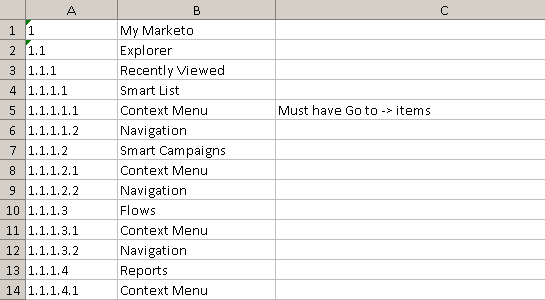
This was an Excel file, but apparently, you can skip the intermediary Excel file step and copy and paste directly from the Project application to the textarea in my form.
Here is the code for that page:
<!--- Kill extra output. --->
<cfsilent>

	<!--- Set page settings. --->
	<cfsetting
		requesttimeout="300"
		showdebugoutput="false"
		/>


	<!---
		Here, we are defining the recursive function that is
		used to output the task list.
	--->
	<cffunction
		name="OutputTasks"
		access="public"
		returntype="void"
		output="true"
		hint="The rercursive function used to output the Microsoft Project 2007 task list as HTML.">

		<!--- Define arguments. --->
		<cfargument
			name="Data"
			type="query"
			required="true"
			hint="The task query."
			/>

		<cfargument
			name="Task"
			type="string"
			required="false"
			default=""
			hint="The numeric name of the task we want to output (ex. 1.13.4.2)."
			/>

		<cfargument
			name="Sort"
			type="numeric"
			required="false"
			default="0"
			hint="Minimum sort of following queries."
			/>

		<!--- Define the local scope. --->
		<cfset var LOCAL = StructNew() />


		<!---
			Query for task. When doing this, there are two
			scenarios. If this is the first time we are
			calling the function, we are getting all top
			level tasks. This is all tasks that do not have
			a "." sub task yet.
		--->
		<cfquery name="LOCAL.Task" dbtype="query">
			SELECT
				task,
				name,
				notes,
				sort
			FROM
				ARGUMENTS.Data

			<!---
				Check to see wich tasks we need to gather.
				Top level or a specific task.
			--->
			<cfif Len( ARGUMENTS.Task )>

				WHERE
					task = '#ARGUMENTS.Task#'

			<cfelse>

				WHERE
					task NOT LIKE '%.%'

			</cfif>

			ORDER BY

				sort ASC
		</cfquery>


		<!---
			Check to see if we are outputing more than one task
			(potentially). If we have no task argument, then we
			have all top-level tasks.
		--->
		<cfif NOT Len( ARGUMENTS.Task )>


			<ul>
				<!--- Loop over each top level task. --->
				<cfloop query="LOCAL.Task">

					<!--- Make sure we have a task name. --->
					<cfif Len( LOCAL.Task.task )>

						<!---
							For each top level task, recursively
							call this function to output the
							individual task and its sub-tasks.
						--->
						<cfset OutputTasks(
							ARGUMENTS.Data,
							LOCAL.Task.task,
							LOCAL.Task.sort
							) />

					</cfif>

				</cfloop>
			</ul>


		<cfelse>


			<li>
				<!--- Output basic task data. --->
				<span class="outline">
					#LOCAL.Task.task#
				</span>

				<span class="task">
					#LOCAL.Task.name#
				</span>

				<span class="notes">
					#LOCAL.Task.notes#
				</span>


				<!---
					Now that we have output the task data, let's
					query to see if this task has any sub-tasks.
					To do this, we need to query for all task
					numeric names that begine with THIS task name
					and have one more numeric value.
				--->
				<cfquery name="LOCAL.SubTask" dbtype="query">
					SELECT
						task,
						name,
						notes,
						sort
					FROM
						ARGUMENTS.Data
					WHERE
						sort > #ARGUMENTS.sort#
					AND
						<!---
							The sub-task number can have up to 5
							digits before this no longer works.
						--->
						(
								task LIKE '#ARGUMENTS.Task#.[^.]'
							OR
								task LIKE '#ARGUMENTS.Task#.[^.][^.]'
							OR
								task LIKE '#ARGUMENTS.Task#.[^.][^.][^.]'
							OR
								task LIKE '#ARGUMENTS.Task#.[^.][^.][^.][^.]'
							OR
								task LIKE '#ARGUMENTS.Task#.[^.][^.][^.][^.][^.]'
						)
					ORDER BY
						sort ASC
				</cfquery>


				<!--- Check to see if any task were found. --->
				<cfif LOCAL.SubTask.RecordCount>

					<ul>
						<cfloop query="LOCAL.SubTask">

							<!---
								Recursively call this function
								for each of the sub-tasks.
							--->
							<cfset OutputTasks(
								ARGUMENTS.Data,
								LOCAL.SubTask.task,
								LOCAL.SubTask.sort
								) />

						</cfloop>
					</ul>

				</cfif>
			</li>


			<!---
				Flush the content to the page so that the user
				gets a sense that the processing is taking place.
				Since this is recursively calling ColdFusion
				query of queries, this is gonna be fairly slow -
				the more user feedback, the better.
			--->
			<cfflush />


		</cfif>

	</cffunction>


	<!--- Param the form data. --->
	<cfparam
		name="FORM.excel"
		type="string"
		default=""
		/>


	<!--- Check to see if the form has any data. --->
	<cfif Len( FORM.excel )>

		<!---
			Define the columns of our query (used later with
			ListGetAt() methods).
		--->
		<cfset lstColumns = "task,name,notes" />

		<!---
			Create the query for our Excel data. This is the
			query that will be passed to our recursive function
			defined above. Add a SORT column.
		--->
		<cfset qData = QueryNew(
			"sort,#lstColumns#",
			"integer, varchar, varchar, varchar"
			) />


		<!---
			Loop over the Excel form data as if it were a
			newline / CR delimited list. This will make each
			list item a row of tab-delimited Excel data.
		--->
		<cfloop
			index="strRow"
			list="#FORM.excel#"
			delimiters="#Chr( 13 )##Chr( 10 )#">

			<!--- Add a new row to query. --->
			<cfset QueryAddRow( qData ) />

			<!---
				Set the sort. This will line up with the
				CurrentRow of the final query, which is good
				for our top-down approach.
			--->
			<cfset qData[ "sort" ][ qData.RecordCount ] = JavaCast(
				"int",
				qData.RecordCount
				) />


			<!--- Loop over columns. --->
			<cfloop
				index="intColumn"
				from="1"
				to="3"
				step="1">


				<!---
					For each column, try to set the data. It
					might not exist, so catch any errors and
					just ignore them. This may leave cretain
					columns in the query NULL.
				--->
				<cftry>
					<cfset qData[ ListGetAt( lstColumns, intColumn ) ][ qData.RecordCount ] = JavaCast(
						"string",
						Trim(
							ListGetAt( strRow, intColumn, Chr( 9 ) )
							)
						) />

					<cfcatch>
						<!--- Error. --->
					</cfcatch>
				</cftry>

			</cfloop>

		</cfloop>


	</cfif>

</cfsilent>

<!DOCTYPE html PUBLIC "-//W3C//DTD XHTML 1.0 Transitional//EN" "http://www.w3.org/TR/xhtml1/DTD/xhtml1-transitional.dtd">
<html>
<head>
	<title>Glen Project</title>
</head>
<body>

	<cfoutput>

		<h1>
			Copy n' Paste Excel Columns From Microsoft Project 2007
		</h1>

		<form action="#CGI.script_name#" method="post">

			<textarea
				name="excel"
				style="width: 100% ; height: 300px ;"
				>#FORM.excel#</textarea>

			<input type="submit" value="Process Excel Data" />

		</form>


		<!---
			If there is excel data then we have an
			excel data query. Output the query using
			our recursive function.
		--->
		<cfif Len( FORM.excel )>

			<cfset OutputTasks( qData ) />

		</cfif>

	</cfoutput>

</body>
</html>
I am sure there are a lot of ways to do this, some of which are more efficient than this, but this is the first thing I thought of given the data that I had. I take the data and parse it into a ColdFusion query. Then, I recursively call ColdFusion query of queries on this query looking for tasks and sub-tasks. ColdFusion query of queries are not the fastest thing, and calling them many many times is a slow process. The trade-off to it, though, is that it makes the logic for finding sub-tasks very simple.
Anyway, thought this might be useful to anyone who's using Microsoft Project 2007 and needs to convert the task list to HTML. I would like to give this a go using the Project 2007 XML since I have been really into XML and XSLT Transformations lately, but I don't have that data to play with. If anyone would like me to take this example and build on it, just let me know.
Want to use code from this post? Check out the license.

Reader Comments
Sir did you use any dll for getting the result?