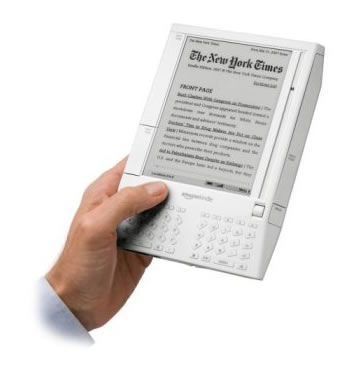
Amazon's Kindle eBook And Wireless Reading Device
I jumped over to Amazon.com this morning to see that they were selling (or rather selling out of) their new eBook and wireless reading device, Kindle. While you can't quite browse the internet as you would with an iPhone or a Smart Phone, in addition to book downloads, Kindle uses the EVDO high-speed data network to download newspaper, blog, and wiki data to be viewed locally on the device.
| |
|
|
||
| |
 |
|
||
| |
|
|
Electronic book readers are something that I have always been interested in but never really looked into. This Kindle device looks pretty cool to me, but one thing that I don't like is that they continually stress that you DO NOT NEED a computer for this device. While I understand the point they are trying to make, its stand-alone portability, I am often comforted when a device has a computer counterpart. This usually means that data can be transferred, converted, and stored. For instance, without a computer, can I upload existing PDFs to the Kindle device for reading? Is there a piece of software that lets you convert any text document to a Kindle-supported format? Can I download a book using Whispernet (Amazon's wireless delivery system) and then back it up on my computer?
Amazon's Kindle page leaves many of my questions unanswered. In one of the videos they briefly mention that you can get Amazon to convert text documents to Kindle documents FOR A SMALL PRICE. But is this only if you don't have a computer? Or is this the only way that text conversion can take place. And, is this the same process as the "Email your Word documents and pictures (.JPG, .GIF, .BMP, .PNG) to Kindle for easy on-the-go viewing" process? Or can I email words documents to the Kindle device without having to pay Amazon a conversion cost?
I think for any electronic reader device to be successful it is going to have to allow easy loading of custom content. That way people can curl up in bed with a PDF of the latest FAQu or PC Magazine. Without this feature, you are limited to the volumes that Amazon decides to translate into Kindle format. But, maybe this is sufficient? As a test, I did a quick Kindle Book search for the next book on my night stand: The Four Agreements: A Practical Guide to Personal Freedom, A Toltec Wisdom Book. The resultant search page tells me:
Your search "Four Agreements" did not match any products in: Books
Oh well. The first search didn't go so well, but in all fairness though, many of my book searches including "object oriented programming" (176 books) and "muscle" (26 books) turned up many results that looked quite favorable.
Electronic book readers seem very cool, and I really think that there is a future to them. What I would like to see is easy custom content loading. What would really be cool would be a FireFox plug-in that had a "Save As Kindle Document" feature that would save the current web page as Kindle-compatible document to be synched to the device. When I start seeing more of this kind of "content-in" functionality, then I will seriously think about getting one of these bad boys.

Reader Comments
http://www.centernetworks.com/robert-scoble-kindle-review
@Critter,
That was a pretty in-depth review. Thanks for passing me that link. That pretty much dashed any thought of me getting this version. Oh well, I guess I will just stick to the old school paper and ink.
Didn't know where to comment on this, so here goes: Your home page http://www.bennadel.com now has a page rank of 8 equal to google.com itself :D keep up the good work!
@Shuns,
That is some awesome news :) Thanks for letting me know! I will keep it up.
I have a few issues with the Kindle.
1) Too expensive. I'd pay less than $150 for a reader, so I guess it will be a long time before I buy one. If it did more, like video, and organizer functions it might help. I realize it might cost a lot to make this unit, but that is beside the point. The value to me of having a digital reader just isn't there at $399.
2) Books are too expensive. Yes I know they are less expensive to buy on Kindle than in physical form, but books are just too expensive. In my house we obtain books these ways: a) Purchase a book new perhaps 10% of th e time. b) borrow from the library 75 % of the time c) purchase a used book 5% of the time d) receive a book from a friend or relative who read it and is passing it on 10% of the time.
The only option I know of with Kindle is to purchase books new. Make it possible to load it from the library, or to purchase used, or to take hand-me-downs and I might pay $399
3) I can't give a book that I bought to a friend. There is no way to pass a book along once read. Come on. How about a small fee to transfer my ownership to someone else. Say $1.
Paper books that are passed on from one person to the next expand the life of the book and provide it to many more readers.
I think the most interesting thing about Kindle is the fast computer-less download of newspapers and other publications - still $399 is just too much to pay for that capability.
@John,
I agree with what you are saying. I really like the idea of being able to transfer the books to someone else for a minimal fee. I think that would appeal to a lot of people. That's the kind of option that keeps honest people, honest; I think people who don't want to deal with digital theft or things of that nature, but who do want to share, would be willing to pay tiny fees for things like what you suggest.
Converting normal or easy text, word doc or pdf file to kindle is quite easy but if the pdf file consists of lot of images and tables the conversion process does not work properly and the whole layout of the ebook gets change.
Kindle is still in experimental stage in converting the complicated pdf file to kindle format, but very recently I came across one website which provide ebook conversion service along with kindle ebook conversion at very affordable rates, mostly for the PDF ebook which consists of tables and images which are quite tough to convert them to ebook format such as mobipocket, kindle or MS reader, but I have found that the above ebook conversion company converts these type of ebooks in more profession and efficient way at very reasonable rate.
http://www.itglobalsolution.com/mobipocket/amazon-kindle-ebook-conversion.htm
There are a lot of sites out there showing book video. BookVideoTV, BookTelevision and of course CSPAN, but I like how BN.com and Reader's Entertainment TV have specific genre channels and original shows. There's just more to see and I can be specific in what genre I'm interested in. Anyone else watch online tv?
In it something is. Many thanks for the information, now I will know.
In it something is. Many thanks for the information, now I will know.