
REMatchGroups() ColdFusion User Defined Function
I was reading over on CF-Talk and saw that Jon Clausen was trying to use back references in his REReplace() functions in a non-string context:
<cfset pageOut = reReplace(
	pageContent,
	"<%show:([a-zA-Z0-9_]+)%>",
	appSettings["\1"],
	"ALL"
	)/>
The problem with this is that all of the arguments are evaluated by ColdFusion at the point of initial REReplace() function execution; \1 doesn't mean anything at this point. The only reason \1 means anything when it is in a string is because that string is later evaluated for each regular expression pattern matched.
The easiest way to deal with this, is to use a function that returns the captured groups of the regular expression pattern so that you can deal with them individually. My RELoop.cfc ColdFusion custom tag can do this, but, and I'm sorry if this is ultra repetitive, I figured I would throw together a function that mimicked ColdFusion 8's REMatch() function, but with the twist that it returns the groups, not just the matched string:
<cffunction
	name="REMatchGroups"
	access="public"
	returntype="array"
	output="false"
	hint="Returns the captrued groups for each pattern match.">

	<!--- Define arguments. --->
	<cfargument
		name="Text"
		type="string"
		required="true"
		hint="The target text in which we are trying to match patterns."
		/>

	<cfargument
		name="Pattern"
		type="string"
		required="true"
		hint="The regular expression patterns that we are matching."
		/>

	<cfargument
		name="Scope"
		type="string"
		required="false"
		default="ALL"
		hint="The scope of pattern matching (valid is ONE or ALL)."
		/>


	<!--- Define the local scope. --->
	<cfset var LOCAL = StructNew() />


	<!--- Create an array to hold our matches. --->
	<cfset LOCAL.Results = ArrayNew( 1 ) />


	<!--- Create the compiled pattern object. --->
	<cfset LOCAL.Pattern = CreateObject(
		"java",
		"java.util.regex.Pattern"
		).Compile(
			JavaCast( "string", ARGUMENTS.Pattern )
			)
		/>

	<!---
		Create the matcher for our pattern based on
		the target text.
	--->
	<cfset LOCAL.Matcher = LOCAL.Pattern.Matcher(
		JavaCast( "string", ARGUMENTS.Text )
		) />


	<!---
		Keep looping over the pattern matcher until it can no
		longer find a match OR the searching scope is satisified.
	--->
	<cfloop condition="LOCAL.Matcher.Find()">

		<!--- Create a struct to hold our groups. --->
		<cfset LOCAL.Groups = StructNew() />


		<!---
			Loop over the captured groups to store each one
			of them individually.
		--->
		<cfloop
			index="LOCAL.GroupIndex"
			from="0"
			to="#LOCAL.Matcher.GroupCount()#"
			step="1">

			<!---
				Store the captured group. If this group was not
				captured, then the key will not be valid in the
				struct (which is fine).
			--->
			<cfset LOCAL.Groups[ LOCAL.GroupIndex ] = LOCAL.Matcher.Group(
				JavaCast( "int", LOCAL.GroupIndex )
				) />

		</cfloop>


		<!--- Add this group to our results. --->
		<cfset ArrayAppend( LOCAL.Results, LOCAL.Groups ) />

		<!---
			Check to see if our search scope has been
			satisified by the number of matches found.
		--->
		<cfif (ARGUMENTS.Scope EQ "ONE")>

			<!--- We found our one match, so break out. --->
			<cfbreak />

		</cfif>

	</cfloop>


	<!--- Return the results. --->
	<cfreturn LOCAL.Results />
</cffunction>
This function takes the text you are working, the regular expression patterns, and then unlike ColdFusion 8's REMatch() function, you have the option to specify match scoping - ALL or ONE (defaults to ALL). Let's take a look at an example:
<!--- Crate the text that we will search. --->
<cfsavecontent variable="strText">
	Jill: 212-555-1234
	Sarah: 917.538.0001
	Maria: 212.538.1234 x14
	Kim: 212.555.5432 x5435
</cfsavecontent>


<!--- Collect the phone numbers. --->
<cfset arrMatches = REMatchGroups(
	strText,
	"(\d+)[. \-]?(\d+)[. \-]?(\d+)(?: x(\d+))?"
	) />


<!--- Dump out results. --->
<cfdump
	var="#arrMatches#"
	label="REMatchGroups() Results Array"
	/>
Here, we have a list of phone numbers that have various patterns. We want to grab all the numeric data, irrelevant of the delimiters, and then return the groups. Of that, we have an optional phone number extension which may or may not be returned. Running the above code, we get the following CFDump output:
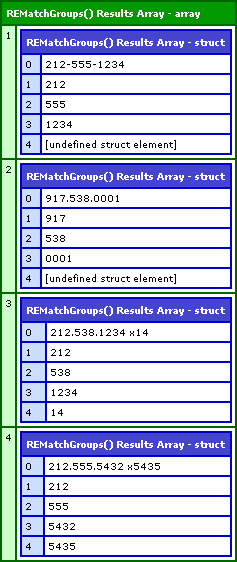
Notice that each array item contains a structure of captured groups. The zero group is always the full string match and then each indexed group represents a captured group. Don't get worried that some of the struct keys say "undefined struct element". This is just what happens when you store a Java NULL value (the result of the Matcher's Group() method) into a struct key. Regardless of what the CFDump output looks like, things like StructKeyExists() still work as expected (as you'll see in a second).
Now, let's take that array, returned above, and output the phone numbers:
<!--- Loop over the phone numbers. --->
<cfloop
	index="intI"
	from="1"
	to="#ArrayLen( arrMatches )#"
	step="1">

	<!--- Get the groups. --->
	<cfset objGroups = arrMatches[ intI ] />

	<p>
		(#objGroups[ 1 ]#) #objGroups[ 2 ]#-#objGroups[ 3 ]#

		<!--- Check to see if a phone ext. was found. --->
		<cfif StructKeyExists( objGroups, "4" )>
			x#objGroups[ 4 ]#
		</cfif>
	</p>

</cfloop>
Notice that we are assuming that groups 1, 2, and 3 exist as they are required for the pattern to match. We are then testing the existence of the 4th group to see if an extension was found. Running the above code, we get the following output:
(212) 555-1234
(917) 538-0001
(212) 538-1234 x14
(212) 555-5432 x5435
Ok, so by now, I think I have covered like every angle of finding patterns, returning groups, and acting on them in an iterative manner. Going forward, I will try to just point people to these examples rather than writing more examples.
Want to use code from this post? Check out the license.

Reader Comments
Ben,
I posted the following reply on CF-Talk as well, but I figured I'd post it here as well since CF-Talk seems to be running slow today:
<blockquote>
Ben,
Thanks! As always, you rock! I had kind of figured that the method execution order was the issue, but was hoping to find a workaround to "trick" the excution so that the regex backref was captured before the method was called.
Very nice code and potentially very useful! I'm not entirely sure that, in my situation, it's going to be faster than using a loop with reFind() as I have currently, though I'm going to check it out with some timers later today. I'll let you know the results.
What you've written, though could be tremendously useful for parsing the contents of a file and turning into workable data for reuse. In my case I'm simply replacing the user provided shorthand "tokens" so there's no need to retain the information after the token has been replaced.
Nice work!
Jon
</blockquote>
:-)
@Jon,
Always glad to help. If nothing else, it gives me just one more example to which to point people when possible. Plus, always happy to find new ways in which to make regular expression useful to all programmers.
Ben,
I was having trouble referencing values in the structures so I modified it. Trying to call #arrTest2[1].1# results in an error. With the new code I can call #arrTest2[1].key1# to get a value directly. Maybe I was doing something wrong but no matter how I tried to get the value (without looping through all of the results) I got an error.
Also, I modified mine to move the pattern to the first argument (Like your other UDF REMatchGroup and like the OOTB REMatch. I wonder why Adobe didn't make the REReplace functions have the same order as REMatch and REFind.
What do you think?
<!--- OLD Code
<cfset LOCAL.Groups[ LOCAL.GroupIndex ] = LOCAL.Matcher.Group(
JavaCast( "int", LOCAL.GroupIndex )
) /> --->
<cfset GroupIndexName="key"&LOCAL.GroupIndex>
<cfset LOCAL.Groups[ GroupIndexName ] = LOCAL.Matcher.Group(
JavaCast( "int", LOCAL.GroupIndex )
) />
Thanks for an awesome site!
@John,
Whatever you got working is good. You were probably having trouble referencing the values because you can't use the value "1" as a key in struct notation. "1" is not a valid variable name... but it can be a valid key. The trick is, and you will see this in my demo, is that you have to reference using array notation:
objGroup[ 1 ] (which works)
... vs.
objGroup.1 (which doesn't work)
Glad you are liking the site :)
Just came across your UDF and your site - bookmarked it right away! I am having an issue with ReMatchGroups. Here are the 2 lines of code. The arrMatches array dumps out empty, but the ReReplaceNodecase function does the replacement. Any idea why REMatchGroups isn't finding the matches?
<cfset arrMatches = REMatchGroups(strText, "a [^>]*href=""mailto:([^\""]+)\""[^>]*>\s*((\n|.)+?)\s*</a>") />
#ReReplaceNoCase(strText, "<a [^>]*href=""mailto:([^\""]+)\""[^>]*>\s*((\n|.)+?)\s*</a>", "\2", "ALL")#
@Cory,
Behind the scenes, the reMatchGroups() method is using the Java regular expression engine. reReplaceNoCase() uses the POSIX engine. They are slightly different. My guess is that your use of "." is messing it up. In generic CF regular expressions, "." matches anything, including new line:
www.bennadel.com/blog/1412-Dot-Character-Matches-In-ColdFusion-And-Java-Regular-Expressions.htm
What are you trying to match with the "."?
Ben,
I am simply trying to find existing mailto links in a string of HTML (coming from the database. I am new to regular expressions, but I think what I currently have is probably overkill for such a simple pattern.
@Cory,
Try replacing (\n|.) with [\w\W]. I think that might be what you're trying to get at.
Ben,
I replaced (\n|.) with [\w\W] in both lines of code, and while the ReReplaceNoCase still works, the dump of the arrMatches variable is still empty?
@Cory,
Hmmm. When I have some more time, I'll try to do some testing.
Ben,
I went with a more simple pattern - without the mailto:
[\w-]+@([\w-]+\.)+[\w-]+
That seems to do the trick! Thank you!
@Cory,
Oh sweet! Nicely done.
Fantastic! I found this very, very useful!
This made regular expressions so much quicker for me.
And indeed, awesome site, thank you!
@Ryan,
Glad to help - getting access to the regex groups not only makes your patterns easier (since you can return data you don't directly want to access), it makes the returned data more usable.
Is there a way to get the returned value each time this script is called rather than grouping an array?
I'm trying to use soemthing like [btnID]1[/btnID] in the database and using the rereplacenocase method ie:
str = rereplacenocase(str, '\[btnID\](.*?)\[/btnID\]', '\1', 'all');
then if I wanted to use the 1 in a function for example:
str = rereplacenocase(str, '\[btnID\](.*?)\[/btnID\]', getID('\1'), 'all');
function getID(n){
return int(n);
}
I get the error '\1' is not a number. but using your method before rereplacenocase:
matchFirst = reMatchGroup(str, '\[btnID\](.*?)\[/btnID\]');
THEN:
str = rereplacenocase(str, '\[btnID\](.*?)\[/btnID\]', getID(matchFirst[1][1]), 'all');
I get the number correctly... however the number will be the same everytime [btnID][/btnID] is called up no matter what number it shows.
just a note: in the example above the "1" used in the function was in reference to [btnID]1[/btnID] and not the backreference '\1'
@Max,
That would be cool. I actually do that all the time... in javascript ;) ColdFusion, however does not support that. I actually take this method (what I blogged about above) and turned it into a custom tag that could do what you are trying to do, I think... sort of.
Take a look at this entry:
www.bennadel.com/blog/971-RELoop-ColdFusion-Custom-Tag-To-Iterate-Over-Regular-Expression-Patterns.htm
It uses a similar approach; however, during each iteration, if you replace the first group (the entire match value), it will replace it in the actual resultant string.
It's not as elegant as what you want to do, but since ColdFusion doesn't work that way, this is probably the closest thing.