
NOTE: This post is not so much for other people, but rather more for myself as a lookup. I have seen examples of this, but just wanted to walk through it so that I could fully understand how it works.
Anyone who has ever had to pass a Java array into a method has quickly come to find out that a ColdFusion array is not a Java array. Furthermore, attempting to pass a ColdFusion array into a method expecting a Java array will throw an error probably telling you that no such method exists. The problem is that ColdFusion arrays are not Java arrays but are, in fact, some form of Vector List. This is what gives us the ability easily resize arrays and store mixed data types within them.
Creating a Java array is insanely easy in ColdFusion 8 and somewhat burdensome in ColdFusion 7. Let's take a look at how this can be done in ColdFusion 7 first (so that we can then see how awesome ColdFusion 8 is). To create and manipulate Java arrays, we are going to use the Java Array Reflection class, java.lang.reflect.Array. This class, which is composed of all static methods, acts as the go-between for our ColdFusion code and the Java array. So for example, instead of setting a value directly into the Java array, we tell the Java array reflection class to do this for us by providing the array, the index, and the value we want to set.
In this example, we are going to build a simple ColdFusion array of string values and then convert it into a Java array:
<!--- Create a ColdFusion array of strings values. --->
<cfset arrValue = ArrayNew( 1 ) />

<!--- Populate the array. --->
<cfset arrValue[ 1 ] = "What's up hot stuff?" />
<cfset arrValue[ 2 ] = "You come here a lot?" />
<cfset arrValue[ 3 ] = "You from out of town?" />
<cfset arrValue[ 4 ] = "Want a little of this?" />
<cfset arrValue[ 5 ] = "How 'bout a little of that?" />


<!---
	Now that we have a ColdFusion array, we need to create a
	Java array of the data. We cannot act on that array directly
	since ColdFusoin doesn't play with arrays the same way Java
	does. So, we have to use the Array Reflect class to get Java
	to do the heavy lifting for us.
--->

<!---
	The first thing we need to do is get the Java class of the
	data type that we are going to store in the array. In our
	scenario, we are going to store an array of strings.
	Therefore, let's get a reference to the string class.
--->
<cfset objStringClass = CreateObject(
	"java",
	"java.lang.String"
	).GetClass()
	/>

<!---
	Now, we need a reference to Java's array reflection class
	that we will use to do the array manipulation. These are all
	static methods so we don't need to initialize the reflection
	instance (ie. we are not calling Init() on it).
--->
<cfset objReflect = CreateObject(
	"java",
	"java.lang.reflect.Array"
	) />


<!---
	Using the Java array reflection class, we are going to
	create a Java Array object. To do so, we need to the class
	(defined above) and the length of the array (gotten from the
	ColdFusion array). We need the length because Java arrays
	cannot be as easily resized as ColdFusion's arrays which are
	really collections.
--->
<cfset arrJavaValue = objReflect.NewInstance(
	objStringClass,
	JavaCast( "int", ArrayLen( arrValue ) )
	) />


<!---
	Now that we have our Java array, we need to loop over the
	values we have in our ColdFusion array and copy them in to
	the Java array.
--->
<cfloop
	index="intIndex"
	from="1"
	to="#ArrayLen( arrValue )#"
	step="1">

	<!---
		Use the Java reflect class to set the string value into
		the java array at the approriate index. Remember that
		the Java arrays are zero-based, and so, we must subract
		one from our ColdFusion index to map the proper index.
	--->
	<cfset objReflect.Set(
		arrJavaValue,
		JavaCast( "int", (intIndex - 1) ),
		JavaCast( "string", arrValue[ intIndex ] )
		) />

</cfloop>


<!--- Dump out the ColdFusion array. --->
<cfdump
	var="#arrValue#"
	label="ColdFusion Array"
	/>

<!--- Dump out the Java String array. --->
<cfdump
	var="#arrJavaValue#"
	label="Java String Array"
	/>
Running the above code, you will see that we get very similar CFDump outputs for both the ColdFusion array and the Java array:
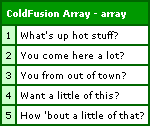
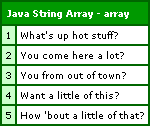
But, don't let the output fool you; these are two very different objects and they have completely different sets of behavior. Let's take a look at their class inheritance hierarchy:
<h4>
	ColdFusion Array Class Hierarchy
</h4>

<p>
	#arrValue.GetClass().GetName()#<br />
	#arrValue.GetClass().GetSuperClass().GetName()#<br />
	#arrValue.GetClass().GetSuperClass().GetSuperClass().GetName()#<br />
	#arrValue.GetClass().GetSuperClass().GetSuperClass().GetSuperClass().GetName()#<br />
	#arrValue.GetClass().GetSuperClass().GetSuperClass().GetSuperClass().GetSuperClass().GetName()#<br />
</p>

<h4>
	Java String Array Class Hierarchy
</h4>

<p>
	#arrJavaValue.GetClass().GetName()#<br />
</p>
Running this, we get the following output:
ColdFusion Array Class Hierarchy
coldfusion.runtime.Array
java.util.Vector
java.util.AbstractList
java.util.AbstractCollection
java.lang.ObjectJava String Array Class Hierarchy
[Ljava.lang.String;
As you can see, the ColdFusion array is an instance of the coldfusion.runtime.Array which inherits from Vector and Collection. Our Java array on the other hand is simply an array of string objects. NOTE: The "[" in the class name denotes that it is an array of the given type.
So, taking a ColdFusion array and converting it into a Java array is not the easiest thing in ColdFusion 7 (and earlier). Luckily, ColdFusion 8 has made some very sexy improvements to the JavaCast() method. Now, you can have JavaCast() return an array of objects rather than just a single value. To do this, you simply need to append the [] array notation after the desired data type:
<!--- Convert our ColdFusion array into a Java array. --->
<cfset arrJavaValue = JavaCast(
	"string[]",
	arrValue
	) />
That's all there is to it! Notice that we are asking to get the Java type "string[]"; this is an array of strings. That simple upgrade to JavaCast() in ColdFusion 8 has taken dozens of lines of code and reduced it to three. Way to go Adobe!
The example above was done for Strings, but this can be done with any type of object. As long as you can get the object's Class object for use in the NewInstance() call, you can create an array that can take any type of data.

Reader Comments
Very nice that CF8 added that ability. I did notice that you opted to copy the CF vector-based array to the actual java value array manually. Most all Java data structures offer the ability to export as an array. In fact, you can call ".toArray()" on the vector class and get an array of objects. If you needed a strict array of strings, you create the array like you did, but instead of copying manually, just use ".copyInto". I've posted an example on me blog. Cheers Mr. Nadel! Keep up the great blogging!
http://blog.adampresley.com/2007/11/12/on-coldfusion-7-arrays/
@Adam,
Very cool. I have never used the .CopyInto() method before. I like it. And I guess because the Java array is strictly typed, that ColdFusion will make sure to cast to that type (just to make sure everything runs smoothly). Despite not knowing about that function, one of my fears is that ColdFusion doesn't always cast properly which is why I have become a much more liberal user of JavaCast() when interfacing with Java.
Anyway, your way is much short and I like it! Thanks.
You are correct about the casting. The function uses the basics of polymorphism as it expects to copy into an array of Objects. The String class is based off Object, and therefore meets the requirements and will cast up. It's cool what you can do with the java side of CF. :)
Stumbled onto this with a similar problem. Going the other way. I am being sent a 0 based array from another application and need to read it into ColdFusion 8. I've scoured the internet looking for a way to do this but this is the closest I've found.
Anyway, what the other application does is do a form to my site. So a dump of the form will show :
entry[0].name = "Fred"
entry[0].email = "whatever@whereever.com"
entry[1].name = "Suzy"
entry[1].email = "suzy@q.com"
and so on.
Of course I can not read entry[0] with CF8.
I know I can't be the first to have this problem but I can't find the solution.
Oh poot. Never mind. While researching this some more I thought to myself "WDDX". But then under that I found the solution.
I was trying to reference these as structures or arrays so since it was coming in from a form:
form["entry[0]"].name
That didn't work.
I found I have to use the entire field name in the parenthesis.
form["entry[0].name"] gave me the correct output.
That is okay. I did learn something from Ben today. The "label" attribute of the cfdump. lol Gone are my days of creating a title over the dump.
Of course I wonder, if I take the 0 based array can I somehow convert it from Java to CF? That would be much much easier.
The pain is trying to figure out how many entries I have in the array since CF can't count them.
@Don,
Sorry for not responding to your other comments. Even though the array is zero-based in array, when you bring it into ColdFusion, it will be one-based. You can't update it directly (for that you would need reflection), but you should be able to reference the indicies fine. So, in summary:
entries[ 0 ] ... in Java becomes:
entries[ 1 ] ... in ColdFusion automatically.
Hey Ben,
can't you just use the toArray() function that Java provides?
As in
<cfset arrValue[ 1 ] = "What's up hot stuff?" />
<cfset arrValue[ 2 ] = "You come here a lot?" />
<cfset arrValue[ 3 ] = "You from out of town?" />
<cfset arrValue[ 4 ] = "Want a little of this?" />
<cfset arrValue[ 5 ] = "How 'bout a little of that?" />
<cfset javaArrValue = arrValue.toArray() />
If I remember correctly, you can even provide a class to said function that causes it to return an array of that class.
Ooops, just read the first comment. Just ignore what I wrote :)
@Chris,
The .toArray() method is definitely cool; but, as I have started playing around with more Java (from within ColdFusion), I am finding it less useful. The problem with the toArray() is that, by default, it returns an array of "Object" types (Object[]). If you are trying to pass in a typed array to a Java method, typically, it doesn't like that - it wants more specific typing.
At that point, you can you use the .toArray( Type[] ) method, but you have to pass in a typed array to tell the underlying collection how to cast th values. And, if you have to pass in a typed array of the type of array you're trying to create, it's almost like you have to solve the problem in order to solve the problem.
Luckily, the javaCast() function does allow *some* array casting; but, as I have recently found out, that only works with core data types (ex. string, int, boolean). You cannot, for example, javaCast a ColdFusion array to a Java array of type java.lang.StringBuilder[]. How badass would that be, though?
Actually, that would make an awesome upgrade to the JavaCast() method in ColdFusion 10!
@Ben,
I agree with your point about the toArray function and yeah, better java cast functionalities for CF would be awesome.
I've actually had this problem (casting java arrays) a couple of times. You can always find a workaround and I can totally see why ColdFusion is using Vectors internally instead of fixed size arrays, but it can be confusing and frustrating nonetheless.
Thanks for posting a solution to that problem. I think I am going to try writing a function that takes the coldfusion array and a string of the Java datatype (e.g. "java.lang.String") and returns a java array. That should solve the problem for now.