Ask Ben: Parsing A Microsoft XML Rowset Into A ColdFusion Query
Hi Ben, do you know a trick/pattern for getting an cfhttp response variable that contains the following and turns it into a query? (Note: XML demonstrated below)
The first trick to handling this is to get a grip on what the XML response object contains. Mostly likely, you are just going to parse the CFHTTP.FileContent variable into a ColdFusion XML document object, but for clarity / learning sake, I am going to parse the raw XML using ColdFusion's CFXml tag:
<!---
	Store the XML response into a ColdFusion XML object. I am
	explicity showing the XML here, but you probably would end
	up doing something like:

	<cfset xmlResponse = XmlParse( CFHTTP.FileContent ) />
--->
<cfxml variable="xmlResponse">

	<xml
		xmlns:s="uuid:BDC6E3F0-6DA3-11d1-A2A3-00AA00C14882"
		xmlns:dt="uuid:C2F41010-65B3-11d1-A29F-00AA00C14882"
		xmlns:rs="urn:schemas-microsoft-com:rowset"
		xmlns:z="#RowsetSchema">

		<!--- Define the rowset column schema. --->
		<s:Schema id="RowsetSchema">

			<s:ElementType
				name="row"
				content="eltOnly"
				rs:CommandTimeout="30">

				<!--- Define first column. --->
				<s:AttributeType
					name="auctionDate"
					rs:number="1"
					rs:nullable="true">

					<s:datatype
						dt:type="string"
						dt:maxLength="10"
						/>

				</s:AttributeType>

				<!--- Define second column. --->
				<s:AttributeType
					name="Auction"
					rs:number="2"
					rs:nullable="true"
					rs:writeunknown="true">

					<s:datatype
						dt:type="string"
						rs:dbtype="str"
						dt:maxLength="20"
						/>

				</s:AttributeType>

				<!--- Define third column. --->
				<s:AttributeType
					name="lotNumber"
					rs:number="3"
					rs:writeunknown="true">

					<s:datatype
						dt:type="int"
						dt:maxLength="4"
						rs:precision="10"
						rs:fixedlength="true"
						rs:maybenull="false"
						/>

				</s:AttributeType>

			</s:ElementType >

		</s:Schema>


		<!--- Define the row data itself. --->
		<rs:data>

			<z:row
				auctionDate="2007/11/03"
				Auction="ABC"
				lotNumber="1234"
				/>

			<z:row
				auctionDate="2007/12/05"
				Auction="XYZ"
				lotNumber="6789"
				/>

		</rs:data>

	</xml>

</cfxml>
As we can see from this XML markup, the columns names and data types are defined by the AttributeType node and it's child datatype node. These are the XML nodes that we will use to define the ColdFusion query object. Then, the actual row data is contained in the attributes of the XML row nodes.
All of the nodes in this XML document are prefixed to resolve to various name spaces. Normally, I would just strip these name spaces out for ease of searching, but since I know nothing about the environment in which you are working, it is probably safer to leave them in and just refer to the prefixes in the XmlSearch() / XPath values. This works fine with one exception; the XML name space, "#RowsetSchema", was causing a problem. Something about the hash symbol was throwing XmlSearch() through a loop. I am not sure if the hash sign has a special meaning in XmlSearch(). As such, you will see that when searching for the row nodes, I have to rely on the local-name() value rather than the prefixed node value, z:row.
That being, said, here is the solution that I came up with:
<!---
	Create our resultant query. We are going to start off with
	an empty query because we don't know how the columns are
	going to be named or typed.
--->
<cfset qResponse = QueryNew( "" ) />

<!---
	Create an array to hold the mapping of column data types
	to JavaCast() types. This will come into play later when
	we poopulate the query.
--->
<cfset arrDataMap = ArrayNew( 1 ) />

<!---
	Create a column name map. This will come into play later
	when we populate the query.
--->
<cfset arrColumnMap = ArrayNew( 1 ) />


<!---
	Get the column names. From this node list, we will
	construct our query columns. Because we want to try and
	properly type our query columns, let's only get column
	names that have a nested data type node.
--->
<cfset arrColumnNames = XmlSearch(
	xmlResponse,
	"//s:ElementType[ @name = 'row' ]" &
	"/s:AttributeType[ s:datatype[ @dt:type ] ]/@name/"
	) />

<!---
	Now, let's get the list of data types for the columns.
	This should give us an array of nodes that corresponds
	to the column name node list gotten above.
--->
<cfset arrDataTypes = XmlSearch(
	xmlResponse,
	"//s:ElementType[ @name = 'row' ]" &
	"/s:AttributeType/s:datatype/@dt:type/"
	) />


<!---
	ASSERT: At this point, we should have two node arrays of
	equal length. One will hold the column name, the other will
	hold the column type.
--->


<!--- Loop over the column values. --->
<cfloop
	index="intColumnIndex"
	from="1"
	to="#ArrayLen( arrColumnNames )#"
	step="1">

	<!--- Get the name of the column. --->
	<cfset strName = arrColumnNames[ intColumnIndex ].XmlValue />

	<!--- Get the data type of the column. --->
	<cfset strType = arrDataTypes[ intColumnIndex ].XmlValue />


	<!---
		Now, it's not enough to have just gotten the data type
		from the query schema; it needs to match up with the
		types that are allowed in the ColdFusion query (and
		underalying Java record set).

		Furthermore, we need to figure out out Data Map so that
		when we go to populate the query, we will know what type
		to cast to when using JavaCast().
	--->
	<cfswitch expression="#strType#">

		<cfcase value="int">

			<!--- Set the column type. --->
			<cfset strType = "cf_sql_integer" />

			<!--- Set the data map type. --->
			<cfset arrDataMap[ intColumnIndex ] = "int" />

		</cfcase>

		<!---
			Be default, if we did not match the type, then
			just store as a string, which can handle the most
			data types.
		--->
		<cfdefaultcase>

			<!--- Set the column type. --->
			<cfset strType = "cf_sql_varchar" />

			<!--- Set the data map type. --->
			<cfset arrDataMap[ intColumnIndex ] = "string" />

		</cfdefaultcase>
	</cfswitch>


	<!--- Add the name to the column map. --->
	<cfset arrColumnMap[ intColumnIndex ] = strName />


	<!--- Add the new query column. --->
	<cfset QueryAddColumn(
		qResponse,
		strName,
		strType,
		ArrayNew( 1 )
		) />

</cfloop>


<!---
	ASSERT: At this point, we have constructed our ColdFusion
	query data object with the proper column names and data
	types. The query, however is empty.

	We also have a column map and a data map populated based
	on the index / order in which we found the columns.
--->


<!---
	Now, we want to work on populating the query with the
	returned data. Let's query for all the data nodes. To get
	the row nodes, we have to use the local-name() rather than
	the prefixed value, z:row.

	NOTE: I am not sure why the prefixed name doesn't work. It
	seems to have something to do with the # in the xml name
	space definition. If you remove the # in front of
	RowsetSchema, then it works, but since we are trying not to
	alter the response, let's go with local-name().
--->
<cfset arrRowNodes = XmlSearch(
	xmlResponse,
	"//rs:data/*[ local-name() = 'row' ]/"
	) />


<!--- Loop over the row data. --->
<cfloop
	index="intRowIndex"
	from="1"
	to="#ArrayLen( arrRowNodes )#"
	step="1">

	<!--- Add a row to our response query. --->
	<cfset QueryAddRow( qResponse ) />

	<!--- Get a short hand reference to the row. --->
	<cfset objRow = arrRowNodes[ intRowIndex ] />


	<!--- Loop over the column map. --->
	<cfloop
		index="intColumnIndex"
		from="1"
		to="#ArrayLen( arrColumnMap )#"
		step="1">

		<!--- Get a short hand to the column name. --->
		<cfset strName = arrColumnMap[ intColumnIndex ] />

		<!--- Get a short hand to the data type. --->
		<cfset strType = arrDataMap[ intColumnIndex ] />


		<!---
			Check to see if this row has the given column value
			(represented as an attribute of the row node).
		--->
		<cfif StructKeyExists(
			objRow.XmlAttributes,
			strName
			)>

			<!---
				The attribute exists. Now, let's store it into
				the query using the given data type mapping.
			--->
			<cfset qResponse[ strName ][ qResponse.RecordCount ] =
				JavaCast(
					strType,
					objRow.XmlAttributes[ strName ]
					) />

		<cfelse>

			<!---
				The attribute did not exist. Store this
				value as an explicity null (even though the
				query object will do this on it's own, it's
				nice to be explicit.
			--->
			<cfset qResponse[ strName ][ qResponse.RecordCount ] =
				JavaCast( "null", 0 )
				/>

		</cfif>

	</cfloop>

</cfloop>


<!--- Dump out query. --->
<cfdump
	var="#qResponse#"
	label="Query From Microsoft RowSet Schema"
	/>
Running this code, we get the following output:
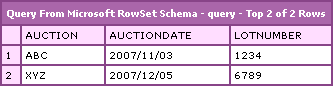
As you can see, the Microsoft RowSet XML data was properly parsed into a ColdFusion query object. But, there's a lot going on here. Aside form the XmlSearch() usage, we also have to consider the data types and how they translate to the data types that are available in the ColdFusion JavaCast() method. Since we have to prepare the data to be used in the underlying Java record set object, we have to be very careful about how we cast the string XML data into real data types. If we do not do this, then we will run into all sorts of problems and unexpected results when we perform ColdFusion query of queries on this new query object.
Hope that helps.
Want to use code from this post? Check out the license.

Reader Comments
Ben, see if this could also answer this person's question.
http://rip747.wordpress.com/2006/10/30/dotnet-dataset-to-cf-structure-of-queries/
@Tony,
I think that UDF is for getting an actual .NET object via a web service or something. If you look at the argument being passed in, they are calling get_any() on it. I vague remember reading something about this being used on .NET web services... I am trying to just deal with the XML data returned in a CFHTttp call.
However, I did give blog post to the person asking the question, so they understand better than I do and can evaluate your link as well.
Hi Ben,
Great work on this question, and thanks for the post.
Here's a diagnostic loop to access the xml elements in this type of response which may be of use to readers of this post :
<cfif isXml(rowsetXML)>
<!-- establish the number of child elements -->
<cfset datasetsize = ArrayLen(rowsetXML["xml"]["rs:data"]["XmlChildren"])>
<!-- loop through the rs:data elements -->
<cfloop index="i" from = "1" to = #datasetsize# step="1">
<!-- parse an individual element -->
<cfset element = XMLParse(toString(rowsetXML["xml"]["rs:data"]["XmlChildren"][i]))>
<cfoutput>
<!-- write out the individual attributes -->
#element["z:row"].XmlAttributes.Auction# #element["z:row"].XmlAttributes.auctionDate# #element["z:row"].XmlAttributes.lotNumber#<br />
</cfoutput>
</cfloop>
</cfif>
You really make it seem so easy with your presentation but I find this topic to be really something which I think I would never understand. It seems too complicated and very broad for me. I am looking forward for your next post, I will try to get the hang of it!