
I ran into what I think is a jQuery bug this morning when testing to see if an image had finished loading. As you may or may not know, the image object has a boolean attribute, "complete", which determines whether or not the image has finished loading (either to success or failure/error). It seems, however, that this attribute can only be accessed via the image node property and not through .attr() function.
Take a look at this test code:
<!DOCTYPE html PUBLIC "-//W3C//DTD XHTML 1.0 Transitional//EN" "http://www.w3.org/TR/xhtml1/DTD/xhtml1-transitional.dtd">
<html>
<head>
	<title>jQuery Bug</title>

	<script type="text/javascript" src="jquery-latest.pack.js"></script>
	<script type="text/javascript">

		// Once the document is loaded, check to see if the
		// image has loaded.
		$(
			function(){
				var jImg = $( "img:first" );

				// Alert the image "complete" flag using the
				// attr() method as well as the DOM property.
				alert(
					"attr(): " +
					jImg.attr( "complete" ) + "\n\n" +

					".complete: " +
					jImg[ 0 ].complete + "\n\n" +

					"getAttribute(): " +
					jImg[ 0 ].getAttribute( "complete" )
					);
			}
			);

	</script>
</head>
<body>

	<p>
		<img src="about:blank" alt="Empty Image" />
	</p>

</body>
</html>
Notice that we are alerting the "complete" value via the .attr() method as well as the DOM node propertyy and the DOM getAttribute() method. This is what we get:
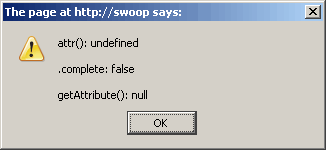
The .attr() method fails to return a valid value. The .complete attribute works fine. Behind the scene, the jQuery .attr() method works in conjunction with the .getAttribute() method, which looks like it fails to get the "complete" attribute as well. So, maybe this is a bug with the browser?
Of course, that above output was run in FireFox. This is what we get when we run it in Internet Explorer:
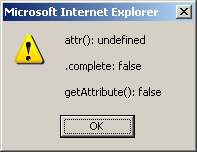
Notice here that .getAttribute() does return a valid value (false), and still, .attr() fails to return a boolean value. This seems very odd. Anyone have any thoughts?

Reader Comments
@Ben:
You're using $(document).ready() when really you should be using $(window).load().
The ready() fires when the DOM is ready--which is generally before images have loaded. Often you don't need to wait for images to load, but there are occasions when you want to make sure everything on the page has finished loading.
I'm also not so sure that the img.complete property is all that reliable.
Perhaps you'd be better off doing something like:
$(function (){
$("img:first").load(function (){
alert("Image loaded!");
});
});
An educated guess... getAttribute probably only works for attributes of the tag. complete isn't an attribute - it's a property of the DOM element, set by the browser itself. It's a fine line, and like I said it's a stab in the dimly lit, but thought I'd throw it in. Just ignore IE... stupid browser :p
As already mentioned, the onload callback is more handy as it saved polling the complete flag. onerror is another useful one as well.
@Dan,
You can't rely on the onLoad method of the image since that will only fire if the image has not already finished loading at the time of the event binding.
I suppose that I could wait till the window loaded. That's not a bad option, however, then I have to wait for ALL images to load, not just the one I want to target... seems weak. But, maybe that is the best option.
However, looking at the W3C website, it looks like it is NOT part of the standard:
http://www.w3schools.com/htmldom/dom_obj_image.asp
However, it is supported in FireFox, IE, and Opera. I guess, since it's not a W3C standard, you could argue that is is *not* a bug.
But, then again, innerHTML is also not a W3C standard, and it is what all of the html() methods rely on in jQuery... so, not a good argument perhaps.
Unfortunately, this is how getAttribute and setAttribute are supposed to work.
For example:
document.body.onload = function() {}
assert( typeof(document.body.onload) == "function" )
assert( document.body.getAttribute("onload") == null )
assert( typeof(document.body["onload"]) == "function" )
Specifically, get/setAttribute are intended to change the attributes of the element, but not the properties of the node.
As a rule of thumb, I'd only ever use getAttribute() to access things I also set with setAttribute(), but not for anything else. I pretty much never use get/setAttribute for this very reason.
What they should really be using in jQuery is the [] notation since it's equivalent to dot notation in ECMAScript.
Also, note that the "complete" property is non-standard
http://www.w3.org/TR/DOM-Level-2-HTML/html.html#ID-17701901 , though it does seem to work in most modern browsers.
Woops, you already mentioned the fact that it's not standard in a comment! :P
@Elliott,
So, for things like ID and HREF, do you go down into the DOM element via the jQuery stack? Example:
$( "a:first" )[ 0 ].href
Or do you find a balance in between somewhere?
I'd like to add that the jQuery 'onImagesLoad' plugin will correctly handle the image onLoad events in all browsers and will give you callback functions when the image(s) have loaded. This plugin is not limited to waiting for the entire page to load... you can simply attach this plugin to a DIV or directly to an image/groups of images and the callbacks will be invoked the moment those particular images have loaded (even if the rest of the page has not finished).
Check it out:
http://includes.cirkuit.net/js/jquery/plugins/onImagesLoad/1.1/documentation/
@Adam,
That looks cool.
Just came across this post and thought I'd post on it since I've spent some hair-pulling time on similar stuff. The best way to handle an image load with jquery is as follows:
$("img.selector").load(function(evt){
$(evt.target).fadeIn();
});
if($("img.selector")[0].complete){
$("img.selector").fadeIn();
}
The first part is for an image that is not cached, and the condition following it is for images that are. The "load" event does not fire if the image is cached (although it should).
You can create your own loader too...
function imgLoad(img, completeCallback, errorCallback){
if(img!=null && completeCallback!=null){
var loadWatch = setInterval(watch, 100);
function watch(){
if(img.complete){
clearInterval(loadWatch);
completeCallback(img);
}
}
}else{
if(typeof errorCallback=="function") errorCallback();
}
}
//then call this from anywhere
imgLoad(j("img.selector")[0], function(img){
j(img).fadeIn();
});
@Stephen,
I like the idea of creating your own loader.
@Stephen:
Excellent stuff. Appreciate your contribution to this thread.
Thanks!
Spiffy loader Stephen!
@all Let's say I want to preload 4 images with Stephen's function. Would you recommend to call imgLoad(...) five times in a row or to wait until the first image has been loaded completely and then requesting the second image and so forth?
I mean something like this:
imgLoad(img1, imgLoad(img2, imgLoad(img3, imgLoad(img4, null, null), null), null);
// the actual code is incorrect but you get the idea:
// loading image complete ==> firing the next loading process
The reason why I'm giving thought to this is because I read that "one client pc can only make 2 HTTP requests at the same time to the same server (IP adress)". That way (I thought) one could effectively take the load off the 'website' and make room for user interaction (involving http requests too).
Do you get my meaning? I'm pretty inexperienced with Javascript/jQuery so it would be nice to hear an expert view on this :)
@Martin,
When possible, I would say let the client (browser) handle the queuing. If you try to load 5 images and the client can only make 2 requests at a time, let it worry about that. Don't give yourself the added stress of having to figure out when those images have loaded.
Thanks Ben, that does make sense. With like 5 images it ain't no big deal.
You're using $(document).ready() when really you should be using $(window).load().
thankssssssss!!!
@Seba,
These two events fire at different times; I don't think one is inherently better than the other - depends on what you want to do? window/load, does that fire before or after the document/read? I cannot remember.
window.load() will fire last, since it *tries* to detect when the images, iframes, etc are loaded. document.ready() is fired when the DOM elements are available to access.
http://docs.jquery.com/Events/load
http://docs.jquery.com/Events/ready
Glad y'all like the preloader! I've used a similar approach a few times now, and it's working well for me.
On the topic of multiple images, Ben is right. Let the browser handle the number of requests they can make. Just remember you have intervals running, so consolidate where possible. If you have 3 images using the same preloader or something, try to use the same interval. You'd essentially need to modify the function I posted to accept an array, and modify the watch() function to check the .complete value of each image in that array.
@Stephen,
I have heard that IE is particularly bad with having many concurrent intervals running; but this is just what I've heard, I've never run it anywhere. I hear this from a guy who built his own interval mechanism that had a single setInterval() method to create a watcher; everything else in his app then went through that feature. He said it was a noticeable performance difference.
I'm not sure whether IE is worse or not (although I would assume it is ;). Just think of how your processor would try to handle numerous intervals. If you have intervals firing at the same time all over the place, there is going to be some sort of queue for that succession of function calls. Depending on what your functions are doing in those intervals greatly affects the resources being used.
The main two things I do to try to offset interval exhaustion are:
1) Combine intervals when you can.
2) Use the highest interval possible. I think I ended up changing the original function I posted to 250 or even 500 milliseconds; because, in many cases, it's really not THAT important that the user sees the photo the millisecond it is loaded.
@Stephen,
One think that is also good is to only apply intervals when they are needed and to clear them when they are not. A good, but tangent, example is watching a textarea for changes (ex. to impose a character limit). You ONLY need the interval in place when the user is actually using the textarea. As such, when the user blur()s the textarea, remove the interval. Then, re-apply when the focus() the textarea.
I just fixed the code.
There was a function "watch" inside the function imgLoad. It spammed a lot of errors:
Error: missing argument 1 when calling function watch.
To fix this:
instead of setInterval(watch, 100);,
use setInterval(function(){..yak..} , 100);
I hope that helps you folks.
sample:
.....
var loadWatch = setInterval(function()
{
if(img.complete)
{
clearInterval(loadWatch);
completeCallback(img);
}
}, 100);
}
else
....
Hi!
Any comments on this one?
...
doShow=function(){
if($('#img_id').attr('complete')){
alert('Image is loaded!');
} else {
window.setTimeout('doShow()',100);
}
};
$('#img_id').attr('src','image.jpg');
doShow();
...
Seems like works everywhere...
@Jay, "complete" is not actually an attribute of an IMG element; rather, it's a property of the Image object. It would be more proper to say $("#img_id").get(0).complete or $("#img_id")[0].complete.
@Stephen,
Thank you for valuable comment!
@Jay,
I'm actually having trouble duplicating my original problem :)
Thanks a lot, great post!
Hi, having an issue with IE6 (only) not displaying all google static maps called from a json data object. Looks like a similar problem on this post. Have tried to fix this for days and am not getting anywhere.
Appreciate any input.
----
var p = p++; // loop through json data obj
var myimg = 'http://maps.google.com/maps/api/staticmap?center=' + dataroot.data[i].Retailer_Latitude + ',' + dataroot.data[i].Retailer_Longitude + '&zoom=15&markers=color:0x00A0E4|' + dataroot.data[i].Retailer_Latitude + ',' + dataroot.data[i].Retailer_Longitude + '&size=200x120&sensor=false';
var mapImage = ("mapImage" + p).toString();
divTag.innerHTML = ('<span style="float:right;"><img src=' + myimg +' id="' + mapImage + '"></span>' + dataroot.data[i].Name + '<br>' + dataroot.data[i].Address_1 + ' ' + dataroot.data[i].Address_2 + '<br>' + dataroot.data[i].City + ', ' + dataroot.data[i].PostCode);
.
.
.
document.getElementById("inlineApp").appendChild(divTag);
----
Still have nearly 13% of visits on IE6 and need it to work!!!
thanks.
Work for images you need pre-loaded, before rendering a page, that are defined as background sources.
c/o http://james.padolsey.com
[code]
$.fn.preload = function() {
this.each(function() {
$('<img/>')[0].src = this;
});
};
$(['images/someimage.jpg','images/otherimage.png']).preload();
$(window).load(function() {
// render your page
});
[/code]